
Mastering AT Over COM: Industrial Router Configuration & Commands 2026
In my experience, most engineers rely exclusively on a router’s web interface for their daily configuration. While the “GUI” is convenient, there is a more direct and powerful way to communicate with your hardware: using AT commands.
Think of AT commands as the foundational language of cellular modems. By sending these instructions over a physical COM port (serial port), you bypass the web layers and speak directly to the cellular module. This is particularly critical in scenarios where the web interface is inaccessible, or when you need to perform deep-level troubleshooting and automate remote tasks like SMS messaging and real-time status checks.
This guide will show you how to leverage this direct communication path to unlock the full potential of your Robustel industrial router. We’ll move past basic settings and explore how to use the serial port as a professional diagnostic and control tool.
What We Will Cover:
- The Fundamentals: A clear definition of AT commands and why the COM port is the most reliable “backdoor” for hardware management.
- Essential Setup: How to physically connect and configure your serial terminal to start sending instructions.
- Core Command Library: A practical list of commands for checking signal strength, network registration, and modem health.
- Advanced Automation: How to use AT commands for remote SMS triggers and emergency system recovery.
Introduction
When you’re managing industrial IoT devices in the field, you quickly realize that you need every tool at your disposal to keep things running. While modern routers offer sleek web interfaces for easy setup, there are moments when the “GUI” simply isn’t enough—or isn’t accessible. In those high-pressure situations, you need to get straight to the heart of the hardware.
That is where AT commands come in. Derived from the “Attention” prefix, these commands act as the foundational language for cellular modems. Think of them as the command-line interface for your cellular module—a direct “backdoor” that lets you speak to the modem even when other communication layers are down.
In my experience, being able to send a simple AT command via the serial port is often the “aha!” moment that solves a complex connectivity issue. This isn’t about technical flair; it’s about having a reliable, on-the-spot solution that can save you a costly “truck roll” or hours of remote guesswork. By mastering this direct communication path, you ensure that you are never locked out of your own hardware.
What is AT over COM?
At its heart, AT over COM is a direct line of communication. By sending standard “Attention” (AT) commands through a serial interface—like a COM port on your laptop—you can talk directly to the cellular modem. This method effectively bypasses the router’s main operating system, giving you raw, unfiltered access to the modem’s core functions.
This transparency is what separates professional industrial hardware from consumer “black boxes”. When you use a Robustel router, you aren’t just stuck with what the web interface tells you; you have a fully transparent tool that allows you to see exactly how the modem is behaving. This granular control is indispensable in the field, specifically when you need to:
- Audit Network Performance: Instead of just seeing “low signal”, you can query the exact dBi and network registration status to see why a connection is sluggish.
- Create a Backup Communication Channel: You can send and receive SMS messages directly through the modem. This is a lifesaver for remote alerts or basic control commands if your primary data connection becomes unstable.
- Perform Deep-Level Debugging: When a network switch fails or a connection drops, AT commands allow you to pinpoint whether the issue lies with the carrier, the signal, or the configuration.
How to Use AT Commands on Your Robustel Router?
To get started with AT commands on a Robustel router, you’ll need to use the “AT Over COM” app. This software module provides the bridge between your modem and the serial port, so you can interact with it directly. For my team, the process usually looks like this:
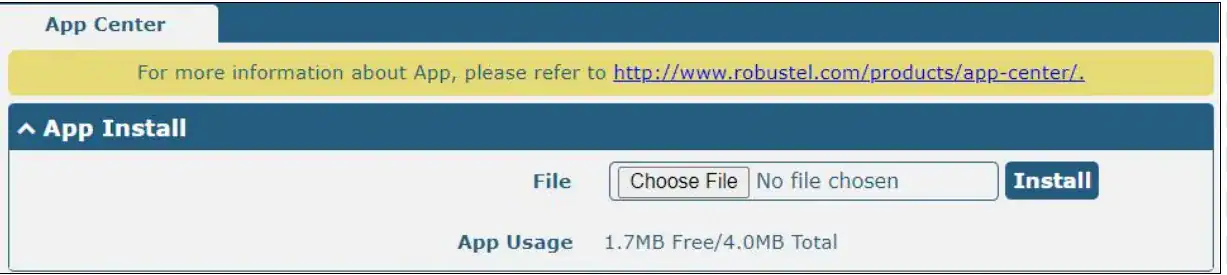
1. Install the “AT Over COM” app: First, you’ll need to find and install the “AT over COM” application from the router’s App Center. This module is essential for enabling the direct serial communication with the cellular modem.
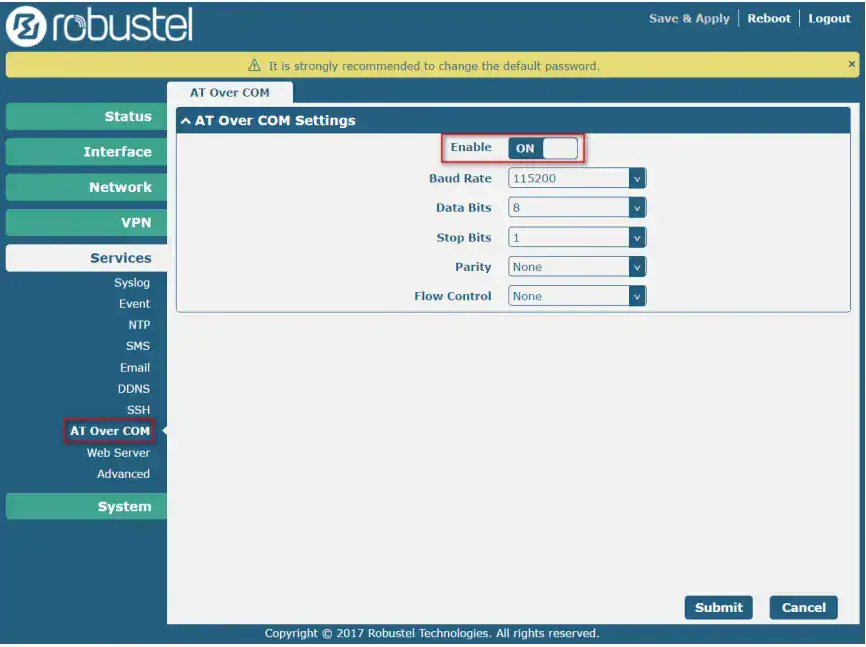
2. Configure the COM port: Once the app is installed, you’ll need to access the router’s web interface and configure the serial port settings for AT Over COM. This involves setting parameters like the baud rate (e.g., 115200), data bits, parity, and stop bits.
3. Access the modem with a terminal program: Now, you’re ready to connect to the router’s serial port using a terminal program like SecureCRT or PuTTY on your PC. Once connected, you can input standard AT commands. For example, entering AT should receive an OK response.
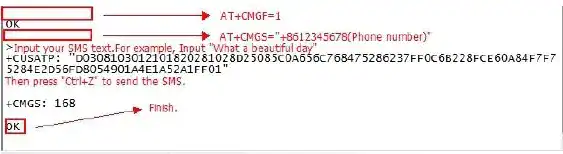
4. Send SMS via AT commands: One of the most common and useful applications for this method is sending SMS alerts. This is critical for remote maintenance, especially when data connectivity is unreliable. By using the AT+CMGS command, you can send text messages to a predefined number to alert your team of a system event, like an equipment failure or a sensor reading that is out of range.
You can also leverage this method for automated applications. For example, a third-party application on a connected computer can use the COM port to send an AT command that triggers a system reboot or changes network settings. This is a crucial capability for mission-critical deployments where manual intervention isn’t always possible. The Robustel R5020 Lite is a great example of a router that supports these advanced functions, offering a secure, Linux-based RobustOS and a comprehensive suite of VPNs to protect your data during these operations.
Why This is a Game-Changer for Industrial IoT?
In industrial automation, a minor network hiccup can quickly escalate into a costly outage. Having direct control via the serial port is like having a “master key” to your site. My team has frequently used this method to resolve complex issues without ever having to dispatch a technician.
I remember a project where a router refused to reconnect to the network after a power cycle. The web interface showed “Connecting…” but gave no further clues. By plugging into the serial port and running a few diagnostic AT commands, we discovered a misconfigured APN that the GUI wasn’t displaying. We fixed it in minutes, saving a full day of travel and labor costs.
This level of transparency is why industrial-grade devices are so different from consumer-grade ones. When you treat your router as a powerful, multi-purpose tool rather than just a simple “black box,” you gain the efficiency needed for a truly successful IIoT deployment.
FAQs
Q1: What’s the difference between using AT commands and the web GUI?
A: The web GUI is a user-friendly, abstracted interface that simplifies common tasks like setting up a VPN or configuring basic network settings. AT commands provide a raw, direct interface to the cellular modem itself, allowing for deeper diagnostics, troubleshooting, and direct control over modem-specific functions that may not be exposed through the web interface.
Q2: What is “AT Over COM” and is it secure?
A: “AT Over COM” is simply a software application that enables the use of AT commands over a standard serial port. While the commands themselves are not encrypted, the router and its connection can be secured. For instance, using a secure VPN tunnel, like the one offered by the Robustel Cloud Manager Service (RCMS), ensures that all data transmitted over the network is encrypted and secure, even when you are debugging a local issue. This is how you protect your OT network from threats.
Q3: Can I use AT commands to send sensor data to the cloud?
A: Absolutely. While modern IoT platforms often use protocols like MQTT for data transmission, AT commands can be a fallback for sending simple data or alerts via SMS. This is particularly useful in low-bandwidth or intermittent connectivity scenarios where a full data session isn’t possible. Some devices, like Robustel’s EG5120 edge gateways, combine this with powerful local processing to handle a variety of industrial protocols and send filtered data to the cloud.
About the Author
Anson Feng | Technical Support Engineer
Anson Feng is a Technical Support Engineer at Robustel, specializing in industrial networking and edge connectivity solutions. With deep expertise in deploying and troubleshooting large-scale IIoT infrastructures, Anson focuses on ensuring high availability and robust performance for mission-critical industrial applications.