
Enterprise Node-RED: Centrally Manage your Robustel EG5120 Fleet via FlowFuse
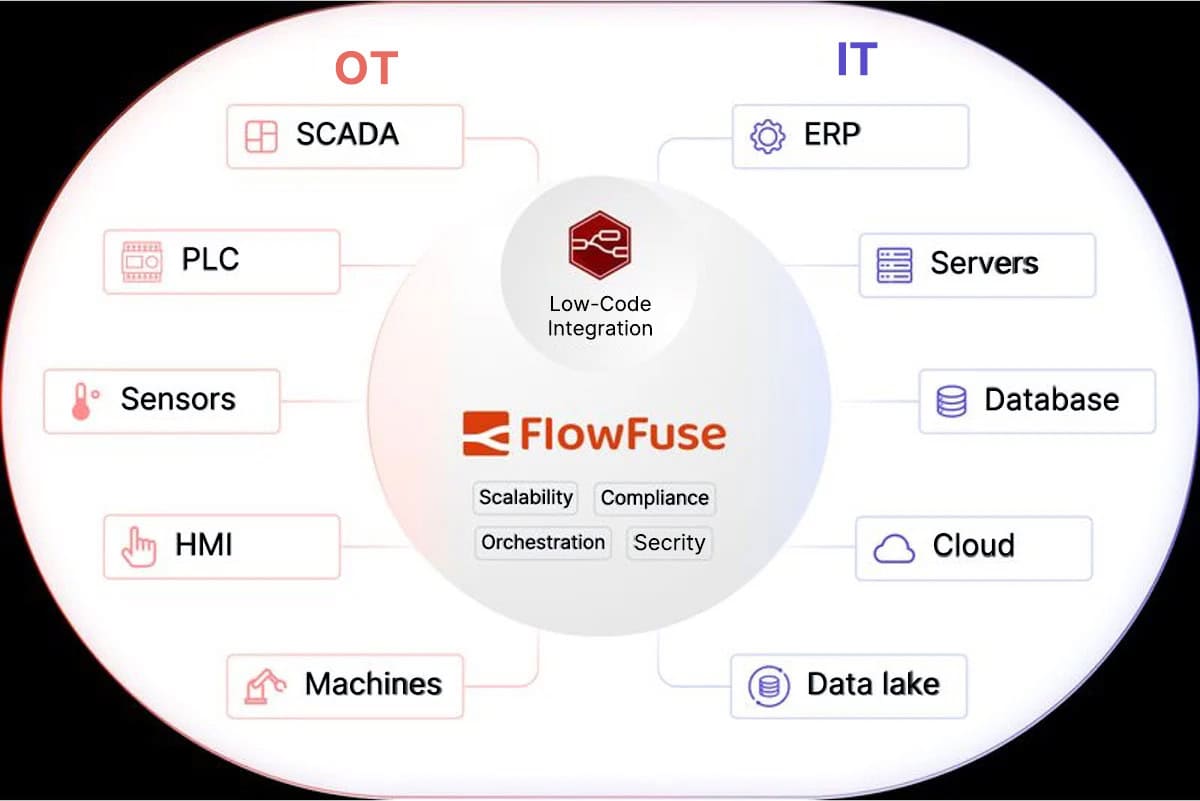
Node-RED is the gold standard for rapid IoT prototyping, but managing it at scale across hundreds of remote sites has traditionally been a challenge. This guide introduces a professional-grade solution: pairing the Robustel EG5120 Industrial Edge Gateway with the FlowFuse management platform.
We move beyond basic installation to show you how to build a centralized Low-code OT ecosystem. You will learn how to leverage the EG5120’s rugged I/O and Debian-based openness to create a secure, VPN-less tunnel for remote orchestration. Whether you are automating a single factory or managing a global fleet, this “Cloud-Native Edge” approach ensures your Node-RED flows are always secure, synchronized, and production-ready.
Introduction: Scalable Low-Code at the Industrial Edge
For many engineers, Node-RED has become the go-to tool for rapid prototyping and local automation, thanks to its intuitive flow-based interface. However, as an IoT project scales from a single pilot to hundreds of remote sites, managing individual Node-RED instances manually becomes a logistical nightmare. This is where the synergy between the Robustel EG5120 industrial edge gateway and FlowFuse changes the game.
By integrating the EG5120’s rugged, high-performance hardware with the enterprise-grade management capabilities of FlowFuse, you aren’t just installing a tool; you are building a scalable Low-code OT ecosystem. This combination allows teams to centrally orchestrate, secure, and deploy Node-RED flows across an entire fleet of gateways without leaving their desks. In this guide, we’ll provide a step-by-step walkthrough on how to bridge the gap between local edge intelligence and cloud-native management using the EG5120 and FlowFuse.
Bridging the OT/IT Gap—The EG5120 Hardware Edge
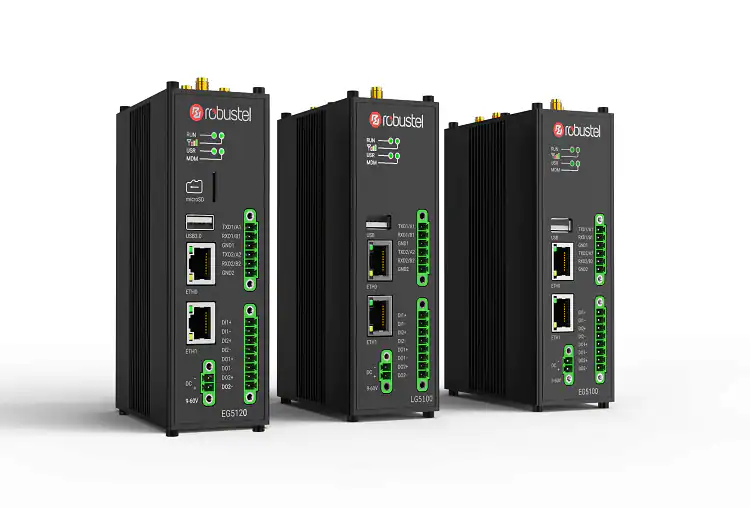
The true strength of the Robustel EG5120 lies in its open-source foundation and hybrid connectivity. Running on a hardened Debian 11 environment, this gateway natively supports Node.js, providing the perfect sandbox for Node-RED to thrive. However, hardware is only as good as its ability to talk to the “field.”
The EG5120 excels here by acting as a universal translator. With built-in support for Modbus, RS232/RS485, Bluetooth, and cellular 5G/4G, it can ingest data from legacy PLCs and modern sensors alike. When you layer FlowFuse on top of this versatile I/O, you move from simple data collection to Unified Device Management.
This combination ensures that whether your deployment is over high-speed Ethernet or a remote cellular link, your Node-RED instances remain:
- Secure: Managed through FlowFuse’s robust security protocols and identity management.
- Scalable: Ready to be deployed as a standardized template across a global fleet of gateways.
- Flexible: Capable of remote logic updates via the cloud without requiring a technician to visit the physical RS485 wiring.
Step-by-Step—Deploying the FlowFuse Agent on EG5120
To bridge your local gateway with the cloud orchestration layer, you need to install the FlowFuse Device Agent. This lightweight service acts as the secure umbilical cord between the RobustOS Pro environment and your FlowFuse instance.
1. System Preparation
First, ensure your EG5120’s Debian environment is optimized and secure. Run the standard update sequence to refresh the package repositories:
Bash
sudo apt update && sudo apt upgrade -y2. Executing the Automated Installation
We recommend using the official FlowFuse installation script. This script is designed for Debian-based systems and handles the heavy lifting—including the installation of the Node.js runtime and environment dependencies:
Bash
bash <(curl -sL https://raw.githubusercontent.com/FlowFuse/device-agent/main/service/raspbian-install-device-agent.sh)Why this matters: Beyond just installing the agent, this script configures the service to auto-run on boot and sets up automatic recovery in the event of a crash. This “self-healing” capability is essential for remote industrial sites where manual intervention is costly.
3. Verifying the Node Health
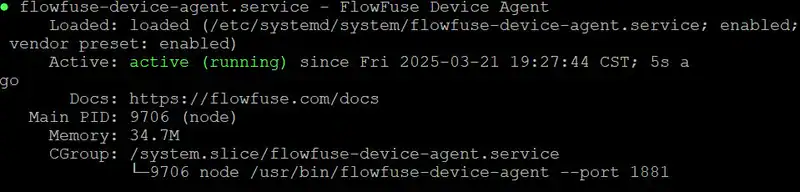
Once the script completes, verify that the systemd service is active and communicating correctly:
Bash
sudo systemctl status flowfuse-device-agent.serviceA successful installation will show an active (running) status, signaling that your EG5120 is now ready to be “claimed” and managed from your FlowFuse dashboard.
Secure Handshake—Registering Your EG5120 with FlowFuse
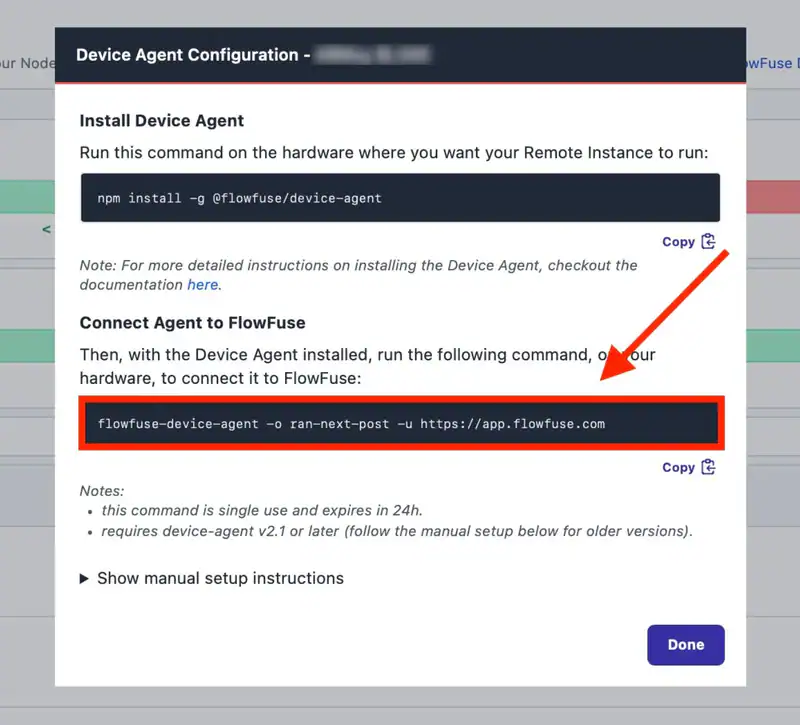
With the Device Agent running locally, the final step is to securely “claim” your hardware within the FlowFuse management console. This registration process establishes an encrypted link, allowing your Robustel EG5120 to receive remote updates and configuration changes.
The Provisioning Workflow:
To register your hardware, navigate to your FlowFuse dashboard and follow the standard “Register Remote Instance” protocol. This ensures your gateway is assigned to the correct team and project environment.
Key Security Step: The One-Time Passcode (OTP)
During the registration setup, FlowFuse will generate a unique one-time passcode (OTP) command. This is a critical security measure:
- Unique Identity: The Device Agent uses this specific command to securely retrieve its unique configuration and credentials.
- Encrypted Association: This ensures that only authorized devices under your control can join your FlowFuse team.
- Action Required: Copy this command exactly as shown. You will need to execute it on the EG5120 terminal to complete the “handshake.”
By utilizing this OTP-based provisioning, you maintain a high security posture, preventing unauthorized access to your industrial edge infrastructure.
Activating the Connection—Final Provisioning
With the one-time passcode (OTP) in hand, it’s time to finalize the link. Executing this command on your EG5120 terminal essentially “activates” the gateway’s digital identity within the FlowFuse ecosystem.
1. Executing the Setup Command
Run the copied command with sudo to ensure the agent has the necessary permissions to write the new configuration files to the RobustOS Pro environment:
Bash
sudo flowfuse-device-agent -o https://app.flowfuse.com2. Interpreting the Output
A successful provisioning will generate an output similar to the one below. Pay close attention to the “Device setup was successful” message—this indicates that the secure credentials have been exchanged and stored:
[AGENT] [info] Entering Device setup...
[AGENT] [info] Device setup was successful
[AGENT] [info] To start the Device Agent with the new configuration, run the following command: flowfuse-device-agent
3. Confirming the Cloud Status
The true “moment of truth” happens in the cloud. Log back into your FlowFuse platform and check your remote instances. Your Robustel EG5120 should now appear with a “Running” status.
This status confirms that your gateway is now a fully managed node, ready for remote Node-RED flow deployment, snapshot management, and continuous monitoring. You have successfully bridged the gap between your on-site industrial hardware and your centralized dev-ops pipeline.
Remote Orchestration—Accessing the Node-RED Editor
The bridge is built. Now, you can manage your Robustel EG5120‘s logic from anywhere in the world without a VPN or complex firewall rules. This is where the low-code power of Node-RED meets the enterprise agility of FlowFuse.
Steps to Access Your Live Environment:
- Locate Your Device: Log in to your FlowFuse Cloud account and select the Remote Instances tab from the primary sidebar.
- Activate Developer Mode: Click on your specific EG5120 instance. To make real-time changes, toggle the “Developer Mode” switch in the top-right corner.
- Why this matters: Developer mode creates a secure, real-time tunnel directly to the Node-RED engine running on your hardware, allowing for instant logic updates and remote debugging.
- Launch the Editor: Once enabled, click the “Open Editor” button.
You are now inside the familiar Node-RED workspace, but with a critical difference: every node you drop and every wire you connect is being orchestrated directly on your industrial edge gateway at the site.
Conclusion: Future-Proofing Your Industrial Logic
The integration of the Robustel EG5120 with FlowFuse marks a significant shift in how we approach industrial automation. By combining rugged, multi-protocol hardware with a centralized, low-code management platform, the barriers to scaling Industrial IoT are effectively removed. You are no longer tethered to localized, single-instance deployments; instead, you have a globally orchestratable fleet that is secure, resilient, and incredibly agile.
Whether you are automating a single factory floor or managing a distributed network of smart infrastructure, this EG5120 and FlowFuse ecosystem provides the production-ready foundation needed to turn complex data flows into actionable intelligence. It’s time to move beyond simple connectivity and start building a smarter, more responsive edge.
Preguntas frecuentes
Q1: Why use FlowFuse instead of the native Node-RED interface for industrial sites?
A: Native Node-RED lacks centralized security and fleet management. FlowFuse adds enterprise-grade features like Role-Based Access Control (RBAC), automatic snapshots, and secure remote access without a VPN. This allows you to manage hundreds of Robustel EG5120 devices from one dashboard, ensuring consistency and reducing site visits.
Q2: Can the Robustel EG5120 handle high-frequency data polling via Node-RED?
A: Yes. Powered by the NXP i.MX 8M Plus processor, the EG5120 is built for heavy lifting. Unlike hobbyist boards, its industrial-grade RAM and eMMC storage allow it to handle rapid Modbus/OPC UA polling and complex JSON processing simultaneously while maintaining system stability under the RobustOS Pro environment.
Q3: Does the FlowFuse connection work over unstable 4G/5G cellular links?
A: Absolutely. The FlowFuse Device Agent is optimized for low-bandwidth environments. Using Reverse Tunneling, it maintains a secure link to the cloud even without a public static IP. Combined with Robustel’s cellular failover technology, you can push logic updates to remote gateways reliably, regardless of the local network infrastructure.
Acerca del autor
Yang Tao | Founder & CEO
Robustel Yang Tao fundó Robustel en 2010 con la visión de simplificar la conectividad industrial. En la actualidad, dirige un equipo global de más de 300 expertos y distribuye soluciones de IoT de misión crítica a más de 100 países.
Firme creyente en la excelencia técnica, Yang dedica el 15 % de los ingresos a I+D y opera una fábrica inteligente 5G propia. Su compromiso con la seguridad está respaldado por certificaciones de primer nivel (IEC 62443, ISO 27001), lo que garantiza que el hardware de Robustel sea tan seguro como innovador.