
Built-In LNS vs External LoRaWAN Network Server: Which Is the Best Fit?
Choosing a LoRaWAN Network Server architecture is ultimately a decision about who will operate, update and recover the network over its lifecycle. The Robustel R1520LG LoRaWAN Gateway is relevant because the same hardware can connect to an external LNS or support a built-in ChirpStack deployment.
Consider a manufacturer testing LoRaWAN temperature and energy sensors at one production site. Running the LNS locally may keep the pilot contained and avoid introducing separate server infrastructure. If the project later expands across factories and warehouses, managing an independent server at every gateway may create fragmented configurations, backups and integrations.
Neither architecture is automatically better. The best fit depends on whether the project values local simplicity or central coordination—and whether the organisation is prepared to own the operational responsibilities that follow.
The LNS Location Changes Who Operates the Network
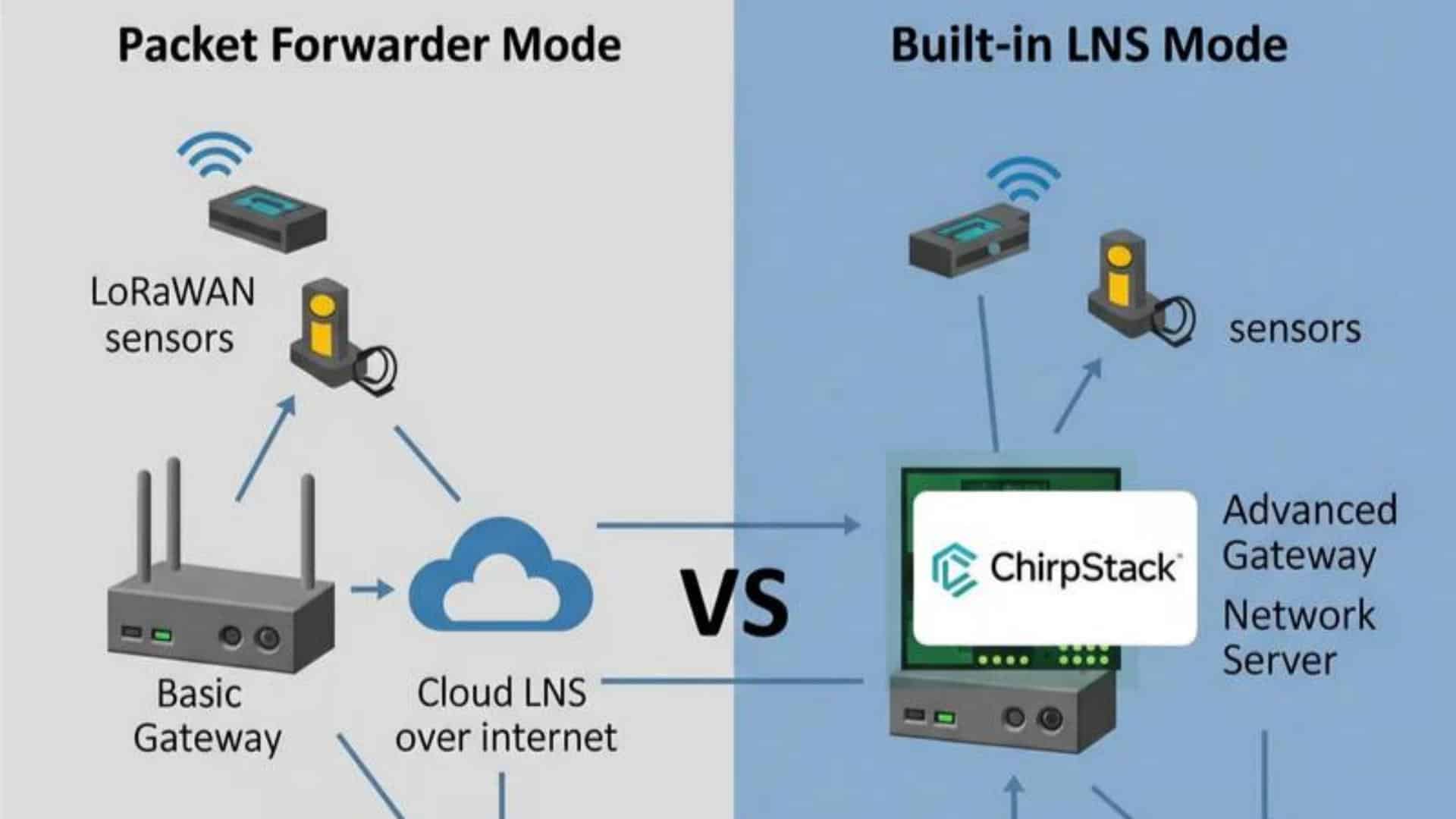
In a conventional LoRaWAN architecture, gateways receive radio packets from end devices and relay them over an IP connection to a Network Server. The LoRa Alliance describes the gateway as the forwarding layer, while the Network Server handles the wider LoRaWAN network role.
The LNS typically sits between the radio gateway layer and the application layer. Depending on the LoRaWAN version and server implementation, its responsibilities may include:
- Processing device join procedures
- Managing network sessions
- Handling LoRaWAN MAC commands
- Scheduling downlinks
- Applying Adaptive Data Rate decisions
- Deduplicating messages received through multiple gateways
- Routing traffic towards the relevant application service
When an LNS is described as “built in,” these responsibilities have not disappeared. The server software has simply moved onto the gateway or edge device.
That changes the operating model.
With a built-in LNS, the site or gateway owner may also become responsible for server configuration, device records, backups, software updates and recovery. With an external LNS, those responsibilities move towards a central IT, OT, integrator or network-operations team.
The decision should therefore begin with ownership: Who will maintain the LoRaWAN network after the installer leaves the site?
A Built-In LNS Fits Contained Sites with Local Ownership
A built-in LNS can be a practical fit when one gateway serves a defined site and the organisation wants the LoRaWAN network to remain locally controlled.
Return to the manufacturer’s pilot site. The project includes one gateway and twenty environmental sensors inside a production building. There is no existing enterprise LoRaWAN platform, and the engineering team wants to validate coverage, device behaviour and application data before committing to a wider architecture.
Introducing a separate server may add more infrastructure than the pilot needs. A built-in LNS keeps the initial system contained:
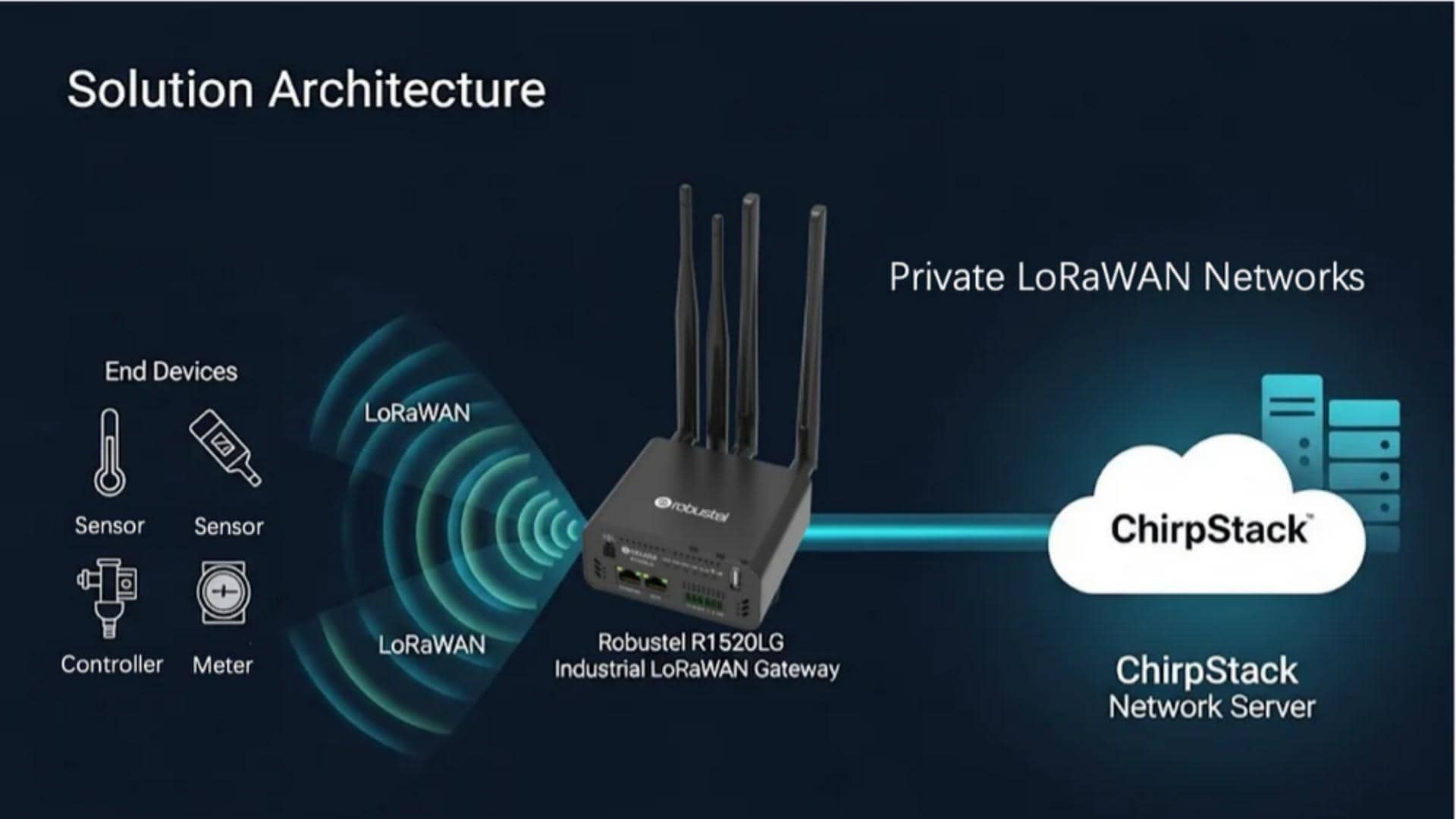
Sensors
→ local LoRaWAN gateway
→ built-in LNS
→ local or upstream application
This approach may reduce the number of separate systems required for a small site. It can also allow local LoRaWAN operation to continue when the gateway temporarily loses its external IP connection, provided that the required application or processing function is also available locally.
Where Local LNS Operation Helps
A built-in architecture may be proportionate when:
- The project uses one gateway or a small contained network
- Local ownership is preferred
- The site does not already have an external LNS
- Data sovereignty requires defined on-site processing
- Backhaul is intermittent
- The deployment is a pilot, laboratory or isolated facility
- Integration requirements are limited and clearly understood
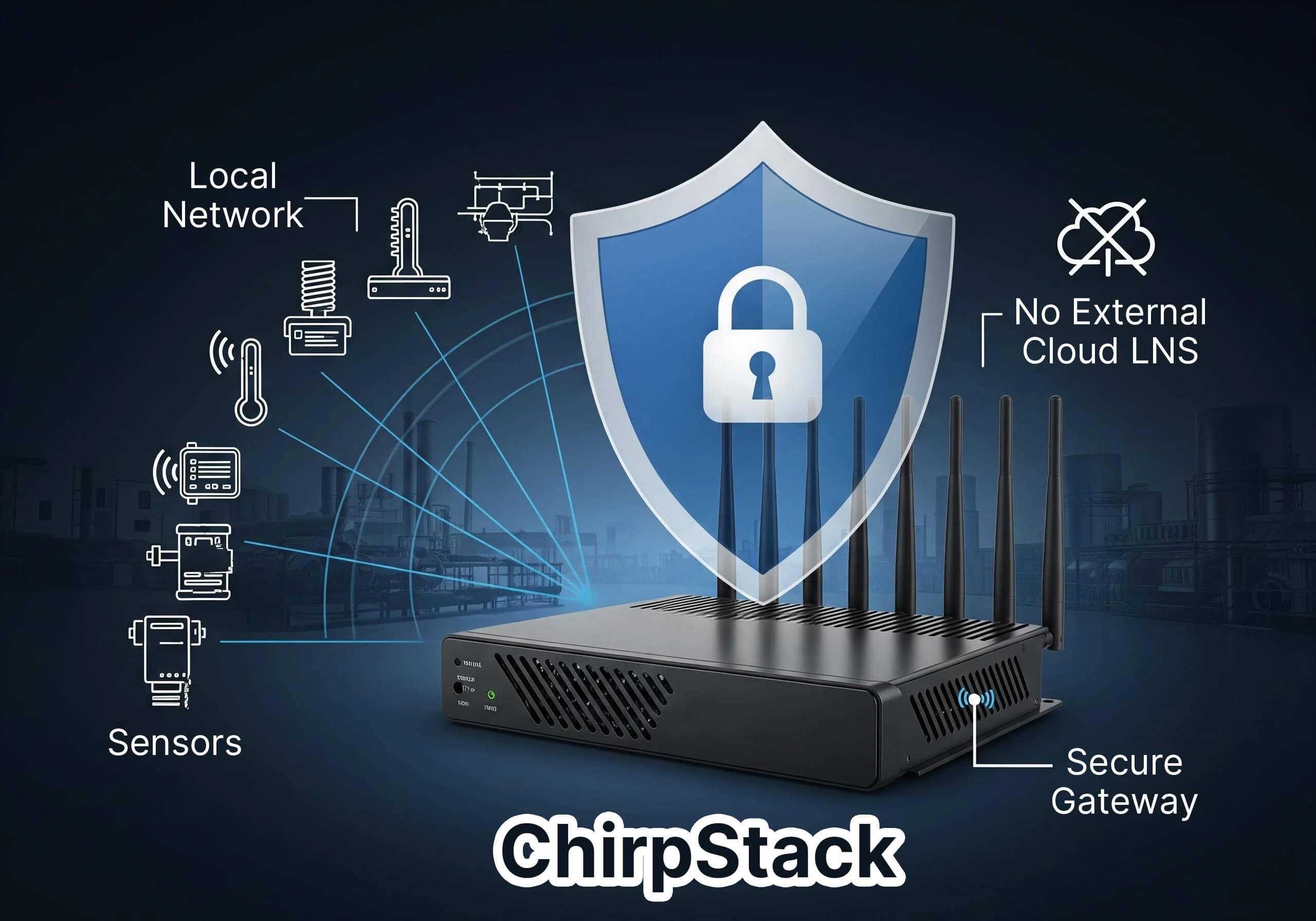
The Robustel R1520LG LoRaWAN Gateway can support an embedded ChirpStack configuration for this type of deployment. Robustel also provides a documented workflow for activating end devices and operating a private LoRaWAN network through the built-in server.
The Simplicity Has a Boundary
A built-in LNS may be easy to start, but it is not maintenance-free.
The project still needs to define:
- Who stores and protects device credentials
- How server and gateway configurations are backed up
- How software updates are tested and scheduled
- What happens if the gateway hardware fails
- How the LNS is restored on replacement hardware
- How data reaches the application
- How multiple local sites will be monitored
The gateway and LNS may also share one failure domain. If the device loses power or suffers a hardware fault, both the radio gateway and the local Network Server may become unavailable together.
An embedded ChirpStack instance should not be assumed to fit any deployment scale simply because it can register and manage LoRaWAN devices. Processing resources, database growth, message volume, integration workload and support procedures must be assessed for the specific project.
An External LNS Fits Shared Networks and Central Teams
Now consider the same manufacturer after its pilot succeeds. The business plans to deploy LoRaWAN sensors across fifteen factories and thirty warehouses. Each site may have one or more gateways, but the organisation wants consistent device onboarding, central visibility, standard security policies and a shared connection to its cloud application.
Running a separate LNS at every gateway may fragment the estate. Updates and backups would need to be coordinated across many local instances, and application integrations could be duplicated site by site.
An external architecture separates the radio sites from the server layer:
Sensors
→ site gateways
→ Ethernet Wi-Fi or cellular backhaul
→ centrally operated LNS
→ application platform
The external LNS may run in a private data centre, an enterprise cloud environment or a managed LoRaWAN platform. “External” describes its location relative to the gateway; it does not require a public cloud service.
Where Central LNS Operation Helps
An external LNS is often a stronger fit when:
- Multiple gateways serve one coverage area
- Many sites share the same operating model
- Device and gateway policies need central control
- Applications consume data from several locations
- A dedicated team manages network software
- Central backup and monitoring are required
- The network may expand or change ownership later
ChirpStack documentation reflects this architectural flexibility: gateway-facing components may be deployed centrally or closer to each gateway, while packet-forwarding options include the Semtech UDP Packet Forwarder and LoRa Basics Station.
Centralisation Does Not Remove Dependencies
An external LNS depends on the backhaul path between each gateway and the server. A gateway can continue receiving LoRaWAN radio packets during an Ethernet or cellular outage, but the external LNS cannot process packets that never reach it. Whether data can be recovered later depends on the gateway software, buffering configuration, available storage and application workflow.
An external server is also not automatically:
- More secure
- More reliable
- Easier to integrate
- Infinitely scalable
- Fully managed
Those outcomes depend on how the server is deployed, protected, monitored and supported.
Compare the Architectures Across the Full Lifecycle
The initial installation is only one part of the decision. The larger difference appears when the system must be upgraded, recovered or expanded.
| Operating responsibility | Built-in LNS | External LNS |
| Initial setup | Often simpler for one contained site | Requires a server or managed service |
| Server ownership | Usually belongs to the site or gateway operator | Usually belongs to a central IT OT or network team |
| Gateway count | Best assessed for small or contained deployments | Better suited to central coordination across multiple gateways |
| Configuration changes | May need to be managed on each local instance | Can be managed at the shared server layer |
| Backups | Must be included in the gateway or site procedure | Can be centralised but still requires a tested process |
| Hardware failure | Gateway and LNS may fail together | Gateway and server failures can be separated |
| Backhaul loss | Local network functions may remain available | Gateway-to-server communication is interrupted |
| Application integration | Can suit a defined local workflow | Often easier to standardise across sites |
| Data location | May remain at the site before forwarding | Resides in the selected central or managed environment |
| Expansion | May create multiple independent LNS instances | Can add gateways to a shared operating layer |
| Migration | Requires export reconfiguration and application planning | Requires gateway and platform compatibility planning |
The matrix should not be read as a product ranking.
For example, keeping the LNS local may be more valuable than central management at an isolated utility site. At the same time, central operation may reduce duplicated engineering across a multi-country building or metering deployment.
The best fit is the architecture whose operational burden matches the team that will support it.
How the Robustel R1520LG LoRaWAN Gateway Supports Both LNS Paths
The Robustel R1520LG LoRaWAN Gateway allows project teams to evaluate built-in and external LNS architectures without changing the gateway hardware.
For a contained site, it can run an embedded ChirpStack server. For centrally managed deployments, it supports external LNS connectivity through UDP, LoRa Basics Station and LORIOT configurations. The product also provides Ethernet, Wi-Fi and cellular backhaul, dual physical SIM slots and RCMS-based device management.
This flexibility addresses three common scenarios.
- A Pilot Without Existing LNS Infrastructure
A plant can use the embedded LNS to commission representative sensors, validate radio coverage and test the application data path. The team still needs to document backups, credentials and the intended migration route.
- A Distributed Network with Central Operations
Gateways at separate locations can forward data to a shared external LNS. Robustel has documented R1520LG integrations using Basic Station with external platforms, demonstrating that the final connection method depends on the server’s authentication and configuration requirements.
- A Site That May Change Architecture Later
The hardware can support either LNS direction, but the project should not assume an automatic or lossless migration. Device records, credentials, application mappings and operating procedures must still be transferred or rebuilt.
The R1520LG’s architecture creates options. It does not make the ownership decision on behalf of the customer.
FAQs
Q1. Can a built-in LNS operate without an internet connection?
A built-in LNS can continue managing local LoRaWAN communication without an external internet connection, provided the gateway and local server remain powered and correctly configured. However, cloud dashboards, remote management and external application delivery will remain unavailable during the outage. Local operation should be tested with the exact application and storage workflow.
Q2. Is an external LNS always the best choice for a large deployment?
No. An external LNS usually makes central coordination easier, but deployment size is not the only factor. Data-location policy, backhaul availability, organisational ownership and site autonomy also matter. Some distributed systems may use a hybrid design with central management and defined local processing at selected sites.
Q3. Can the Robustel R1520LG switch from a built-in to an external LNS?
The Robustel R1520LG LoRaWAN Gateway supports both embedded ChirpStack and external LNS configurations. Changing architecture still requires planning. Gateway settings, device credentials, profiles, payload codecs and application integrations may need to be migrated or recreated, depending on the source and target platforms.
Q4. Is LoRa Basics Station better than a UDP packet forwarder?
LoRa Basics Station supports modern authentication and TLS-based connectivity and is commonly used for external cloud or managed LNS integrations. A UDP forwarder may remain suitable for existing private systems. Compatibility, security policy, server support and lifecycle management should determine the choice rather than treating one protocol as universally correct.
Q5. Does a built-in LNS guarantee that no data is lost during a backhaul outage?
No. A local LNS reduces dependence on the external server connection, but data continuity also depends on the local application, storage, buffering rules and available capacity. If records must later reach a cloud platform, the forwarding and recovery process must be configured and tested under a representative outage.
Conclusion
The Robustel R1520LG LoRaWAN Gateway fits projects that need the freedom to deploy an embedded ChirpStack LNS at a contained site or connect gateways to a centrally operated external platform. That flexibility is useful only when the project also defines who owns the server, credentials, backups, upgrades and recovery process.
Choose a built-in LNS when local control, a contained deployment and limited infrastructure are the main priorities. Choose an external LNS when multiple gateways, shared applications and central lifecycle management require one operating layer.
The server location is not the final decision. The real decision is where the organisation is willing and able to carry the network responsibility.
Explore more articles about Robustel’s LoRaWAN gateway in industrial IoT:



About the Author
Robert Liao | Technical Support Engineer
Robert is an IoT Technical Support Engineer at Robustel, specializing in industrial networking and edge connectivity. A certified Networking Engineer, Robert focuses on the deployment and troubleshooting of large-scale IIoT infrastructures. His work centers on architecting reliable, scalable system performance for complex industrial applications, bridging the gap between field hardware and cloud-side data management.