
Step-by-Step: Connecting a Fanuc CNC Router via FOCAS Protocol
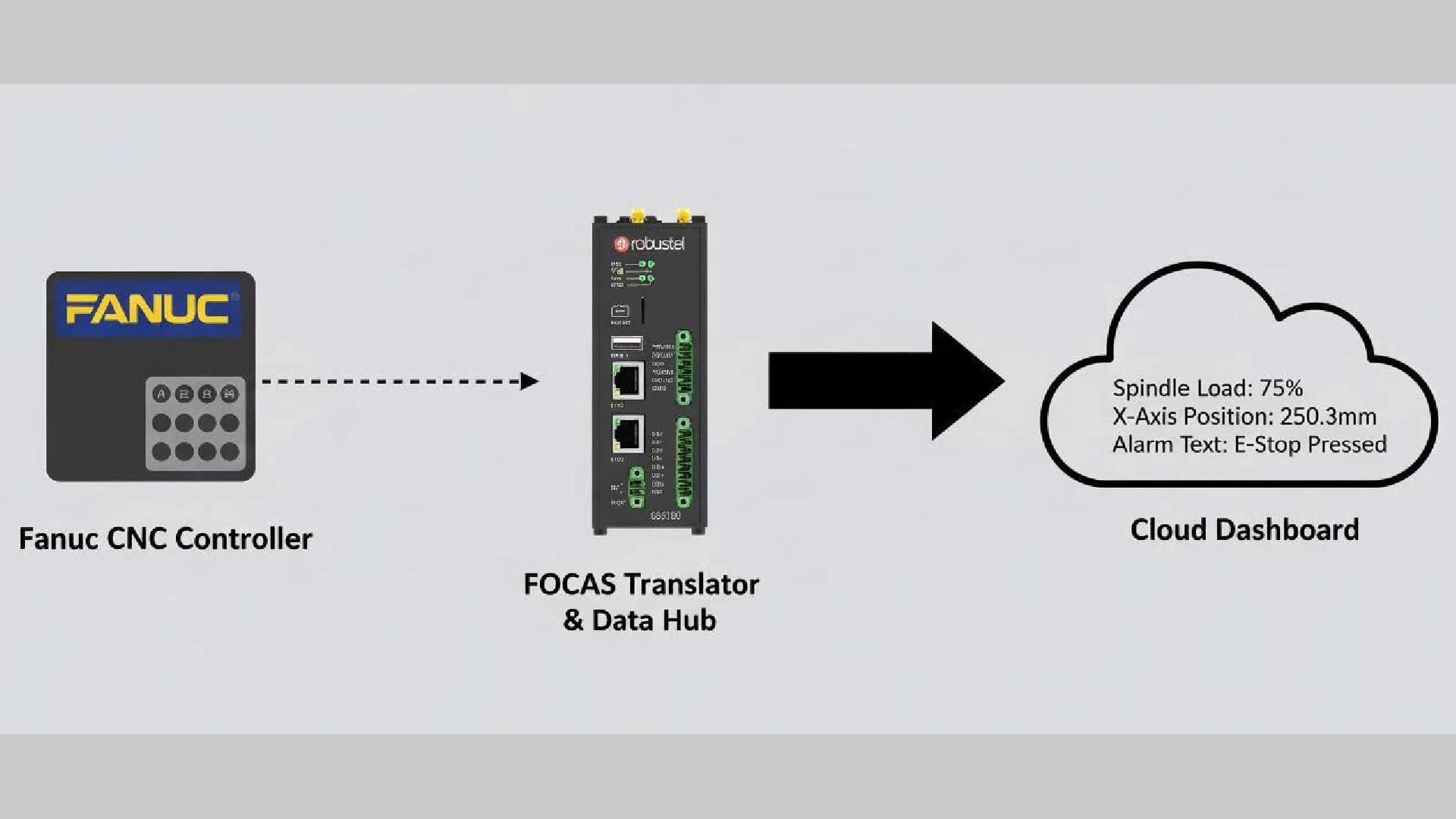
Introduction: Unlocking Fanuc CNC Data with FOCAS
You are standing in front of a sophisticated CNC router powered by a Fanuc controller, knowing it is a goldmine of data—real-time axis positions, spindle loads, alarm histories, and tool offsets. This information could revolutionize your maintenance schedules and production efficiency, but a daunting question remains: how do you get it out? You have heard the term “FOCAS,” but it seems complex and unapproachable.
Let’s be clear: Fanuc FOCAS is powerful, and interfacing with it requires a methodical approach. However, it is far from impossible when you have the right platform acting as your intermediary.
This guide provides a clear, step-by-step tutorial on how to connect your Fanuc CNC router and collect data using the FOCAS protocol. We will walk through the network setup, software requirements, and data acquisition logic needed to unlock this rich stream of real-time information. By leveraging an industrial edge gateway as the integration platform, you can simplify this process and reliably bridge your CNC router to your modern monitoring and analytics systems.
What We Will Cover:
- Simplified Integration: See how using a gateway with pre-built FOCAS drivers can eliminate the need to build a custom application from scratch.
- Understanding FOCAS: Learn why the Fanuc FOCAS library is the standard for accessing deep operational data over Ethernet.
- Implementation Strategy: Discover the critical requirements for Fanuc FOCAS data collection, including network configuration and API call logic.
- The Role of the Edge Gateway: Explore how an industrial edge gateway acts as the ideal platform to bridge your CNC machine to IT systems.
What is Fanuc FOCAS?
FOCAS (Fanuc Open CNC API Specifications) is a library provided by Fanuc that allows external applications to communicate with Fanuc CNC controllers over an Ethernet network. It’s essentially a dictionary and a set of tools enabling your program to “ask” the CNC specific questions and get detailed answers. You don’t just get basic status; you can potentially access hundreds of different data points.
Prerequisites for Connecting Your Fanuc CNC Router
Before you start, ensure you have:
- A Fanuc Controller with Ethernet and the FOCAS Option: FOCAS is typically a paid software option that must be enabled on the CNC controller itself. Verify this is active.
- Network Connection: An Ethernet cable to connect the CNC controller to your edge gateway.
- An Industrial Edge Gateway: A device like the Robustel EG5100 or EG5120 running an open OS (like RobustOS Pro based on Debian) capable of running applications.
- FOCAS Library Understanding (or a Driver): You either need access to the Fanuc FOCAS development libraries (usually obtained from Fanuc) to build a custom application, OR you can use an edge gateway software platform that already includes a FOCAS driver, like Robustel’s Edge2Cloud Pro, which significantly simplifies the process.
Step-by-Step: Fanuc FOCAS Data Collection via Edge Gateway
Step 1: Establish Network Connectivity
This is the physical foundation.
- Connect: Plug an Ethernet cable from the Fanuc controller’s Ethernet port directly into one of the LAN ports on your Robustel edge gateway.
- Configure IPs: Assign static IP addresses to both the CNC controller and the edge gateway’s LAN port, ensuring they are on the same subnet (e.g., CNC: 192.168.1.10, Gateway LAN: 192.168.1.11).
- Security Note: This connection should ideally be on an isolated network segment, protected by the gateway’s firewall. Do NOT connect the CNC directly to your main corporate network.
Step 2: Set Up the FOCAS Application Environment on the Gateway
The FOCAS communication logic needs to run somewhere. The edge gateway is the ideal place.
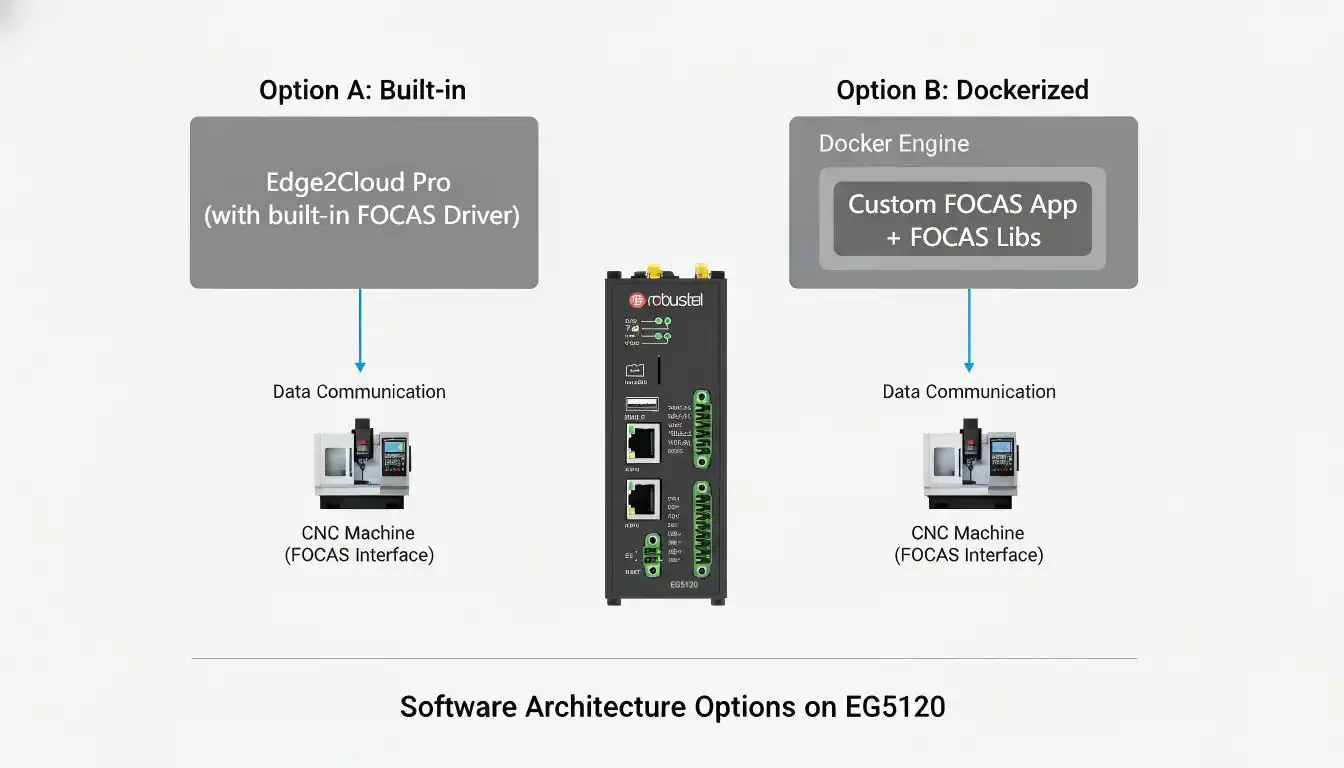
- Option A (Easier – Using Edge2Cloud Pro): If your gateway runs Edge2Cloud Pro, the FOCAS driver is likely pre-integrated. You simply configure the connection parameters (CNC IP address) and select the specific data points you want to read through the platform’s graphical interface. Edge2Cloud Pro handles all the low-level FOCAS API calls for you.
- Option B (Advanced – Custom Application): If building from scratch, you’ll need to:
- Obtain the FOCAS library files from Fanuc.
- Develop your application (e.g., in C++ or using available Python wrappers) on your PC.
- Package this application and the required FOCAS libraries into a Docker container.
- Deploy this container to run on the EG5100/EG5120’s RobustOS Pro environment.
Step 3: Implement Data Acquisition Logic
Your application (either configured in Edge2Cloud Pro or your custom container) needs to periodically make specific FOCAS function calls to read the desired data.
- Example Function Calls (Conceptual):
cnc_rdaxisdata(...)– To read current axis positions.cnc_rdspload(...)– To read the spindle load percentage.cnc_rdalmmsg(...)– To read current alarm messages.cnc_rdparam(...)– To read specific CNC parameters.
- Polling Strategy: Determine how often you need to read each data point (e.g., axis positions every 100ms, alarms every 1 second).
Step 4: Normalize and Forward the Data
Once the data is successfully read from the CNC router via FOCAS, the edge gateway performs its final critical task.
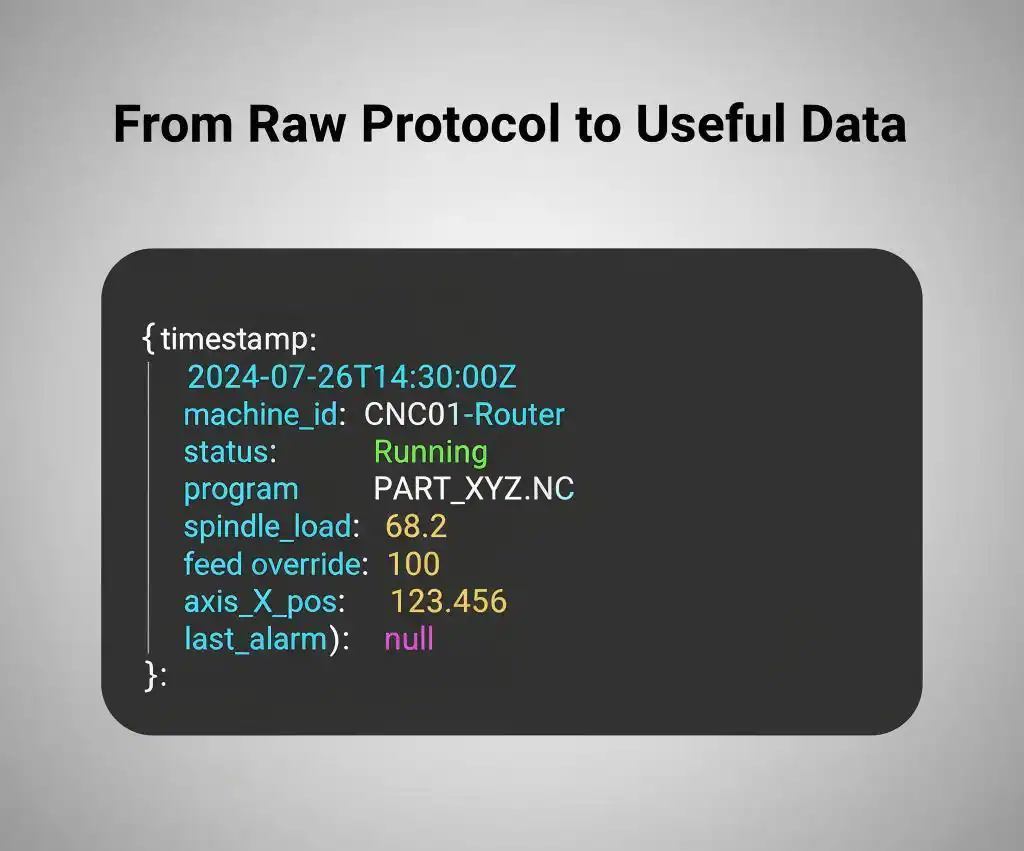
- Normalization: It converts the raw FOCAS data into a standardized JSON format.
- Transmission: It securely sends this JSON payload northbound using MQTT or another standard protocol to your central monitoring platform or database.
Why Use an Edge Gateway for Fanuc FOCAS Data Collection?
The ‘aha!’ moment is realizing the edge gateway solves multiple problems at once:
- Offers Remote Management: The gateway itself can be managed via RCMS, simplifying deployment and maintenance.
- Provides the Execution Environment: Runs the FOCAS application reliably on the factory floor.
- Simplifies Integration: Pre-built drivers (like in Edge2Cloud Pro) eliminate complex FOCAS programming.
- Acts as a Secure Bridge: Isolates the CNC from the IT network and encrypts outbound data.
Conclusion: Unlocking the Riches of Your Fanuc CNC Router
Connecting to a Fanuc CNC router via the FOCAS protocol does more than just move data—it opens a universe of valuable, real-time insights. While the protocol itself is complex, leveraging a modern industrial edge gateway transforms this challenge into a manageable, reliable process.
By utilizing this gateway as your integration foundation, you achieve the following:
- Security & Reliability: A secure bridge between your OT equipment and IT analytics systems.
- Operational Intelligence: Instant access to spindle loads, alarm histories, and axis positions to optimize performance.
- Flexibility: The power to use pre-built FOCAS drivers or deploy your own containerized applications.
You are no longer limited by inaccessible data. With the right edge platform, you are ready to revolutionize your maintenance schedules and maximize the efficiency of your Fanuc machines.
Watch: Discover more about the EG5120.
FAQs
Q1: Do I need to buy a license from Fanuc to use FOCAS?
A1: Typically, yes. The FOCAS option needs to be enabled on the CNC controller itself, which is often a purchased software license from Fanuc. You may also need a separate development license if you plan to build your own custom application using their libraries.
Q2: Which Fanuc controllers support FOCAS over Ethernet?
A2: Most modern Fanuc controllers with an Ethernet port support FOCAS (e.g., Series 0i-MODEL D and later, Series 30i/31i/32i). However, the specific data points available can vary by controller model and software version. Always consult the Fanuc documentation for your specific controller.
Q3: Is FOCAS the only way to get data from a Fanuc CNC router?
A3: No, but it is often the most comprehensive. Some newer controllers also support standards like OPC UA. For simpler status monitoring, you might also use basic digital I/O or Modbus if supported. However, for deep, real-time operational data, FOCAS is Fanuc’s primary mechanism.
About the Author
Robert Liao | Technical Support Engineer
Robert Liao is an IoT Technical Support Engineer at Robustel, specializing in industrial networking and edge connectivity. A certified Networking Engineer, Robert focuses on the deployment and troubleshooting of large-scale IIoT infrastructures. His work centers on architecting reliable, scalable system performance for complex industrial applications, bridging the gap between field hardware and cloud-side data management.