
Dual SIM Failover: Achieving 99.9% Uptime in Industrial IoT

This article will explore the “Intelligent Health Check” framework to show you how professional routers detect “Zombie Connections” that basic signal-monitoring fails to catch. We’ll also break down the step-by-step failover and failback process to explain how to maintain a resilient network without manual intervention or data overages. Finally, this article will differentiate between carrier and infrastructure diversity to reveal the secret to achieving true hardware-level redundancy in remote environments.
What We Will Cover:
- The “Zombie Connection” Problem: Why signal bars don’t guarantee data flow.
- The “Go/No-Go” Test: How multi-target ping detection works.
- Failover vs. Failback: Automating the lifecycle of a redundant connection.
- Strategic Redundancy: Comparing Cold, Warm, and Hot failover speeds.
Most people understand the basic concept of dual SIM failover: if one network connection dies, the router switches to another. Simple enough, right? But the real questions—the ones that separate a professional solution from a basic one—lie in the details.
As an IoT professional, you know the difference between a frustratingly unreliable system and a truly “unbreakable” one is the intelligence of its execution. Let’s pop the hood and take a technical deep dive into how dual SIM failover actually works.
The Heart of the System: Intelligent Health Checks
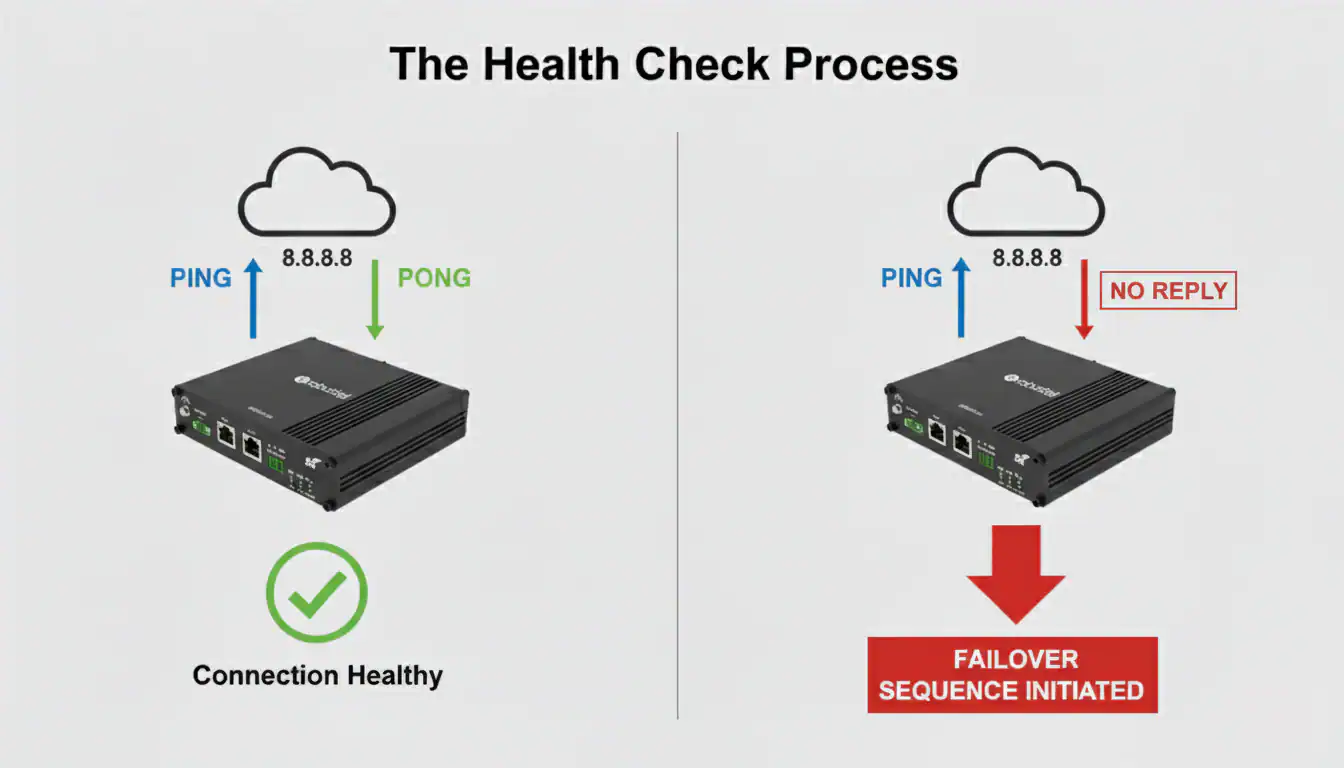
A professional dual SIM router doesn’t just passively wait for the connection to drop. It actively and constantly monitors the health of its primary cellular link. This isn’t a simple on/off check; it’s a sophisticated process designed to solve the “Zombie Connection”—where a device shows full signal bars but cannot pass data.
Ping Detection: The Go/No-Go Test
This is the most reliable health check for industrial hardware.
- Configuration: You configure the router with the IP address of a highly reliable internet target (e.g., Google’s public DNS at 8.8.8.8). You also set the parameters, such as “try 3 times every 10 seconds.”
- The “Ping”: The router sends a small ICMP echo request packet (a “ping”) to that target.
- The “Pong”: A healthy connection means the target server sends a reply (a “pong”) almost instantly.
- The Verdict: If the router fails to receive a reply after the configured number of retries, it declares the primary link “down” and initiates the failover sequence. The real ‘aha!’ moment is realizing this can detect not just a carrier outage, but also routing problems further upstream in the internet.
Beyond the Ping: Proactive Performance Monitoring
The best systems don’t wait for a total outage. They monitor performance thresholds to trigger a switch before the user even notices a problem:
- Signal Strength (RSSI/RSRP) Thresholds: You can configure the router to switch if the signal quality drops below a certain level for a sustained period. This is perfect for mobile applications where a vehicle might enter an area with poor coverage from the primary carrier.
- Latency Thresholds: The router can also monitor the round-trip time of its ping tests. If latency spikes, indicating severe network congestion, it can switch to the secondary carrier to maintain a responsive connection.
The Failover Process: A Step-by-Step Breakdown
Once the health checks declare the primary link down, a precise sequence happens inside the router’s operating system (such as RobustOS):
- Deactivate Primary Interface: The router’s OS brings down the cellular interface associated with the primary SIM card (e.g.,wwan0). This terminates the existing connection.
- Activate Secondary Interface: The OS then brings up the cellular interface for the secondary SIM (wwan1).
- Establish New Session: The router’s modem establishes a new data session with the secondary carrier’s network, obtaining a new IP address.
- Reroute Traffic: The router’s routing table is updated to send all internet traffic through the now-active secondary interface.
This entire process is typically completed in under 30 seconds, ensuring minimal disruption to the end devices.
Strategic Redundancy: Cold vs. Warm Failover
To help you choose the right strategy for your TCO, it is important to understand the technical “state” of your backup SIM.
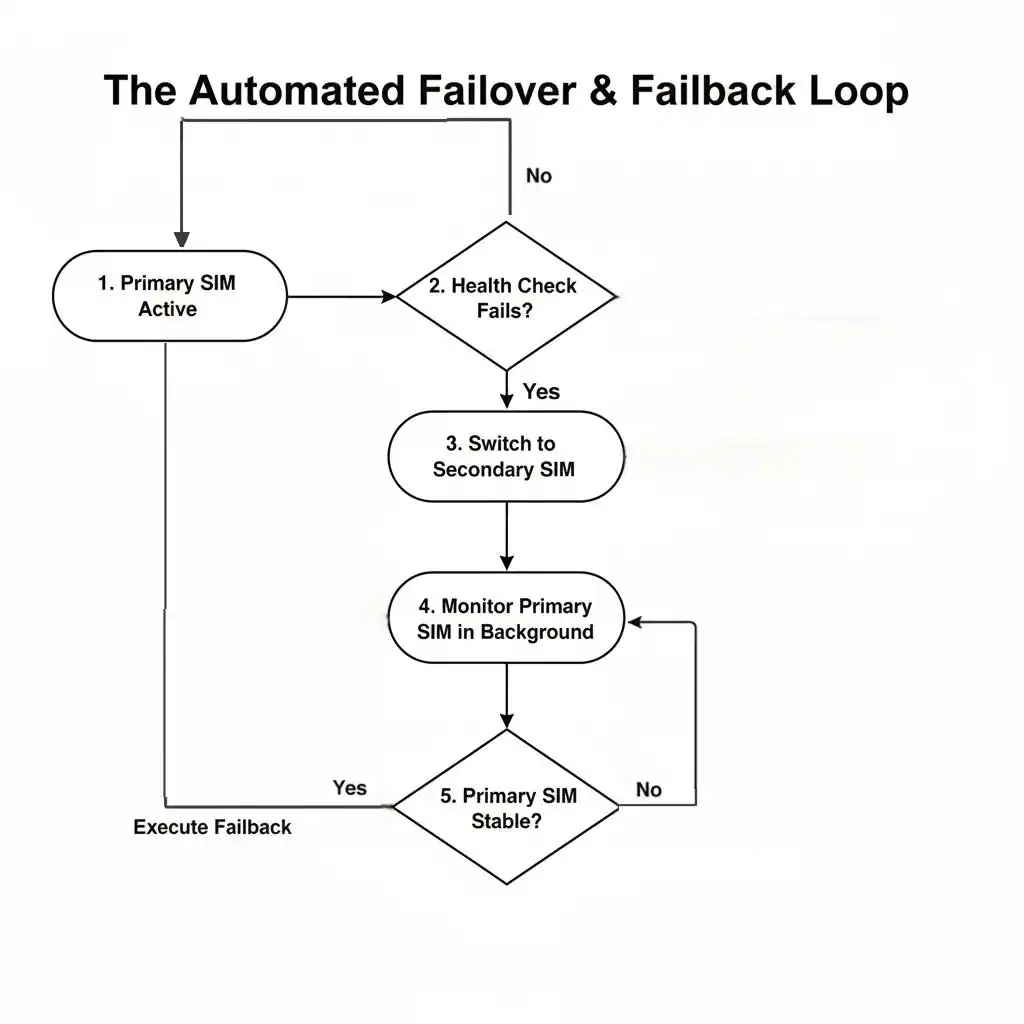
Once the failover has occurred, the router doesn’t forget about the primary SIM. It continues to run health checks on that inactive link in the background.
- Detection: When the primary link is stable again for a pre-configured amount of time (e.g., 5 minutes), the router knows it’s safe to switch back.
- The Switch Back: It then reverses the failover process, deactivating the secondary link and seamlessly re-establishing the primary one.
This is absolutely essential for controlling data costs (as backup plans may be more expensive) and ensuring your system is always using its optimal connection path.
Conclusion: It’s the Intelligence That Matters
Now you know how dual SIM failover works. It’s not just about having two SIM slots; it’s about the intelligence of the underlying software that constantly monitors, reliably switches, and smartly switches back. This sophisticated process is what turns a simple cellular connection into a resilient, unbreakable lifeline for your mission-critical assets.
FAQs
Q1: What is “carrier diversity” and why is it important for dual SIM?
A1: Carrier diversity is the practice of using SIM cards from two completely different network operators (e.g., AT&T and Verizon in the US). This is critically important because it protects you from a failure of a single carrier’s entire network. If both your SIMs were from the same carrier, a network-wide outage would take both your primary and backup connections offline.
Q2: Can I see when a failover event has happened?
A2: Yes. A professional industrial router will keep a detailed internal log of all failover and failback events. Furthermore, if the router is connected to a cloud management platform like RCMS, it can be configured to send you an immediate email or platform alert the moment a failover occurs.
Q3: Does the router switch for just a momentary signal loss?
A3: No, a well-designed system prevents “flapping” (switching back and forth too frequently). It uses configurable timers and retry counts. For example, it might need to see a ping failure for 30 consecutive seconds before it triggers a failover, and it might need to see the primary link be stable for 5 continuous minutes before it fails back.
About the Author
Robert Liao | Technical Support Engineer
Robert Liao is an IoT Technical Support Engineer at Robustel, specializing in industrial networking and edge connectivity. A certified Networking Engineer, Robert focuses on the deployment and troubleshooting of large-scale IIoT infrastructures. His work centers on architecting reliable, scalable system performance for complex industrial applications, bridging the gap between field hardware and cloud-side data management.