
Building a Private LoRaWAN Network: ChirpStack & Robustel R1520LG
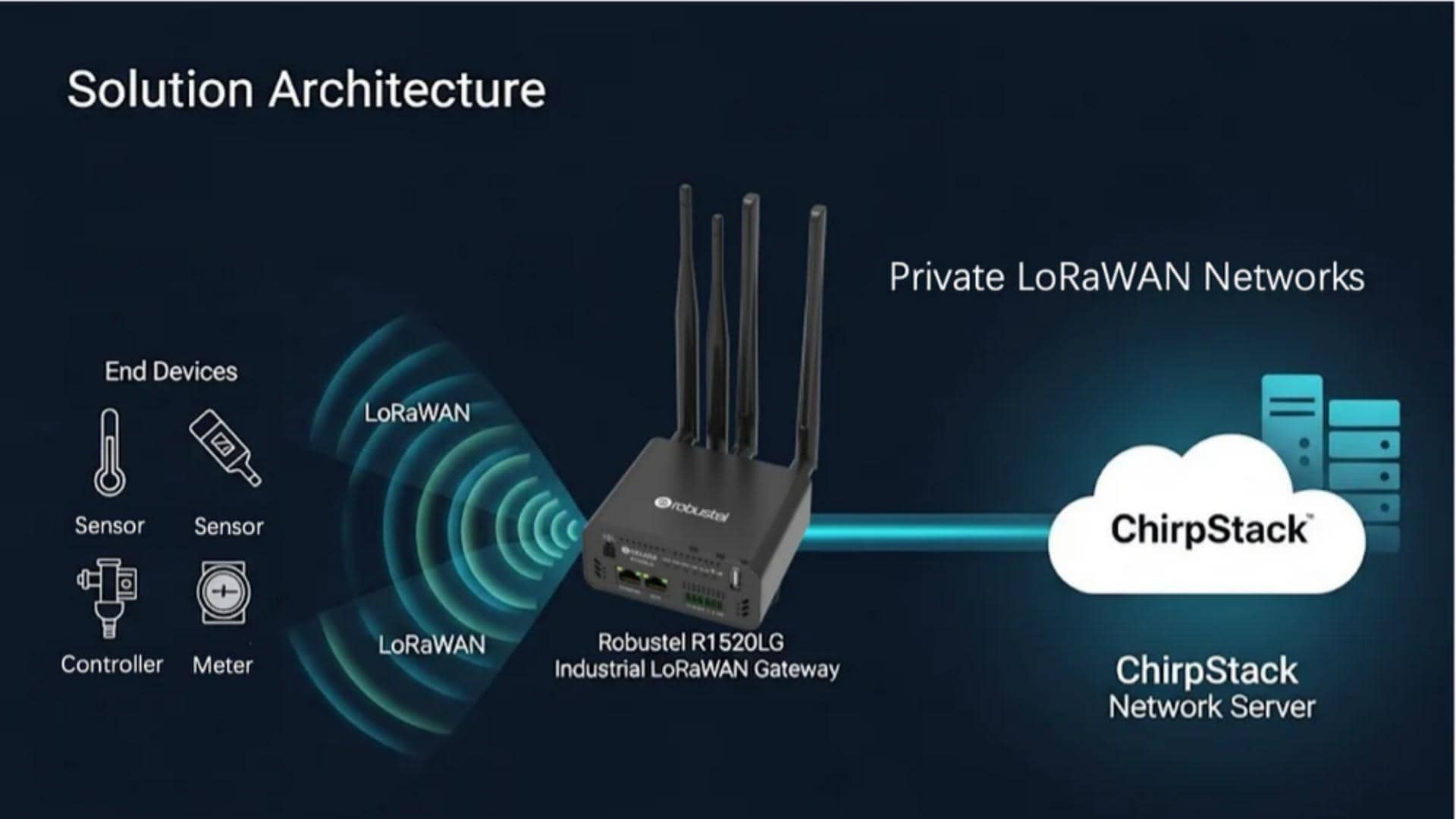
Relying on public networks often means dealing with recurring subscription fees and giving up control over your own data. For many industrial projects, that’s a dealbreaker. Building a Private LoRaWAN Network changes the equation, giving you complete ownership over your connectivity, security, and long-term costs.
In this guide, we’ll walk you through a practical, step-by-step deployment using ChirpStack—the industry’s go-to open-source server—and the Robustel R1520LG Industrial Gateway.
We won’t just talk about the technical setup; we’ll focus on the outcomes that actually matter for your project:
- Zero Recurring Fees: How to eliminate monthly cloud subscriptions.
- Total Data Sovereignty: Keeping your sensitive information on your own hardware, not a third-party server.
- Low-Latency Performance: Why local processing is essential for time-sensitive applications like smart metering or leak detection.
Whether you’re monitoring environmental sensors in a remote field or managing utility meters across a complex facility, this guide provides a production-ready blueprint to get your private network up and running.
The Rise of Private IoT: Taking Back Control with LoRaWAN
When you’re scaling an IoT project, you eventually hit a fork in the road. You can rely on a public network managed by a telecom provider—where you pay per device and follow their rules—or you can build your own. For mission-critical industrial operations, the choice is increasingly clear: Private LoRaWAN. The shift isn’t just about connectivity; it’s about sovereignty. In industrial settings, where network downtime or a data breach can stop production, relying on a third-party provider is often a risk businesses can’t afford. By moving to a private network, you gain complete authority over your infrastructure, your security policies, and—most importantly—your data.
The industry is moving fast in this direction. Market data shows the LoRaWAN ecosystem is expected to grow from $8 billion today to over $32 billion by 2029. This 32% annual growth isn’t just a statistic; it’s a clear signal that organizations worldwide are looking for independent, scalable ways to connect their assets.
In this guide, we’ll move past the theory and show you exactly how to build this independence. We will walk through integrating the ChirpStack open-source server with the Robustel R1520LG, an industrial gateway that combines LoRaWAN connectivity with Edge Computing power.
P.S.: If you’re new to the basics of the protocol, you might want to start with our first.
ChirpStack: The Core of Your Private LoRaWAN Server
ChirpStack is a complete, open-source LoRaWAN Network Server stack. It provides all the necessary components to manage gateways, authenticate devices, route data, and integrate with your end applications. Because it’s open-source, it allows for deployment on your own hardware (like the R1520LG or a server), giving you full control over your Private LoRaWAN Network. Its enterprise-grade features and adherence to industry standards make it a top choice for professional deployments.
Its core components include:
- ChirpStack Network Server (NS): This is the engine of the network. It handles device join procedures (OTAA/ABP), schedules downlink data transmissions, manages Adaptive Data Rate (ADR) for optimal device performance, and processes all LoRaWAN MAC layer commands.
- ChirpStack Application Server (AS): This component provides a user-friendly web interface for managing devices and gateways. It also supports payload decoding/encoding (using JavaScript or Python) and enables powerful API integrations with your applications via HTTP, MQTT, or gRPC.
- ChirpStack Gateway Bridge: This essential utility runs on the Industrial LoRaWAN Gateway itself. It converts the standard LoRa Gateway Protocol (UDP) from the Semtech Packet Forwarder into a secure and structured MQTT/Protobuf format, while also managing gateway authentication.
For detailed documentation, the official ChirpStack website is an invaluable resource. Understanding these components is the first step to building your Private LoRaWAN Network.
Robustel R1520LG: The Gateway Built for Industrial Demands
The Robustel R1520LG is Robustel’s next-generation indoor Industrial LoRaWAN Gateway , specifically optimized for building a reliable and high-performance Private LoRaWAN Network . Its industrial-grade design ensures it can operate in demanding environments, while its powerful hardware provides the foundation for both LoRaWAN communication and edge computing tasks.
Robustel R1520LG: Industrial LoRaWAN Edge Gateway
| Feature Category | Specification |
| 1. System | |
| CPU | ARM Cortex-A7, 792 MHz (NXP i.MX6ULL) |
| RAM | 512 MB DDR3 |
| Storage | 8 GB eMMC |
| Indicators | LED for LoRa, RUN, MDM, USR, WLAN, RSSI |
| 2. LoRaWAN Interface | |
| Frequency Bands | EU868 / AU915 / US915 (Region-dependent) |
| Channels | Up to 8 concurrent channels |
| Chipset | Semtech SX1302 |
| Transmit Power | Max +25 dBm |
| Receiver Sensitivity | Down to -140 dBm |
| Antenna | 1 x RP-SMA Connector |
| 3. Network Connectivity | |
| Cellular | Modem: 4G LTE Cat 4 (Worldwide Frequencies) SIM: 2 x Mini SIM (2FF), Dual SIM Failover Antennas: 2 x SMA Connectors |
| Wi-Fi | Standard: 802.11 b/g/n, 2.4 GHz Modes: Access Point (AP), Client Antenna: 1 x RP-SMA Connector |
| 4. Interfaces | |
| Ethernet | 2 x 10/100 Mbps, RJ45 (ETH0 supports PoE PD – IEEE 802.3at) |
| Serial | 1 x RS232, 1 x RS485 |
| USB | 1 x USB 2.0 Host (Type-A) |
| 5. Power & Physical | |
| Input Voltage | 9 to 60 VDC (3.5mm Pitch Terminal Block or via PoE PD) |
| Power Consumption | ~1.5W (Idle @ 12VDC), ~10W (Max @ 12VDC) |
| Housing | Plastic (PC + ABS) |
| Protection | IP30 |
| Dimensions | 105 x 90 x 46 mm |
| Weight | 238.5 g |
| Installation | DIN-Rail, Wall Mount, Desktop |
| 6. Environmental | |
| Operating Temperature | -20°C to +60°C |
| Storage Temperature | -40°C to +85°C |
| Relative Humidity | 5% to 95% (non-condensing) |
| 7. Certifications | |
| Regulatory | CE, UKCA, RCM, FCC |
| Environmental | RoHS 2.0, WEEE |
| 8. Software | |
| Operating System | RobustOS Pro (based on Debian 11 with LTS), Docker support |
| LoRaWAN | V1.04 Class A/B/C, Built-in ChirpStack LNS, Packet Forwarder mode |
| Key Software Support | Node-RED, MQTT, Modbus (RTU/TCP), OPC UA, BACnet, DNP3, IEC101/104 |
| Cloud Integration | Native MQTT for AWS, Azure, Aliyun; Fully compatible with RCMS |
| Security Features | IEC 62443-4-1 certified development, Penetration Tested, Automatic System Failback, VPN (IPsec, OpenVPN, Wireguard, etc.), Stateful Firewall |
| SDK & Customization | C, C++, Python, Java, Go, Node.js and more; ~6 GB Flash, ~256 MB RAM for user apps |
| Management | Web GUI, CLI, SMS, Robustel Cloud Manager Service (RCMS) |
With its modern 8-channel Semtech SX1302 LoRa concentrator, the R1520LG can handle a high density of devices, making it perfect for both initial deployments and large-scale expansions of your Private LoRaWAN Network.
Benefits of Building Your Private LoRaWAN Network
Combining the ChirpStack with the Robustel R1520LG Industrial LoRaWAN Gateway offers significant advantages over relying on public networks or other solutions:
- Cost Efficiency: By running ChirpStack on your own hardware (on-premises or in a private cloud), you eliminate the recurring subscription fees associated with commercial LoRaWAN network providers. This drastically reduces the total cost of ownership (TCO), especially for large-scale deployments. This is a primary driver for choosing a Private LoRaWAN Network.
- Complete Data Sovereignty and Security: Your data never has to leave your private network. All device data flows from the R1520LG Industrial LoRaWAN Gateway directly to your ChirpStack server. This full control over the data path is critical for sensitive industrial, medical, or municipal applications where compliance with data privacy regulations (like GDPR) is essential.
- Ultra-Low Latency: When the ChirpStack server is deployed on the same local network as the R1520LG Industrial LoRaWAN Gateway , communication latency can be reduced to sub-30ms. This is ideal for industrial control and other real-time IoT applications where immediate responses are necessary.
- Scalability and Flexibility: The R1520LG’s 8-channel LoRa concentrator supports a large number of end devices. As your IoT project grows, you can easily add more R1520LG gateways to expand coverage, all managed under a single ChirpStack instance.
- Enhanced Reliability: The R1520LG’s robust industrial design ensures consistent performance even in harsh conditions. Paired with ChirpStack’s stable and well-maintained open-source code, you get a highly reliable foundation for your Private LoRaWAN Network.
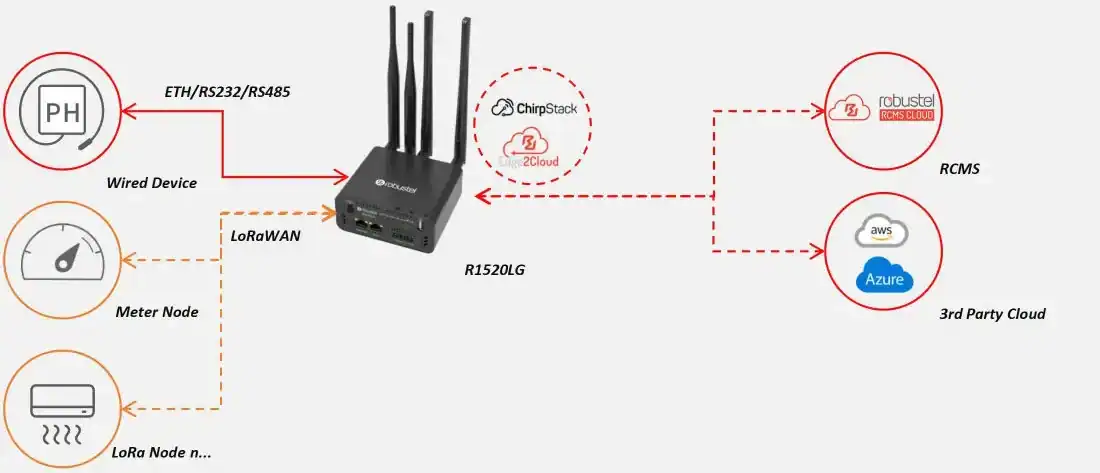
Applications for Your Private LoRaWAN Network
The versatility of a ChirpStack and R1520LG-based Private LoRaWAN Network supports a wide range of industrial and commercial IoT use cases:
- Smart Agriculture: Collect crucial sensor data from fields to optimize irrigation schedules, monitor soil health, and track crop growth conditions over a wide area.
- Smart Metering: Deploy private networks to monitor energy, water, and gas usage across a campus, industrial park, or residential complex for efficient resource management and automated billing.
- Environmental Monitoring: Track temperature, humidity, and air quality in real-time for compliance, safety, and operational efficiency in factories, warehouses, and agricultural settings.
- Asset Tracking: Locate and monitor the status of valuable assets within a large facility, construction site, or shipping yard to improve operational efficiency and prevent loss.
Integrating ChirpStack with the R1520LG: A Step-by-Step Guide
This section provides a detailed guide to setting up your Private LoRaWAN Network . The layout is preserved so you can easily add your configuration screenshots.
1. Pre-Installation Setup
Before starting your ChirpStack R1520LG integration, ensure you have the following:
- Access to the R1520LG Industrial LoRaWAN Gateway ‘s command line via SSH.
- Reliable internet connectivity for the gateway via one of its backhaul options (Ethernet or a 4G SIM card).
- Basic knowledge of Linux for using terminal commands.
2. Industrial LoRaWAN Gateway Initialization: Network Connectivity
The R1520LG offers flexible networking options with its dual Ethernet ports and LTE cellular module. You must configure a stable WAN connection for the gateway to download software and connect to the internet.
Configuring ETH1 as a WAN Interface
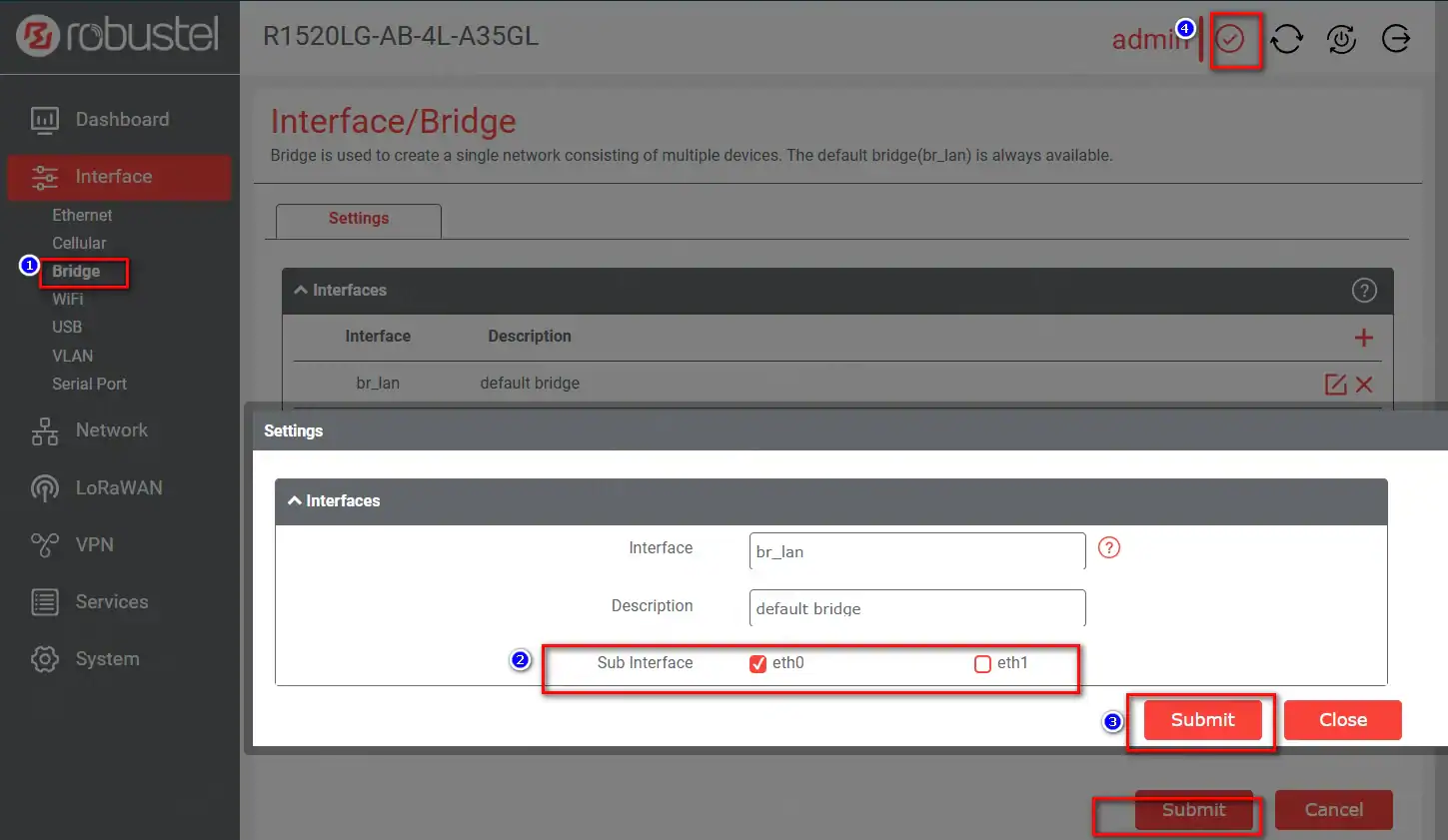
By default, both ETH0 and ETH1 are in bridge mode. To use one as a dedicated internet uplink, follow these steps.
1. Access the R1520LG Web Interface and navigate to Bridge → Settings.
2. Locate the ETH1 Sub Interface and uncheck the “eth1” option.
3. Click Submit, then Save & Apply.
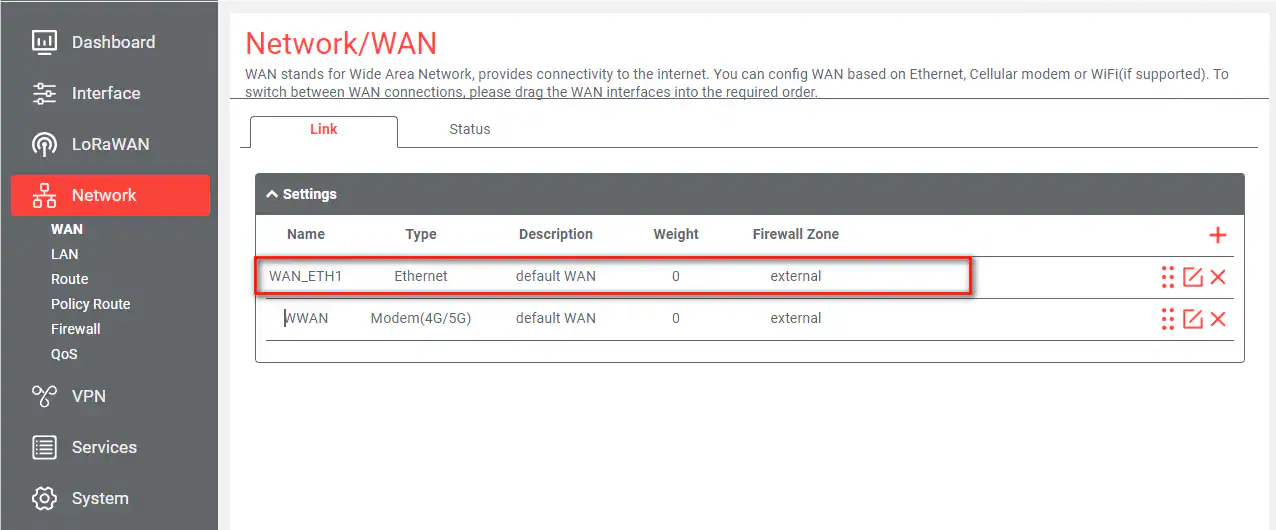
4. Navigate to Network → WAN → Add New Interfaceand configure as follows:
- Name:
WAN - Type:
Ethernet - Interface:
eth1 - Firewall Zone:
External - IPv4 Connection Type:
DHCP
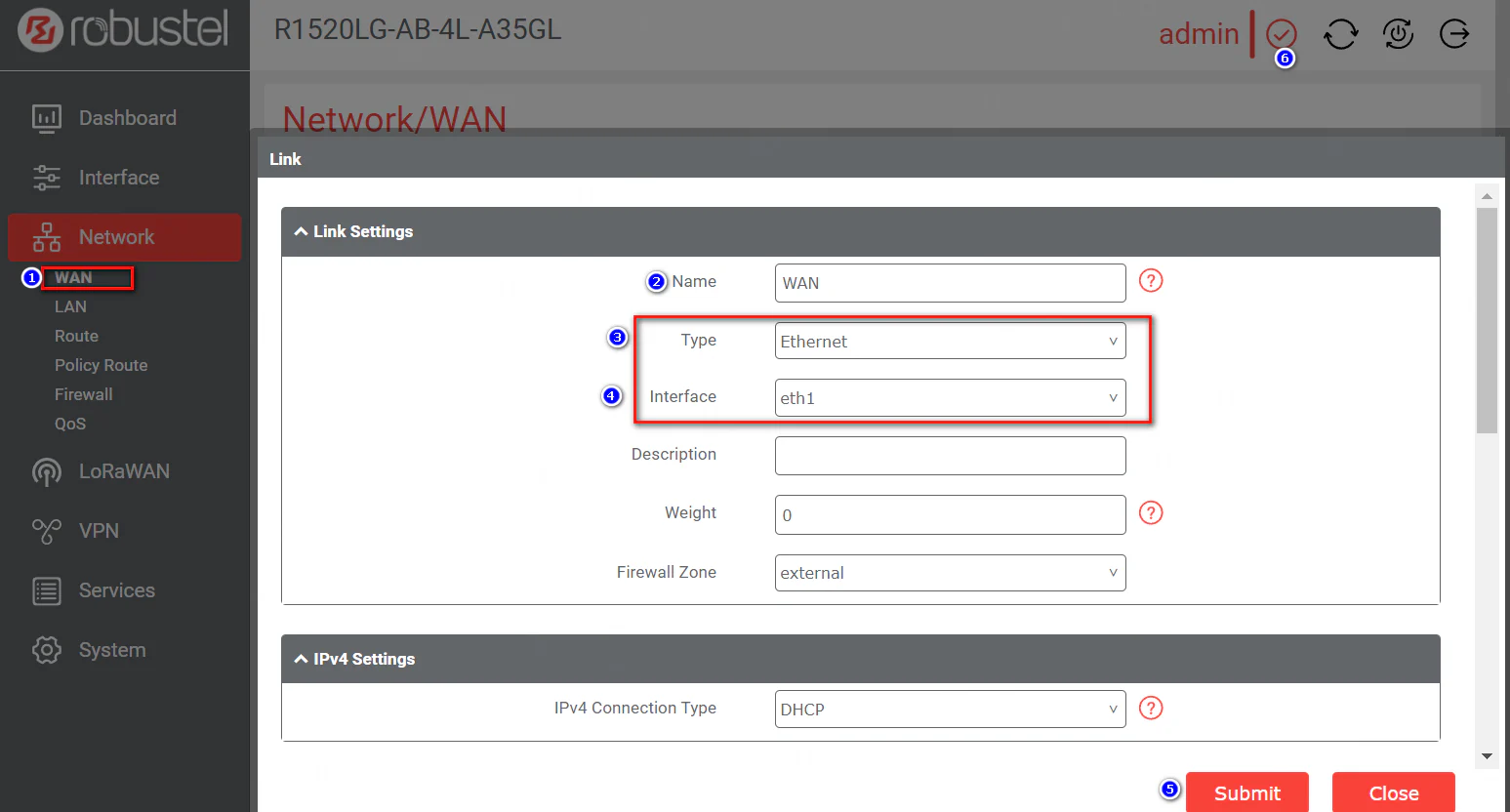
5. After saving, the new Ethernet WAN link will be active.
LTE Cellular Configuration
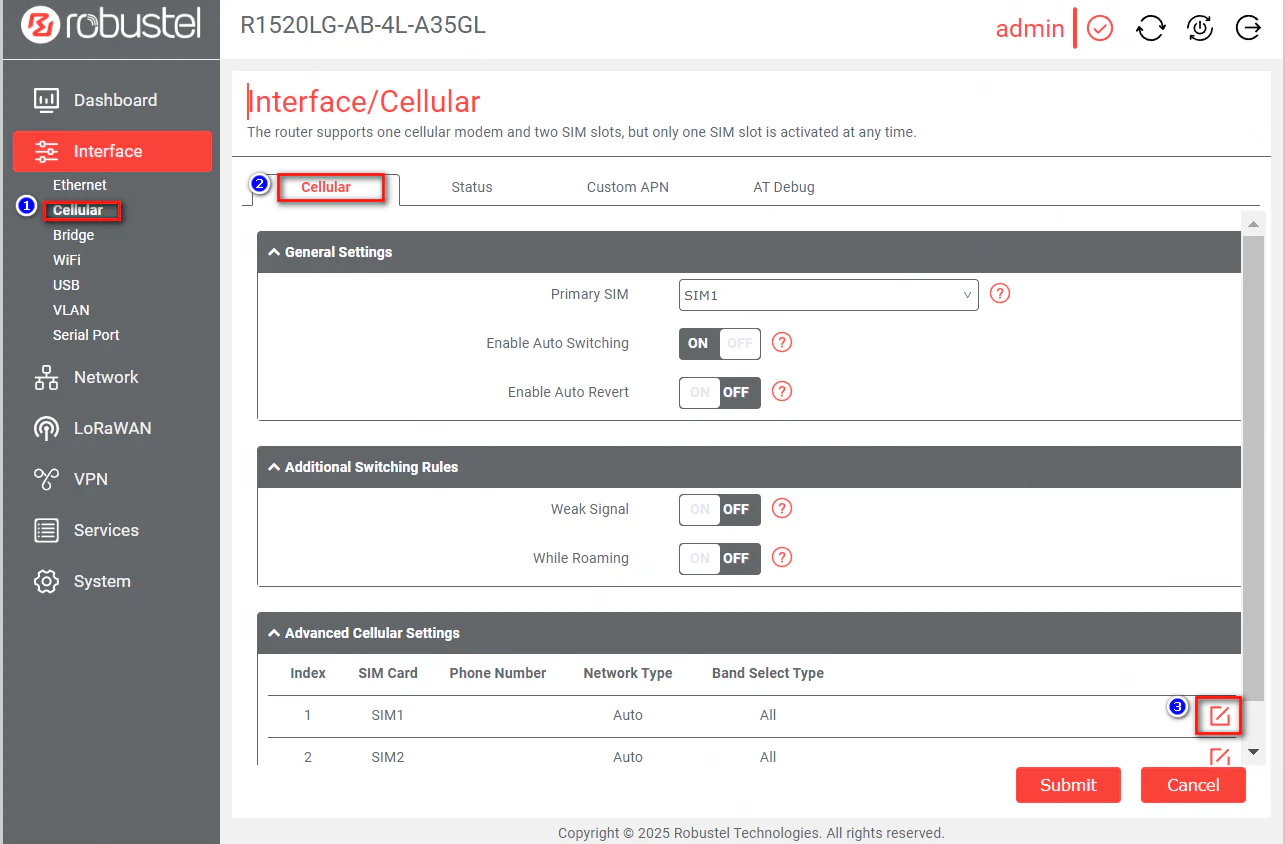
- Install your SIM card and connect the 4G antennas to the MAIN and AUX ports.
- Navigate to
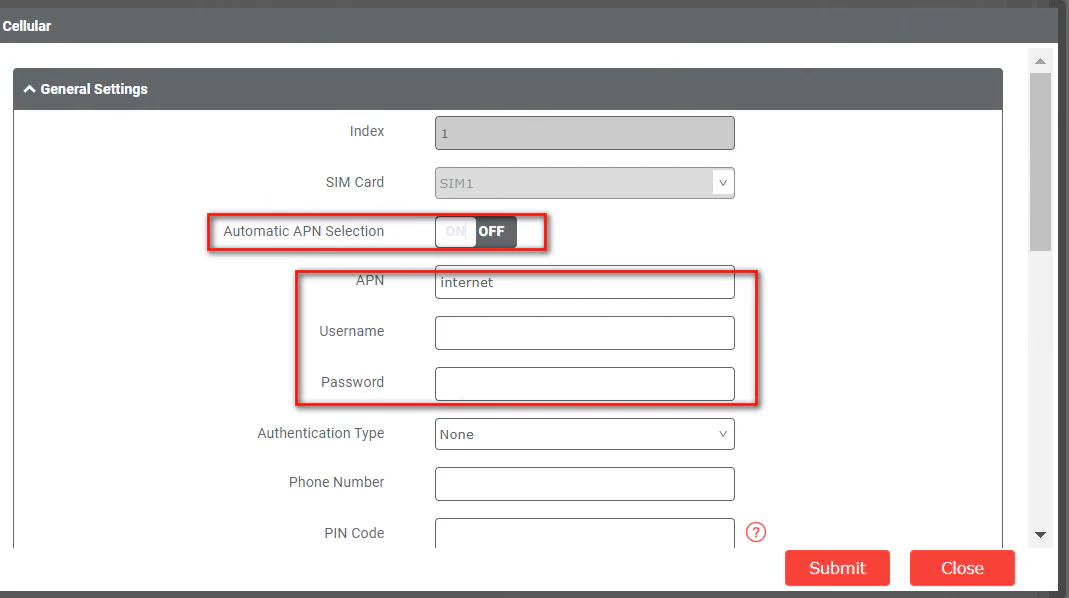
Interface→Cellular→Advanced cellular settingsand set the parameters according to your ISP’s requirements (e.g., APN).
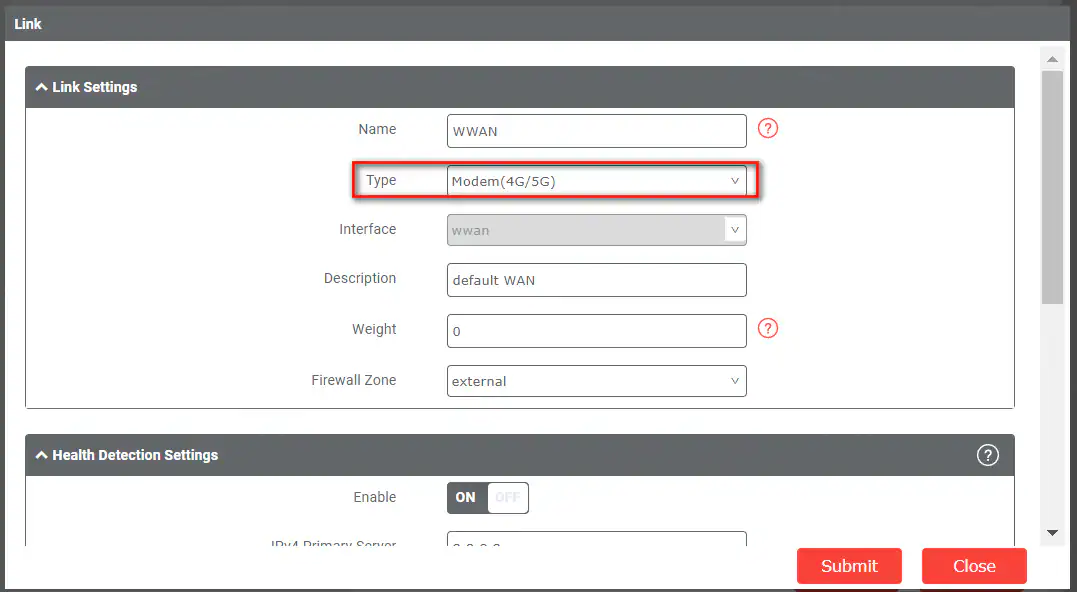
3. Go to Network → WAN → Link and add a new link for cellular dial-up, selecting “Modem” as the link type.
4. After saving, the cellular WAN link will be active.
Creating Sudo Privileges
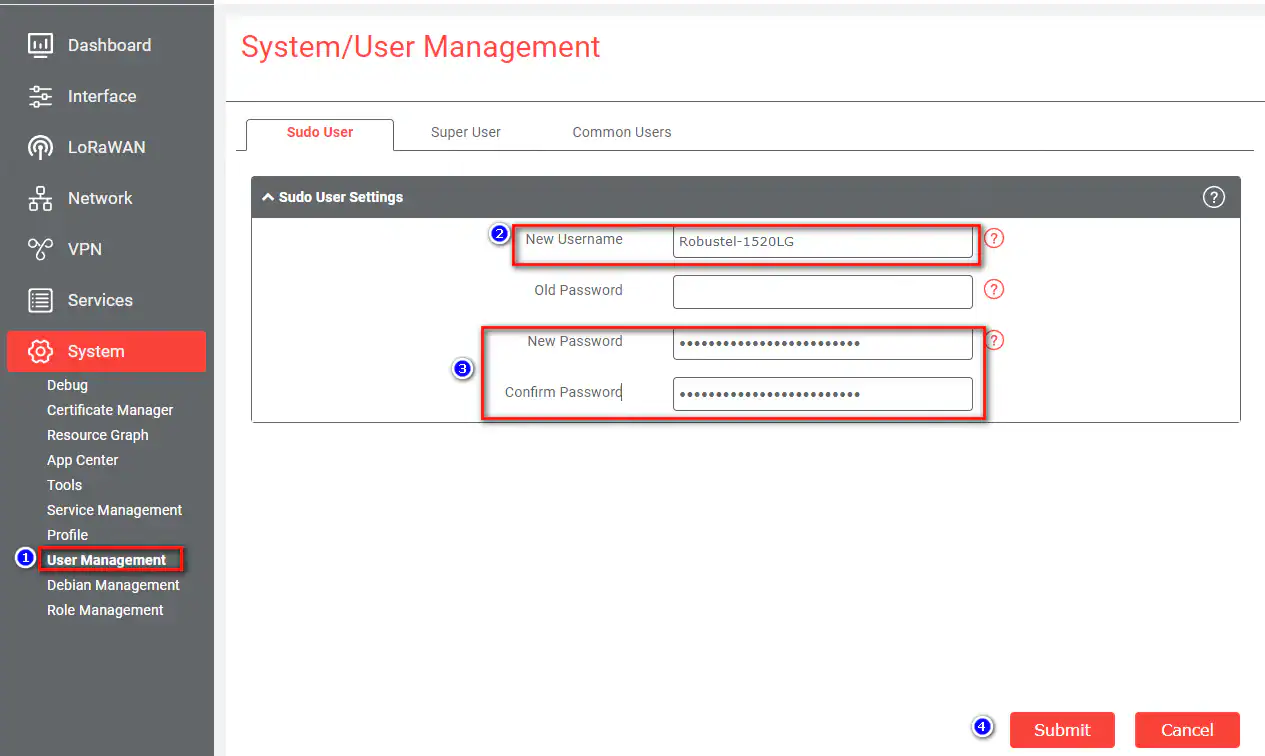
Before installing software, create sudo privileges via the web UI.
1. Go to System > User Management > Sudo user > Sudo User Settings.
2. Click “Add” and configure your sudo user.
3. Install Required Software
Access the terminal via SSH and install the prerequisites:
Bash
sudo apt update sudo apt install mosquitto mosquitto-clients redis-server redis-tools postgresql Set up the PostgreSQL database and roles for ChirpStack:
SQL
sudo -u postgres psqlcreate role chirpstack with login password 'chirpstack';create database chirpstack with owner chirpstack;\c chirpstack create extension pg_trgm;\q
4. Install ChirpStack on Your Private LoRaWAN Network Gateway
Add the ChirpStack repository and install the components:
Bash
sudo apt install apt-transport-https dirmngr -ysudo apt-key adv --keyserver keyserver.ubuntu.com --recv-keys 1CE2AFD36DBCCA00echo "deb https://artifacts.chirpstack.io/packages/4.x/deb stable main" |sudo tee /etc/apt/sources.list.d/chirpstack.list sudo apt updatesudo apt install chirpstack-gateway-bridge
Next, edit the Gateway Bridge configuration file at
/etc/chirpstack-gateway-bridge/chirpstack-gateway-bridge.toml to match your region (e.g., EU868):
[integration.mqtt] event_topic_template="eu868/gateway/{{ .GatewayID }}/event/{{ .EventType }}" command_topic_template="eu868/gateway/{{ .GatewayID }}/command/#" 5. Start and Verify Services
Enable and start the ChirpStack services to bring your Private LoRaWAN Network online:
Bash
sudo systemctl start chirpstacksudo systemctl enable chirpstacksudo systemctl start chirpstack-gateway-bridgesudo systemctl enable chirpstack-gateway-bridge
Verify the services are running correctly:
Bash
sudo systemctl status chirpstacksudo systemctl status chirpstack-gateway-bridge
6. Access the ChirpStack Web Interface
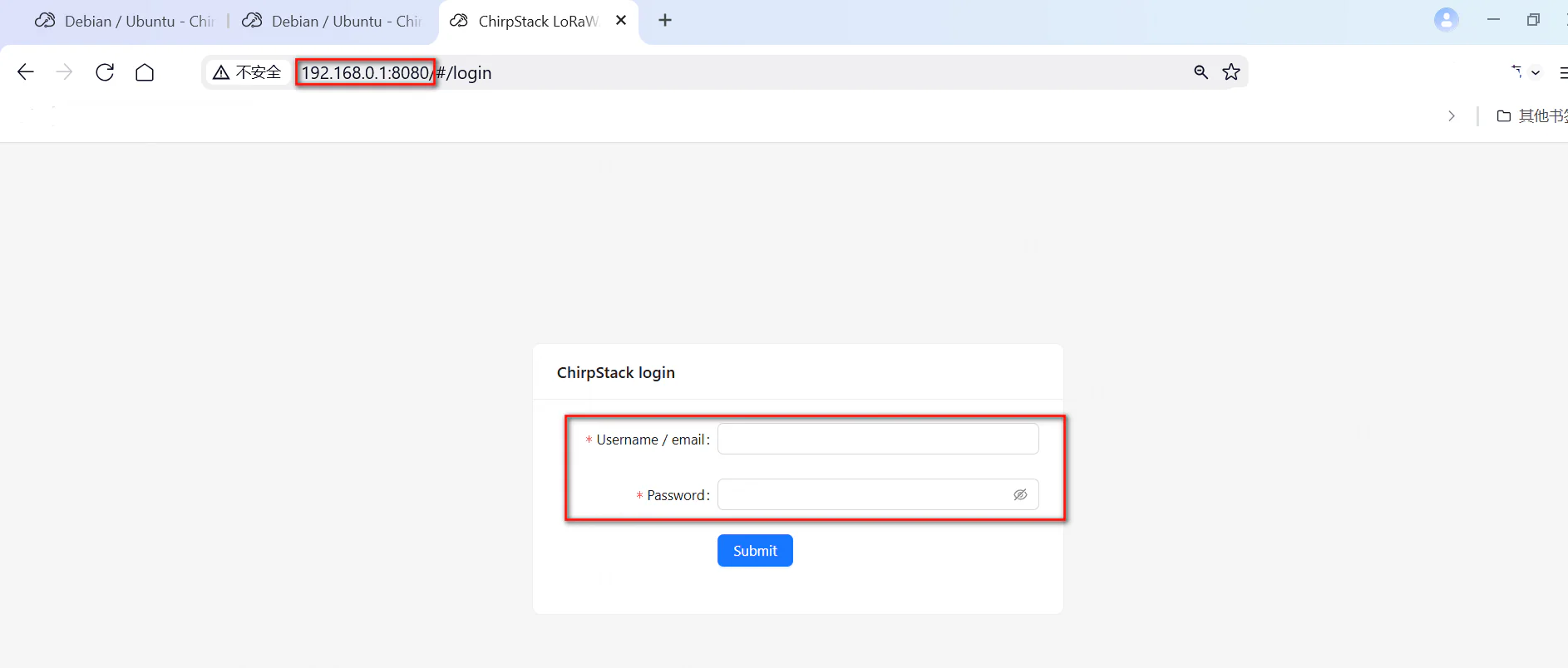
Navigate to your R1520LG’s IP address on port 8080 (e.g., http://192.168.0.1:8080).
Log in with the default credentials (admin/admin) and change the password immediately for security.
7. Create Device Profiles and Add Devices
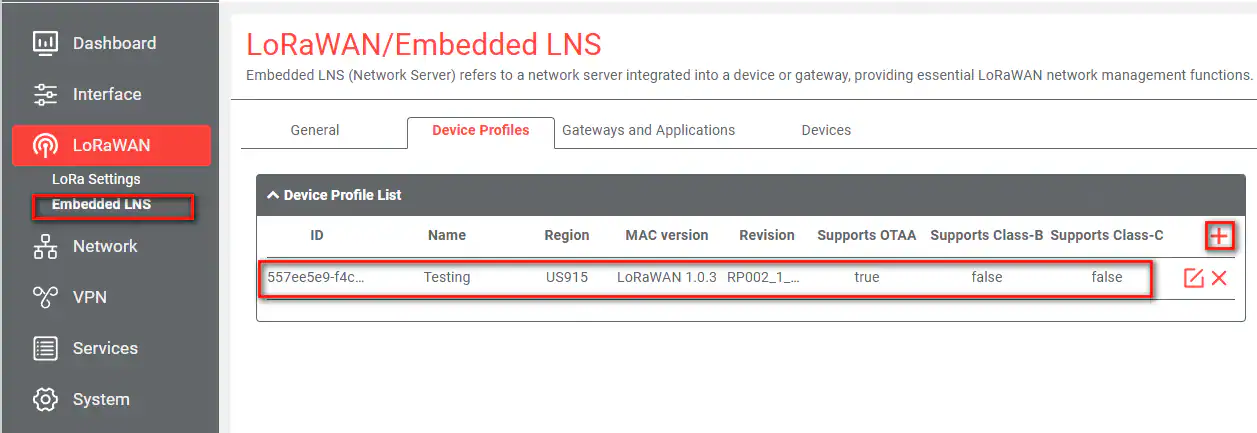
Device Profile: Go to LoRaWAN > Device Profiles to create a new profile for your device type.
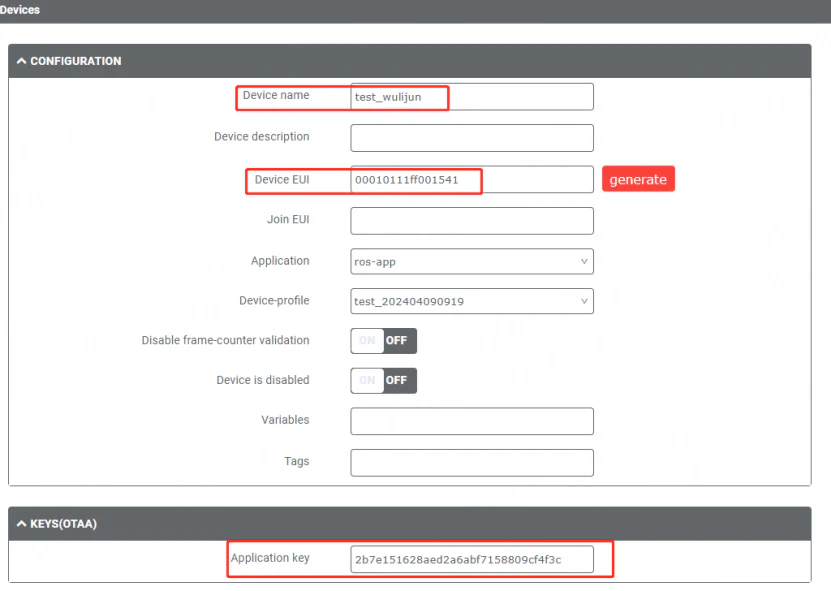
Add Device: Go to LoRaWAN > Devices to add your end devices, entering their DevEUI, AppKey, and other relevant information.
8. The LoRaWAN Join Procedure
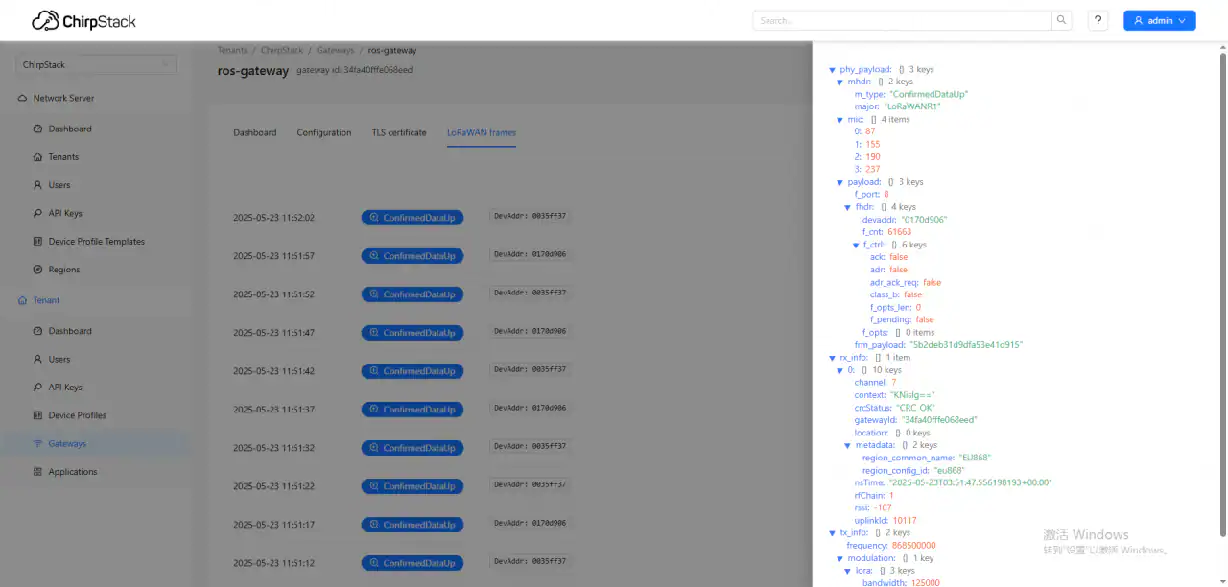
The successful device join process for your Private LoRaWAN Network involves:
1. The end device sends a Join Request.
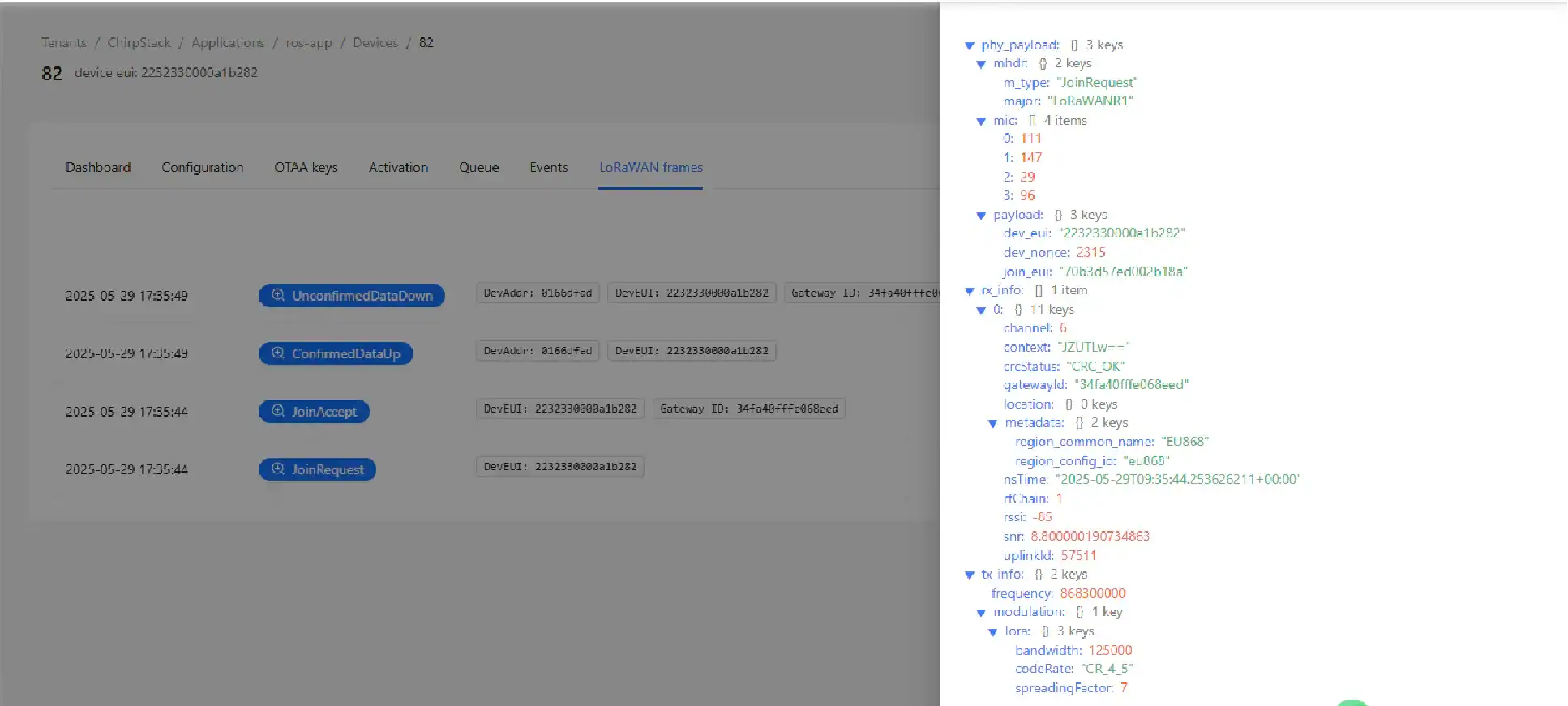
2. The R1520LG Industrial LoRaWAN Gateway forwards it to your ChirpStack instance.
3. ChirpStack validates the device and responds with a Join Accept message.
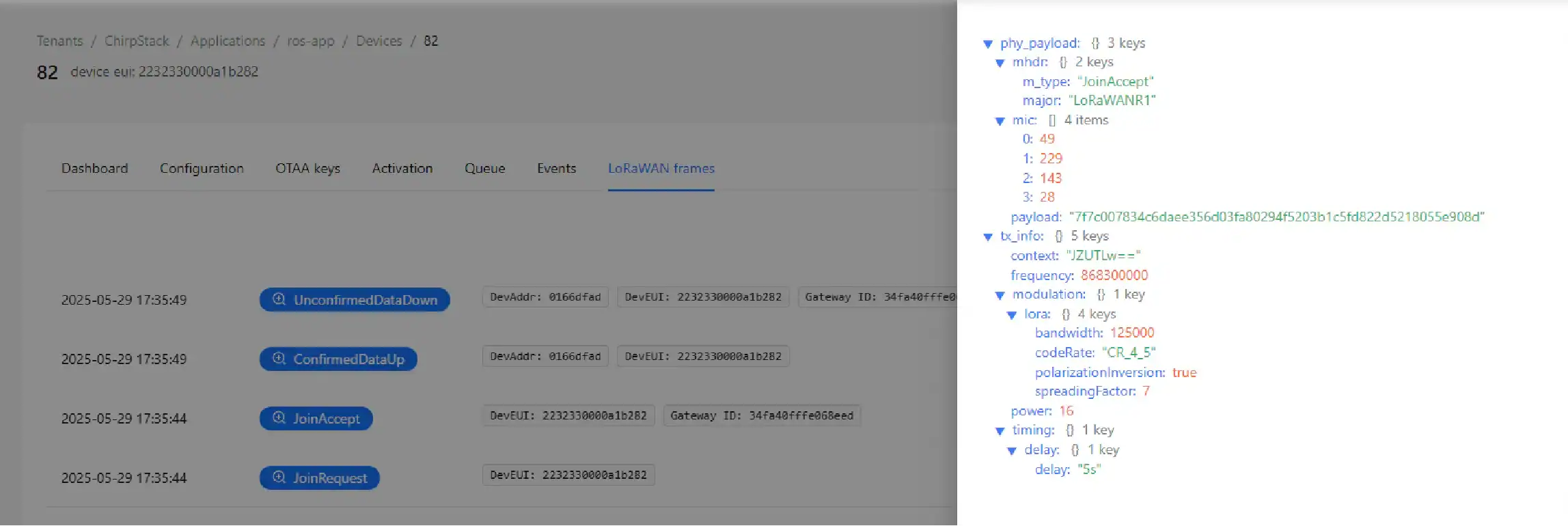
4. The R1520LG Industrial LoRaWAN Gateway forwards this Join Accept to the device, completing the activation.
Conclusion: Ownership, Security, and Your Path Forward
Building a Private LoRaWAN Network is more than just a technical milestone—it’s a strategic shift. By combining ChirpStack with the Robustel R1520LG, you’ve moved from being a tenant on someone else’s network to being the owner of your own. You no longer have to worry about sudden subscription price hikes or whether your data is sitting on a secure server. Instead, you have a high-performance system that scales as your project grows, with every byte of data staying exactly where it belongs: under your control.
Whether you are optimizing a smart metering project or monitoring environmental sensors in a remote facility, this setup provides the stability and low latency that industrial operations demand. You now have a production-ready blueprint that balances open-source flexibility with rugged, industrial-grade hardware.
If you’re ready to take the next step or need to explore different hardware options for your specific environment, take a look at our full range of Industrial IoT Gateways. We’re here to help you bridge the gap between your field data and your most important business decisions
FAQs
Q1: What is the main difference between a public and a Private LoRaWAN Network?
A: Public LoRaWAN networks are operated by third-party service providers on a subscription basis, similar to a mobile phone network. A Private LoRaWAN Network, which you can build with ChirpStack and the R1520LG, is owned and managed entirely by you, offering greater control, security, and no recurring data fees.
Q2: Why choose ChirpStack for my Private LoRaWAN Network over other network servers?
A: ChirpStack is a leading open-source choice because it is highly customizable, feature-rich, and has strong community and commercial support. It allows you to build a powerful Private LoRaWAN Network without vendor lock-in and with full control over your infrastructure.
Q3: Can I use the Robustel R1520LG Industrial LoRaWAN Gateway with other network servers like The Things Network?
A: Yes. The R1520LG is a flexible Industrial LoRaWAN Gateway . While this guide focuses on ChirpStack for building a fully Private LoRaWAN Network , the gateway can be configured to work in “Packet Forwarder” mode, allowing it to forward LoRaWAN packets to virtually any network server, including The Things Network or AWS IoT Core for LoRaWAN.
About the Author
Hubery Zhang | IoT Technical Support Director
Hubery Zhang is the IoT Technical Support Director at Robustel. He leads the global support team in architecting reliable, high-performance IoT infrastructures. With a focus on industrial networking and system scalability, Hubery ensures that Robustel’s technology delivers maximum value and uptime for complex, large-scale deployments across the globe.