
Beyond Signal Strength: Achieving 5G Stability with Precision Band Locking on Industrial Routers
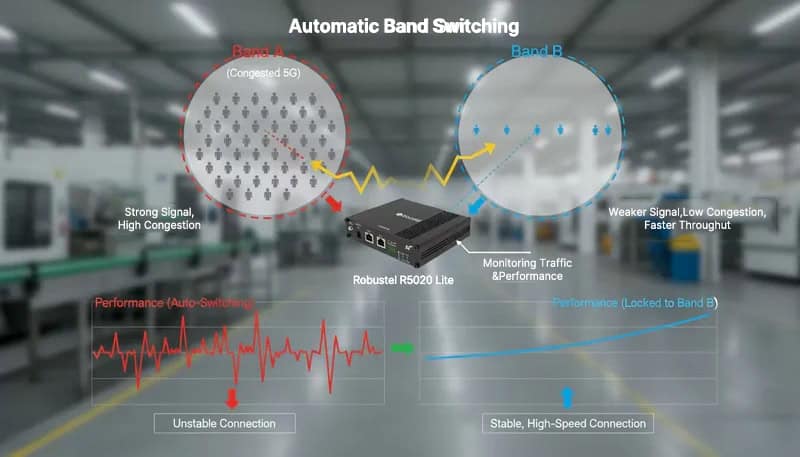
Why does a “strong” 5G signal often result in poor industrial performance? The culprit is usually Band Flapping—the tendency of routers to switch between frequencies in complex RF environments. This guide moves beyond “automatic” defaults to explore the strategic power of 5G Band Locking on industrial gateways like the Robustel R5020 Lite.
What you will master in this guide:
- The “Stability First” Strategy: Why locking your connection to a specific frequency (like n78) is the only way to eliminate latency spikes and network jitter.
- Overcoming Interference: How to bypass congested public bands to prioritize the high-throughput, low-latency pipes your mission-critical PLCs and AGVs require.
- Engineering Execution: A step-by-step walkthrough on forcing band selection via the RobustOS Web GUI and low-level AT Commands.
Stop letting your router “guess” the best signal. Learn how to transform your 5G deployment from a reactive connection into a deterministic, high-performance industrial asset.
Introduction: Mastering 5G Determinism in Industrial Environments
5G is the backbone of modern industrial IoT, promising the low latency and massive throughput required for autonomous robotics, remote machinery, and real-time video analytics. However, a critical reality often escapes network architects: 5G isn’t a single, monolithic signal. It is a spectrum of radio frequencies, or “bands,” each behaving differently depending on your factory floor’s unique RF environment. Some bands offer immense speed but struggle with range; others provide broad coverage but may suffer from congestion.
Standard commercial routers often struggle to manage this complexity. They typically default to the “strongest signal,” ignoring factors like network congestion, interference, or localized obstacles. This leads to the dreaded “band flapping”—a scenario where your device constantly switches frequencies, causing connection drops exactly when you need stability the most.
To achieve truly deterministic connectivity, you must move beyond automatic guessing. This is where 5G Band Locking becomes an indispensable engineering tool. By leveraging an industrial-grade router like the Robustel R5020 Lite and the precision controls of RobustOS, you can bypass the router’s auto-selection logic. In this guide, we’ll show you how to lock your connection to the optimal band, ensuring your industrial deployment remains predictable, stable, and fully optimized for your specific site conditions.
Why Automatic Selection Fails in Industrial Scenarios
While most cellular routers are marketed as “plug-and-play” devices, their default behavior is optimized for convenience, not critical reliability. By default, a router scans all available frequency bands from a carrier and automatically latches onto the one with the highest RSRP (Reference Signal Received Power)—essentially, the “strongest” signal.
In a controlled office environment, this logic holds up. However, industrial sites introduce variables that standard auto-selection algorithms simply aren’t programmed to prioritize:
- The “Strong but Congested” Trap: A 5G band might show full signal bars but be so heavily congested with public traffic that your actual throughput drops and latency spikes.
- Multipath Interference: In factories filled with metal structures, signals bounce. The router may perceive a strong reflected signal that is actually unstable or prone to high packet loss.
- The Standalone (SA) vs. Non-Standalone (NSA) Conflict: Sometimes a router prefers a strong 4G/LTE anchor (NSA) even when a cleaner, lower-latency 5G Standalone (SA) signal is available nearby.
When your business relies on a stable link for a remote PLC or a 4K surveillance stream, you can’t afford to let a generic algorithm “guess” the best frequency. Transitioning from Automatic Selection to Manua.
Field Realities—When Automatic Logic Cripples Performance
In industrial field deployments, relying on “Auto-Selection” often leads to hidden bottlenecks that standard monitoring might miss. Based on real-world troubleshooting across manufacturing and energy sectors, here are the three most common scenarios where manual intervention is required:
1. The “Ghost” Signal: High RSSI, Low Throughput
A router often prioritizes a band with high RSSI (Received Signal Strength Indicator). However, in urban or high-density areas, that “strong” band might be saturated by public mobile traffic. You end up with full signal bars but massive network congestion and high latency—a disaster for real-time data backhaul.
2. The “Ping-Pong” Effect (Cell Flapping)
When a gateway is positioned at the edge of two overlapping cell towers, it can fall into a loop of constant Cell Reselection. This “flapping” between bands causes micro-outages and Ping Jitter. For mission-critical control applications or PLC heartbeats, these millisecond drops are fatal to system uptime.
3. Overlooking the “Goldilocks” Band (n77/n78)
Carriers are rapidly deploying high-performance C-Band (like n77 or n78) which offers massive bandwidth and lower latency. However, because these higher-frequency signals have slightly higher path loss (appearing “weaker” in raw dBm), an automatic router may ignore them in favor of a crowded, low-frequency band. By locking into these superior bands, you unlock the true potential of 5G.
The defining “Aha!” moment for site engineers is realizing that signal stability trumps signal strength. In the industrial IoT world, a slightly “weaker” but dedicated and uncongested band is far superior to a “strong” but noisy one.
Taking Command—The Strategic Power of 5G Band Locking
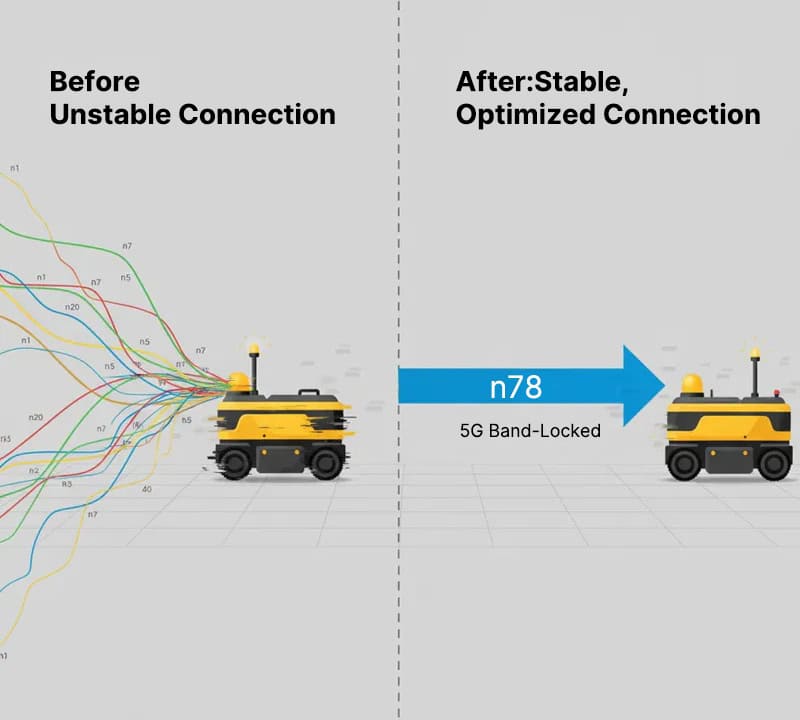
So, how do we regain control? 5G Band Locking is the engineering process of overriding a modem’s default search logic to enforce a connection only to a specific frequency or a curated set of preferred bands. Instead of a generic algorithm making guesses, you—the network architect—become the decision-maker.
For system integrators and OT engineers, this level of Network Orchestration is not just a feature; it’s a requirement for maintaining high-uptime SLAs. By implementing band locking, you transition from reactive troubleshooting to proactive optimization:
- Enforcing Connection Determinism: You force the gateway to remain on a verified “clean” band. This eliminates the “ping-pong effect” and micro-outages that can paralyze AGV (Automated Guided Vehicle) fleets or disrupt remote PLC telemetry.
- Precision Performance Tuning: You can bypass “strong but slow” frequencies in favor of high-capacity bands (like n78). This ensures that bandwidth-heavy tasks, such as high-definition thermal imaging or edge-to-cloud data syncing, have the low-latency pipe they require.
- Streamlined Root Cause Analysis: In a complex industrial environment, bandwidth fluctuation is a major variable. By locking the band, you “freeze” the physical layer, making it significantly faster to diagnose whether a bottleneck is caused by the network, the hardware, or the application logic.
In the world of mission-critical IoT, “automatic” is often a synonym for “unpredictable.” High-performance hardware, such as the Robustel R5020 Lite, is engineered specifically to give you this granular control, ensuring your 5G deployment behaves exactly how you designed it.
Preparation—Setting the Stage for Precision Tuning
Before we dive into the RobustOS configuration, ensuring your hardware is correctly provisioned is essential. A stable physical setup is the foundation of a successful 5G band-locking strategy.
The Hardware Checklist:
- Robustel R5020 Lite Industrial Router: The core gateway for our optimization. Ensure it is powered by a reliable industrial power source to avoid voltage-related signal drops.
- High-Gain Cellular Antennas: Ensure all 5G antennas are securely attached. In industrial environments, even a slightly loose connection can introduce impedance mismatch, skewing your signal readings.
- Active 5G SIM Card: Verify with your carrier that your data plan supports 5G SA (Standalone) or NSA (Non-Standalone) modes.
- Local Management Setup: A computer connected via Ethernet cable directly to the LAN port. While Wi-Fi is an option, a wired connection is the “gold standard” for critical configuration to prevent session timeouts during modem resets.
The Intelligence Requirement:
- Target Band Knowledge: Have a preliminary idea of which 5G NR bands (e.g., n41, n77, or n78) are available at your site. If you aren’t sure yet, don’t worry—our first configuration step will show you how to scan the environment to identify the “Goldilocks” band for your specific location.
Step-by-Step Guide: How to Perform 5G Band Locking
Ready to take control? Let’s get hands-on. Here’s the practical, step-by-step approach to implementing 5G band locking on your industrial router.
Step 1: Initial Setup and Connection
First things first, you need to get connected to the router’s configuration interface.
- Insert the SIM Card: With the router powered off, insert your activated SIM card into the desired slot (e.g., SIM1).
- Power Up: Connect the power supply and turn the router on. It’s important to give it a full two minutes to boot up completely, initialize its software, and register on the cellular network.
- Connect Your Computer: Use an Ethernet cable to link your computer to one of the router’s LAN ports. Make sure your computer’s IPv4 network settings are configured to “Obtain an IP address automatically” (DHCP). This allows the router to assign your computer an IP address so they can communicate.
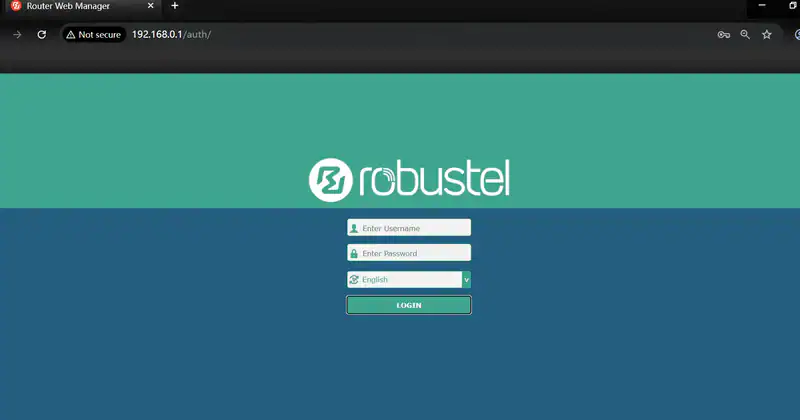
- Log In to the Web GUI: Open a web browser, type 192.168.0.1 into the address bar, and press Enter. You’ll see a login page. The default username and password are both admin.
- Insider Tip: If this router isn’t fresh out of the box, its IP address might have been changed. You can easily find it by checking your computer’s network connection details and looking for the “Default Gateway” IP. That’s your router’s current address.
Step 2: Locking the 5G Band
Now that you’re inside the control panel, it’s time to apply the lock.
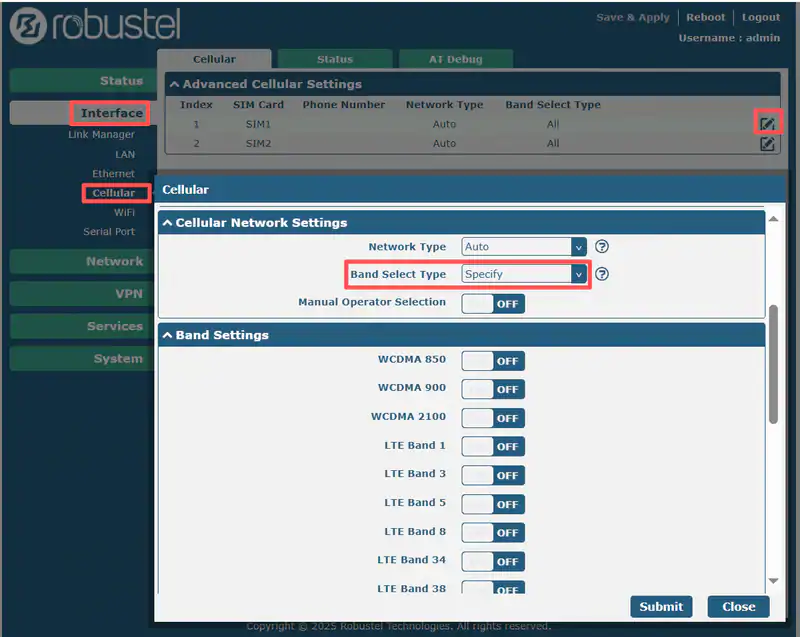
- From the main menu on the left, navigate to Interface -> Cellular.
- You’ll see a list under “Advanced Cellular Settings”. Find the row for the SIM card you inserted (SIM1 or SIM2) and click the Edit button in that row.
- On the next page, scroll down to find the Cellular Network Settings section.
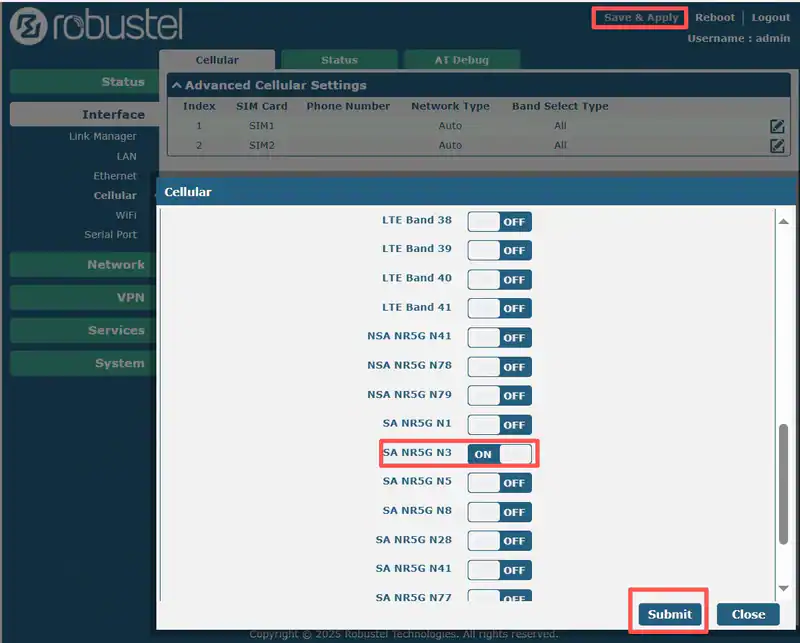
- Locate the dropdown menu for Band Select Type and change its value from “Auto” to “Specify”.
- A new section called Band Settings will instantly appear below, showing a checklist of all available frequency bands. Check the box for only the specific 5G band(s) that you want the router to use.
- Click the Submit button at the bottom of the page to save your new configuration.
- Finally, a ” Save & Apply” button will appear at the top of the page. Click it to make your changes take effect. The router’s modem will then restart and connect using only your selected band.
Conclusion: Elevating 5G from Connectivity to Business Continuity
Transitioning beyond “automatic” defaults is more than just a configuration change—it is a critical milestone in maturing your industrial IoT strategy. By implementing 5G band locking, you effectively strip away the unpredictability of public cellular networks, replacing “blind luck” with Predictive Stability.
In the high-stakes world of industrial automation, where downtime is measured in lost revenue and disrupted supply chains, manual control over your 5G spectrum is a strategic necessity. Whether you utilize the intuitive RobustOS Web GUI for a single site or deploy advanced AT command scripts across a global fleet, you are transforming your Robustel R5020 Lite from a reactive gateway into a high-performance, optimized asset. Taking charge of your frequency bands ensures that your mission-critical data always has the clearest path to its destination.
FAQs
Q1: Can 5G band locking improve my connection speed?
A1: Yes, it absolutely can. If your router is automatically connecting to a band that is strong but highly congested, locking it to a different, less-congested band (even with a slightly weaker signal) can often result in significantly higher data throughput and lower latency. The key is to test and find the band with the best quality (SINR), not just strength (RSRP).
Q2: Is it possible to lock onto multiple 5G bands?
A2: Yes. Most advanced routers and modules allow you to specify a set of preferred bands. For example, you could configure the router to only use bands n41 and n78, and it will choose the best one between those two options. This is useful if you have two good bands in an area and want redundancy without allowing the router to fall back to a known-poor band.
Q3: Will locking the 5G band affect my router’s failover to 4G?
A3: Generally, no. Band locking for 5G and 4G are typically configured independently. You can lock the router to a specific 5G band while still allowing it to automatically select the best 4G band if the 5G signal is lost entirely. This ensures you maintain the best of both worlds: optimized 5G performance and robust 4G failover for maximum uptime. Always check your device’s documentation, like the one for the R5020 Lite, for specifics on its failover logic.
About the Author
Jens Zhou | Technical Support Engineer at Robustel
Jens is a Technical Support Engineer at Robustel, specializing in industrial IoT and edge gateway applications. He is experienced with the configuration and deployment of EG series devices, and well-versed in network communication, industrial protocols, and common wireless technologies. He is dedicated to providing practical tutorials to help engineers efficiently build smart systems.