
Lift Gateway 18650 Battery Maintenance Guide: Charging Temperature and Service Checks
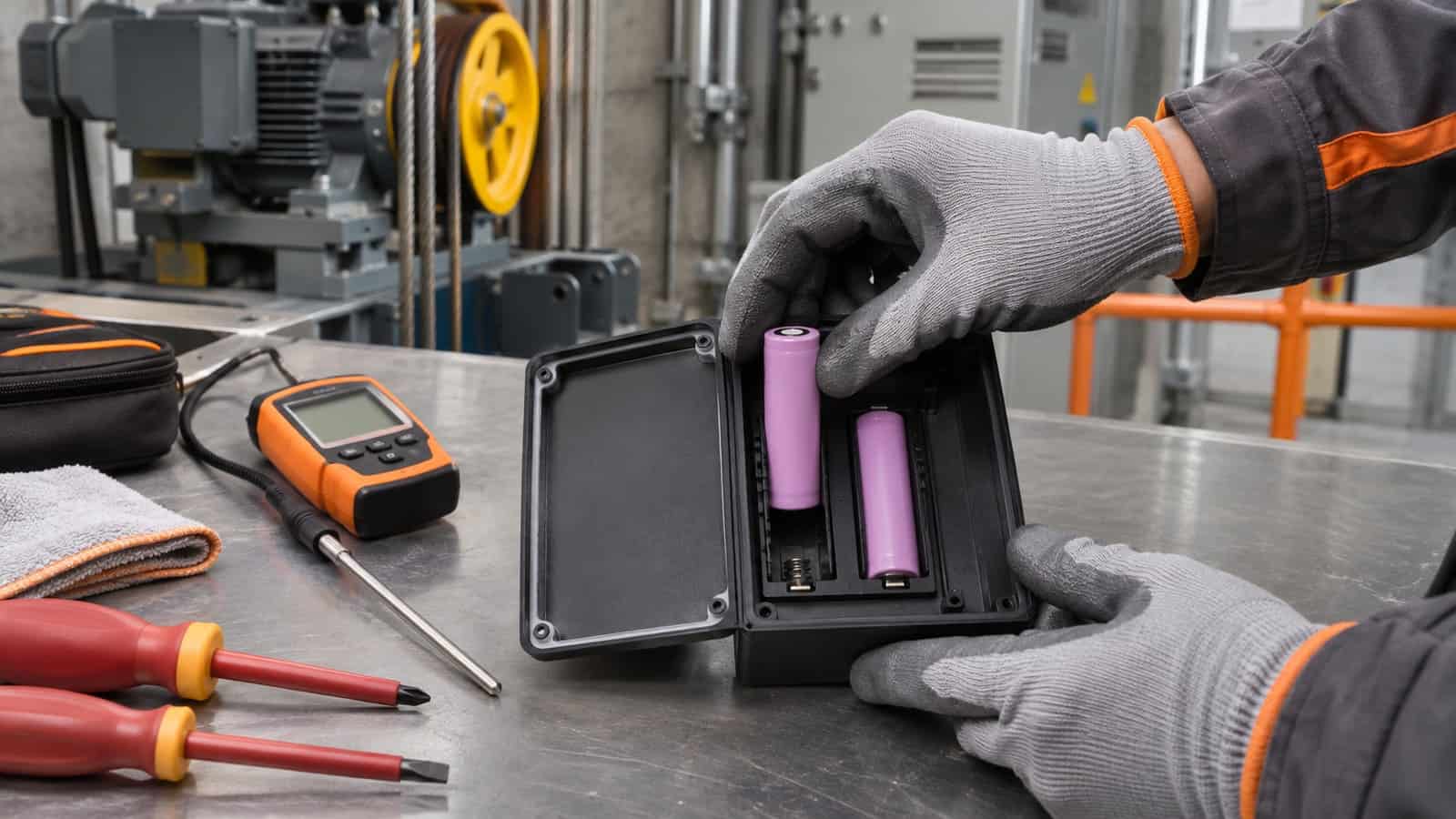
The Robustel EV8100 Elevator Voice Gateway has a holder for two flat-top 18650 lithium cells, requires a single cell to be installed in position 1, operates with batteries from 0 to +45 °C and charges them only from 0 to +35 °C; maintenance must verify those conditions and complete a supervised emergency call on battery power. The holder does not create a universal runtime.
Cell capacity, chemistry, age, temperature, state of charge, gateway load, signal conditions and call activity all affect backup performance. Use approved cells and handling procedures, then measure the installed service instead of estimating from the cell label alone.
Record the exact battery configuration
Create an asset record for cell manufacturer, model, chemistry, rated capacity, serial/batch, installation date, approved supplier, number of cells and position. The EV8100 is compatible with flat-top 18650 cells; incorrect shape, polarity or installation can damage the device and affect warranty.
The Robustel EV8100 Quick Pitch video is useful for orienting service teams to the gateway. Battery selection and maintenance still require the product documentation, cell documentation and local safety procedure.
Keep operation, charging and storage temperatures separate
| Condition | Robustel EV8100 documented range with batteries | Service implication |
|---|---|---|
| gateway operation | 0 to +45 °C | outside this range, the battery-equipped configuration is not within the published operating boundary |
| battery charging | 0 to +35 °C | do not accept charging outside the documented range |
| long-term storage with battery | -20 to +35 °C | record storage condition and recheck before service |
Measure temperature near the battery compartment under realistic cabinet and seasonal conditions. A room sensor several metres away may not represent the gateway enclosure.
Inspect before running an outage test
Check the enclosure and holder for damage, contamination, heat marks, corrosion or loose contacts. Inspect cells for swelling, leakage, torn insulation, dents or abnormal heat. Follow the approved isolation, transport and disposal procedure for any suspect cell; do not continue a functional test with damaged lithium cells.
Verify polarity and seating. If only one cell is used, place it in position 1 as documented. Restore the battery switch and mains state according to the authorised method, then confirm the device reports normal power/battery status before isolating mains.
Robustel’s IoT-enabled smart elevators application example shows the gateway as part of a broader lift service. Battery maintenance must protect the emergency voice path first; additional telemetry load should be included in the outage test.
How Robustel EV8100 Elevator Voice Gateway supports battery service evidence
The Robustel EV8100 Elevator Voice Gateway provides the two-cell holder, battery switch/status indicators and RCMS battery/status data where configured. These features make cell installation and remote observation visible, while the supervised call remains the acceptance proof.
| Maintenance pain | Verified Robustel EV8100 capability | Operating value | Acceptance evidence |
|---|---|---|---|
| wrong cell type or position | flat-top 18650 holder; position 1 rule for one cell | standardise physical installation | cell record and inspection photo under policy |
| charging in unsuitable conditions | documented 0 to +35 °C charging range | define environmental alarm/action | local temperature and charge-state record |
| remote percentage appears healthy | battery status through device/RCMS path | identify trends and plan visits | compare remote state with supervised outage result |
Remote status can trigger maintenance, but it does not prove the phone can seize the FXS line, the modem remains registered or the monitoring centre receives a call.
Run a supervised service test
Start from a documented full-charge condition and stable registration. Notify the monitoring centre, isolate mains using the approved procedure and record the transition time, gateway state, battery voltage/percentage where available, cellular/SIP status and cabinet temperature.
Complete the required call from the lift car. Confirm identification, two-way audio, call duration and return/clearance procedure. If the maintenance requirement includes a duration test, apply the defined load profile and stop criteria; do not deeply discharge cells beyond manufacturer or project limits.
Robustel’s EV8100 and Tsaro case study demonstrates the value of automated daily voice verification. Pair routine remote tests with periodic physical battery inspection and witnessed mains-loss testing according to the site plan.
Use pass/fail criteria and replacement triggers
| Check | Pass | Fail/action |
|---|---|---|
| cell identity | approved flat-top model and recorded pair | isolate and replace through approved route |
| temperature | within operating/charging limit | correct environment before charging/test |
| physical condition | no damage, leakage, swelling or abnormal heat | remove from service safely |
| power transition | gateway remains operational as designed | investigate cells, holder, switch or load |
| emergency call | identification and two-way audio succeed | service remains unavailable until repaired |
| recharge | returns normally within documented temperature | investigate charger/cells/environment |
Replace cells by measured degradation, age/policy, damage, failed outage test or manufacturer instruction. Do not mix old/new cells or unmatched models unless the approved battery procedure explicitly permits it.
Maintain a service history
Record installation, inspections, temperatures, test duration/load, call result, remaining status, recharge result and replacement/disposal. Trend results rather than keeping only the latest pass. A gradual decline can justify planned replacement before a compliance or passenger event.
After service, restore mains, battery switch, alarms and monitoring status. Confirm the monitoring centre closes the test and the gateway returns to its intended registered state.
Frequently Asked Questions
Q1. Can any 18650 battery be used in a lift gateway?
No. Use only the cell type, shape, chemistry and specifications approved by the gateway and cell manufacturers and the project procedure. Physical size alone is not compatibility.
Q2. What temperature is safe for charging 18650 cells?
Use the limits from the exact gateway and cell documentation. For the EV8100 battery configuration, the published charging range is 0 to +35 °C.
Q3. How can backup runtime be estimated?
Capacity and load can provide a planning estimate, but installed runtime must be measured with the actual cells, temperature, radio/service state, phone and call profile. Cell ageing changes the result.
Q4. What should a battery maintenance check include?
It should cover cell identity, condition, polarity/position, holder contacts, temperature, charge state, mains-loss transition, emergency call, recharge and the maintenance record.
Q5. What battery provision does the Robustel EV8100 Elevator Voice Gateway have?
It has a holder for two flat-top 18650 lithium cells, not included by default. With one cell, position 1 is required; operation with batteries is specified at 0 to +45 °C and charging at 0 to +35 °C.
Conclusion
The Robustel EV8100 Elevator Voice Gateway is best suited to lift-phone backup designs that can maintain approved flat-top 18650 cells inside the documented temperature and position limits. Its battery status helps operations, while the supervised car-to-centre call proves readiness.
Keep the cell identity, temperature, outage load, call result and recharge record together. Replace on evidence and approved policy, never on an assumed runtime derived from a new-cell label.
Explore More Articles About Robustel Lift Connectivity


About the Author
Robustel Editorial Team
The Robustel Editorial Team publishes practical articles on industrial connectivity, edge computing, LoRaWAN and device management, focusing on deployment considerations, technical limitations and long-term operation.