
RobustOS Pro Software Support Lifecycle
Robustel provides a defined long-term software support lifecycle for RobustOS Pro, its Debian-based Linux operating environment for industrial edge and gateway platforms. Each RobustOS Pro major generation is maintained for ten years, with ongoing security maintenance, software updates and lifecycle planning designed for industrial systems that may remain deployed well beyond the support period of the underlying Debian release.
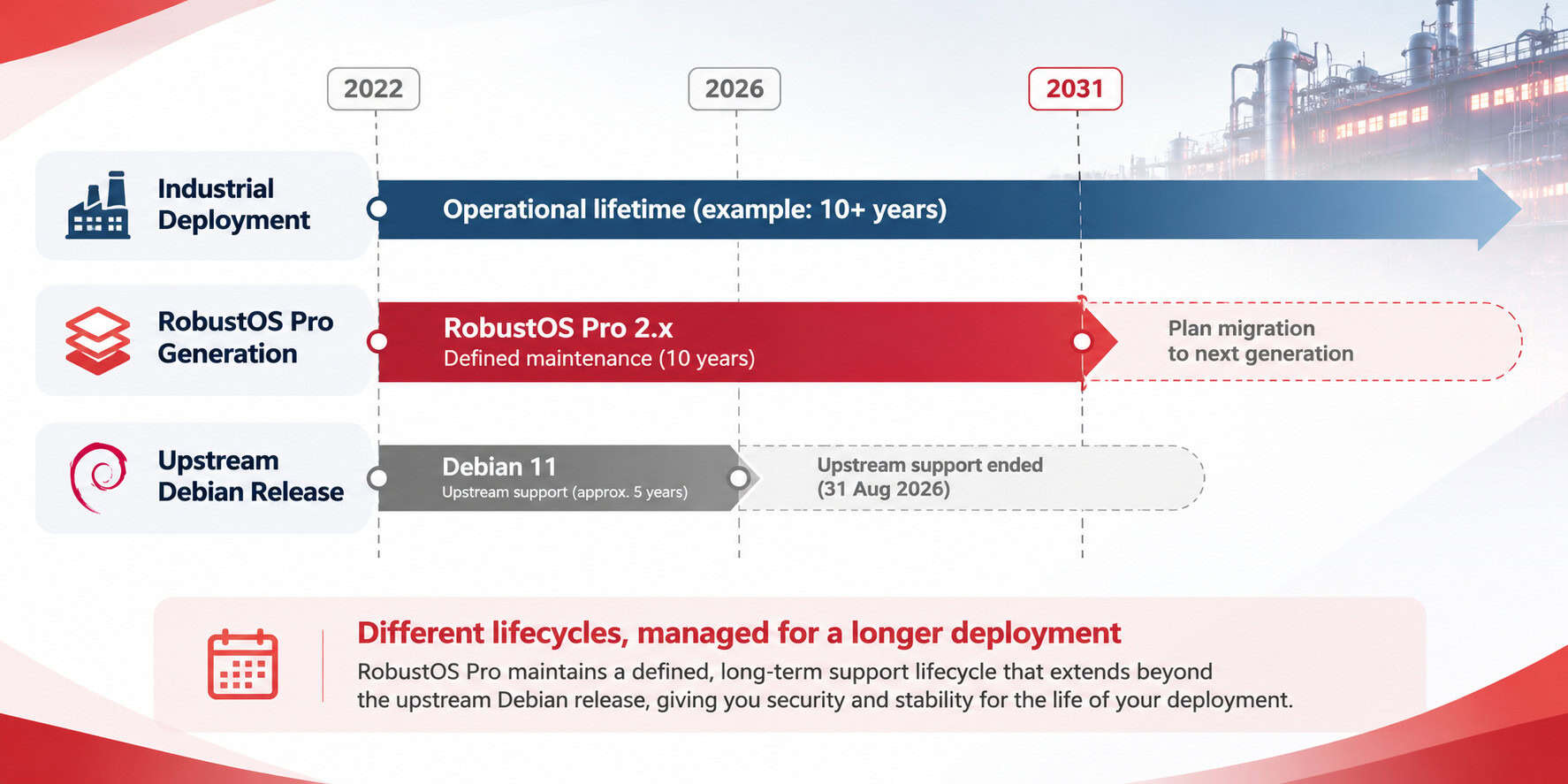
For RobustOS Pro 2.x, Robustel continues security maintenance through 2031, following the end of Debian 11 upstream support on 31 August 2026. Vulnerabilities affecting the supported Robustel software baseline are assessed and remediated in accordance with Robustel’s Vulnerability Assessment and Remediation Targets, while applicable security fixes can be delivered without requiring deployed systems to immediately migrate to a new major software generation.
This support lifecycle applies to RobustOS Pro. Products running standard RobustOS follow a separate software and firmware lifecycle.
Need to understand the support lifecycle for a specific RobustOS Pro product, software version or deployment? Please contact us below.
Why Software Support Lifecycle Matters
Industrial gateways are rarely deployed on the same timetable as the software beneath them. A device may remain in service for many years, while the Linux distribution, kernel components and software packages it was originally built on move through their own release, maintenance and end-of-support cycles.
That creates an important distinction for customers evaluating a long-lived industrial platform. Knowing that a device is based on Debian is useful, but it does not answer the questions that matter most over the life of a deployment: how long the manufacturer will maintain the software it supplies, what happens when upstream support ends, how security issues will continue to be handled, and whether maintaining security will eventually force a major platform migration.
RobustOS Pro is designed around this difference in timescales. Each major RobustOS Pro generation has a defined ten-year maintenance life that is managed separately from the lifecycle of the Debian release beneath it. For RobustOS Pro 2.x, Debian 11 provided the upstream foundation, but the end of Debian’s own support period does not mark the end of the Robustel software lifecycle. Robustel continues defined maintenance of the 2.x generation through 2031.
This does not mean holding a software platform unchanged for ten years. It means separating maintenance of an established generation from development of the next one. Security maintenance and critical bug fixing continue within the supported 2.x lifecycle, while new functionality and future platform development move into later RobustOS Pro generations. Existing 2.x deployments can therefore remain on a maintained software generation while customers plan migration according to the requirements and lifecycle of their own projects.
That balance matters in industrial environments. Applications, containers, additional packages, integrations and site configuration can all depend on the behaviour of the underlying platform. A useful software support lifecycle must therefore address two priorities at the same time: maintaining security over the long term while preserving stability for systems already in production.
The sections that follow explain how Robustel approaches that balance: what Robustel maintains within RobustOS Pro, how support continues beyond the upstream Debian lifecycle, how vulnerabilities become security updates, how updates affect deployed systems, where customer responsibility begins, and how future major-version migration and end of support are managed.
RobustOS Pro Support Lifecycle at a Glance
The RobustOS Pro lifecycle is designed to give customers a predictable basis for operating, maintaining and eventually migrating long-lived industrial deployments. The commitments below define the core principles of that lifecycle: a known support horizon, continued manufacturer maintenance beyond the upstream Linux lifecycle, structured vulnerability management, and the ability to maintain an established software generation without forcing immediate migration to the next one.
10 Years of Defined Support
Each major RobustOS Pro generation is maintained for a defined ten-year software lifecycle. This provides a known support horizon against which customers can plan infrastructure investment, application maintenance, fleet operations and eventual migration.
For industrial and IoT deployments, that predictability is significant. Gateways may remain installed for many years in remote or operationally sensitive environments, while the software ecosystem around them continues to evolve. A defined maintenance period allows the lifecycle of the deployed platform to be planned deliberately rather than being determined solely by the shorter support periods of individual upstream software components.

Support Beyond the Debian Lifecycle
RobustOS Pro has its own manufacturer-managed support lifecycle, separate from the lifecycle of the Debian release used as its Linux foundation. The end of upstream Debian support therefore does not automatically become the end of support for a maintained RobustOS Pro generation.
RobustOS Pro 2.x demonstrates this model directly. Debian 11 reached the end of its upstream support period on 31 August 2026, while Robustel continues maintenance of the supported RobustOS Pro 2.x software baseline through 2031. This allows deployed systems to remain within a defined support lifecycle while Robustel assumes responsibility for the applicable security maintenance of the platform it supplies.
Structured Vulnerability Response
Security maintenance is governed through a defined product-security process. Robustel’s Product Security Incident Response Team (PSIRT) assesses vulnerabilities against the supported RobustOS Pro software baseline to determine whether the affected component is present, whether the vulnerable code path is applicable to the product, and what response is required.
The resulting action may be a software fix, a recommended mitigation, or a documented determination that the product is not affected. Assessment and remediation are managed in accordance with Robustel’s Vulnerability Assessment and Remediation Targets, providing customers with a consistent framework for understanding how vulnerabilities affecting supported Robustel software are evaluated and addressed.
Stable Updates, No Forced Migration
Security maintenance of an established RobustOS Pro generation is separated from the development of future major generations. Existing RobustOS Pro 2.x deployments can remain on the maintained 2.x branch throughout its supported lifecycle, while applicable security fixes and critical maintenance are delivered within that platform.
New functionality and future platform development move into later major generations, allowing customers to plan major-version migration around application compatibility, validation requirements and operational schedules. The availability of a newer RobustOS Pro generation therefore does not invalidate the support commitment made to systems already deployed on a maintained generation.
What Robustel Maintains, What You Control
A long-term software support commitment is only meaningful if the boundary of that commitment is clearly defined. RobustOS Pro uses a layered software architecture that separates the platform supplied and maintained by Robustel from the applications, packages, configuration and data introduced by the customer.
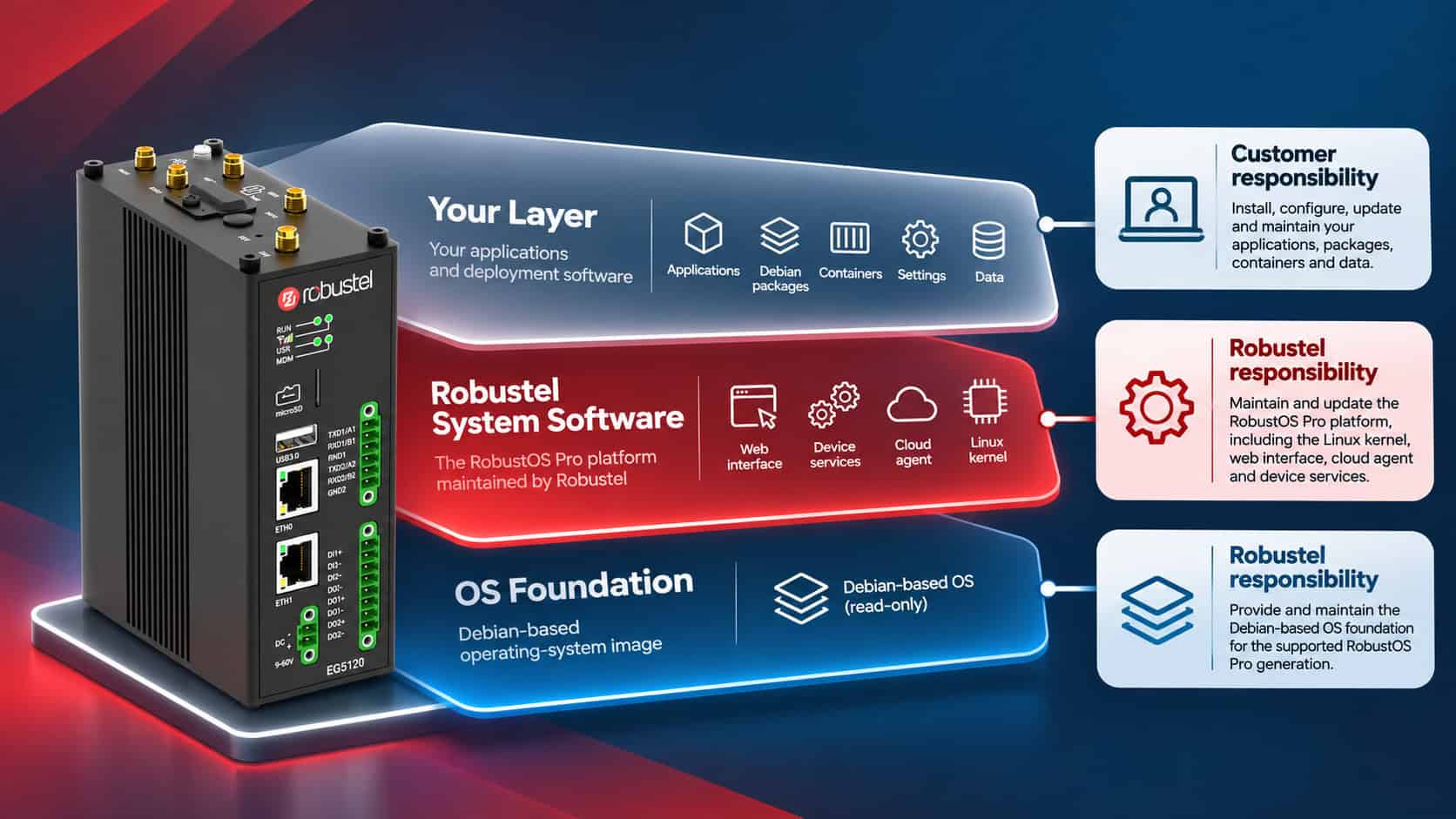
At the base of the device is a Debian-based, read-only operating-system foundation. Above it sits the Robustel system-software layer, including the Linux kernel, web interface, cloud agent and device services. The writable layer above the Robustel platform contains the software and information added for the individual deployment, including Debian packages, applications, containers, settings and data.
This separation is intentional. It allows Robustel to maintain a consistent platform baseline over the supported life of the product while customers retain control of the software environment that makes their deployment specific. Robustel releases maintain the system layer beneath the customer environment; software added by the customer remains under the customer’s own lifecycle management.
The Device in Layers
Every RobustOS Pro device is built on the same basic software architecture. At its foundation is a Debian-based, read-only operating-system image. Above this sits the Robustel system-software layer, which includes the Linux kernel and the Robustel components responsible for core device functions, management and platform services. The writable layer above the platform contains the elements added for the individual deployment, including Debian packages, applications, containers, settings and data.
The separation between these layers is fundamental to how RobustOS Pro is maintained. Robustel can update and support the platform it supplies without treating the customer environment as part of the standard operating-system image. Customers, in turn, retain control of the applications and dependencies that make their deployment specific.
This also establishes the lifecycle responsibility boundary. Robustel maintains the supported RobustOS Pro platform baseline, while customers remain responsible for the software they install or develop themselves. The result is a model that combines a manufacturer-maintained operating environment with the flexibility expected from a Debian-based industrial Linux platform.
Responsibility Boundary
The boundary can be stated simply: Robustel maintains the RobustOS Pro platform it supplies; customers maintain the software and data they add to it.
That distinction does not reduce the flexibility of RobustOS Pro as a Debian-based application platform. It establishes the opposite: customers are free to build their own software environment on top of the platform while retaining ownership of its dependencies, maintenance and validation. Robustel can then maintain the underlying operating environment without assuming responsibility for arbitrary third-party or customer-developed software installed above it.
The same separation also defines how the platform behaves over time. A standard RobustOS Pro firmware release can update the Robustel-maintained layer without routinely removing the applications, containers, configuration or data above it. The detailed consequences of different update operations, and the validation required before fleet deployment, are addressed in the update lifecycle section below.
| Robustel is responsible for | The customer is responsible for |
|---|---|
| Maintaining each supported RobustOS Pro major generation for its defined lifecycle. | Maintaining the applications and software added to the device for the customer’s deployment. |
| Maintaining the Robustel-supplied software baseline, including the Linux kernel, Robustel system software and applicable components supplied within the supported firmware image. | Maintaining customer-installed Debian packages, applications, containers and custom programs. |
| Monitoring and assessing vulnerabilities affecting the supported RobustOS Pro software baseline through Robustel PSIRT. | Monitoring and addressing vulnerabilities affecting customer-installed software and its dependencies. |
| Developing and publishing applicable security fixes, mitigations and platform updates for supported RobustOS Pro software. | Reviewing relevant security information and determining when updates should be introduced into the deployment. |
| Continuing defined maintenance of supported RobustOS Pro generations beyond the upstream Debian lifecycle where covered by the Robustel support commitment. | Managing the lifecycle of additional software installed outside the Robustel-supplied baseline. |
| Backporting applicable security fixes into maintained software generations where required, rather than requiring immediate migration to a later major generation. | Testing RobustOS Pro updates against customer applications and integrations before wider fleet deployment. |
| Providing standard firmware-update mechanisms and supported platform recovery capabilities. | Maintaining current backups of customer applications, configuration and data. |
| Providing future RobustOS Pro generations and defining the support endpoint for each maintained generation. | Planning and validating major-version migration according to application compatibility, operational requirements and project timelines. |
When Debian Support Ends, Support Continues
RobustOS Pro is built on Debian, but the support lifecycle of a RobustOS Pro generation is not limited to the upstream lifecycle of the Debian release beneath it. For long-lived industrial deployments, this distinction is important: upstream Linux distributions evolve on their own schedules, while deployed gateways may be expected to remain in service for considerably longer.
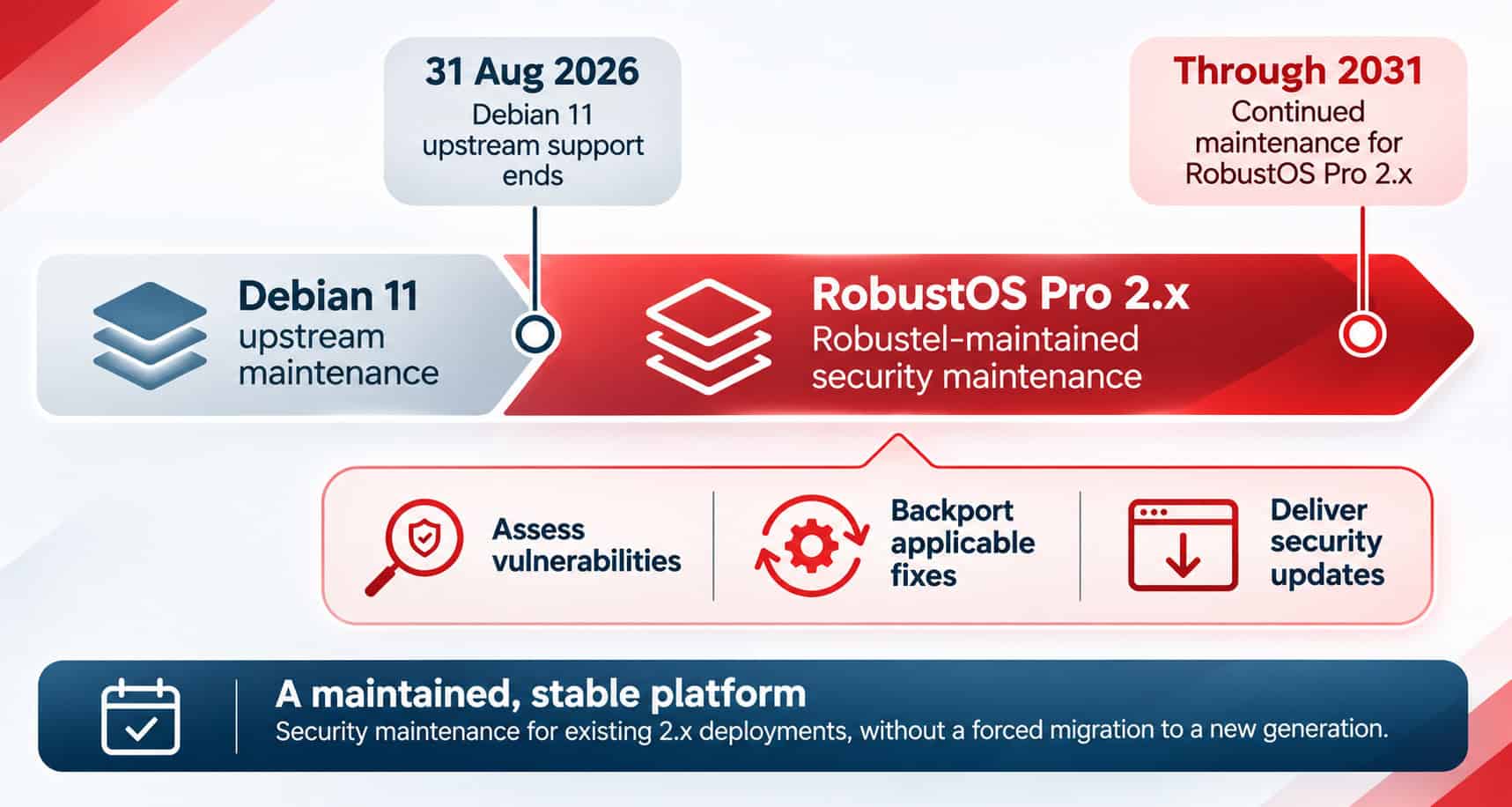
RobustOS Pro 2.x is based on Debian 11. Upstream support for Debian 11 ended on 31 August 2026, while the defined maintenance period for RobustOS Pro 2.x continues through 2031. From 1 September 2026, responsibility for maintaining the supported RobustOS Pro 2.x software baseline therefore moves from reliance on the upstream Debian lifecycle to Robustel’s own product-maintenance process.
Maintaining a Stable 2.x Platform
Continued maintenance does not mean continuously rebuilding the deployed platform around newer upstream releases. Robustel maintains the established 2.x generation as a stable software branch, assessing vulnerabilities and critical software issues against the components supplied within that supported baseline.
Where a vulnerability affects the RobustOS Pro 2.x platform, applicable security corrections can be backported into the maintained software generation rather than requiring the device to adopt a new major operating-system baseline. The Product documentation specifically identifies the Linux kernel as remaining stable within 2.x, with relevant security fixes backported where required.
This approach allows security maintenance and platform evolution to proceed on different tracks. Existing 2.x deployments can continue to receive applicable maintenance throughout their defined lifecycle, while new functionality and broader platform changes are developed in later RobustOS Pro generations.
Security Maintenance Without Immediate Major-Version Migration
Applicable security remediation can be delivered as individual security update packages through supported channels including the Robustel website and RCMS. A full firmware replacement or migration to a later RobustOS Pro generation is therefore not inherently required simply because a security issue has been identified.
Major-version migration remains a separate lifecycle decision. Customers can evaluate a later RobustOS Pro generation when application requirements, new platform capabilities or deployment strategy justify doing so, while systems already operating on a maintained 2.x baseline can remain within the support commitment made to that generation.
The practical consequence is that the end of Debian 11 upstream support did not become the end of the RobustOS Pro 2.x lifecycle. Robustel continues to maintain the supported platform baseline through 2031, providing a defined period in which customers can operate established deployments, manage security updates and plan future migration on an appropriate operational timetable.
How Vulnerabilities Become Security Updates
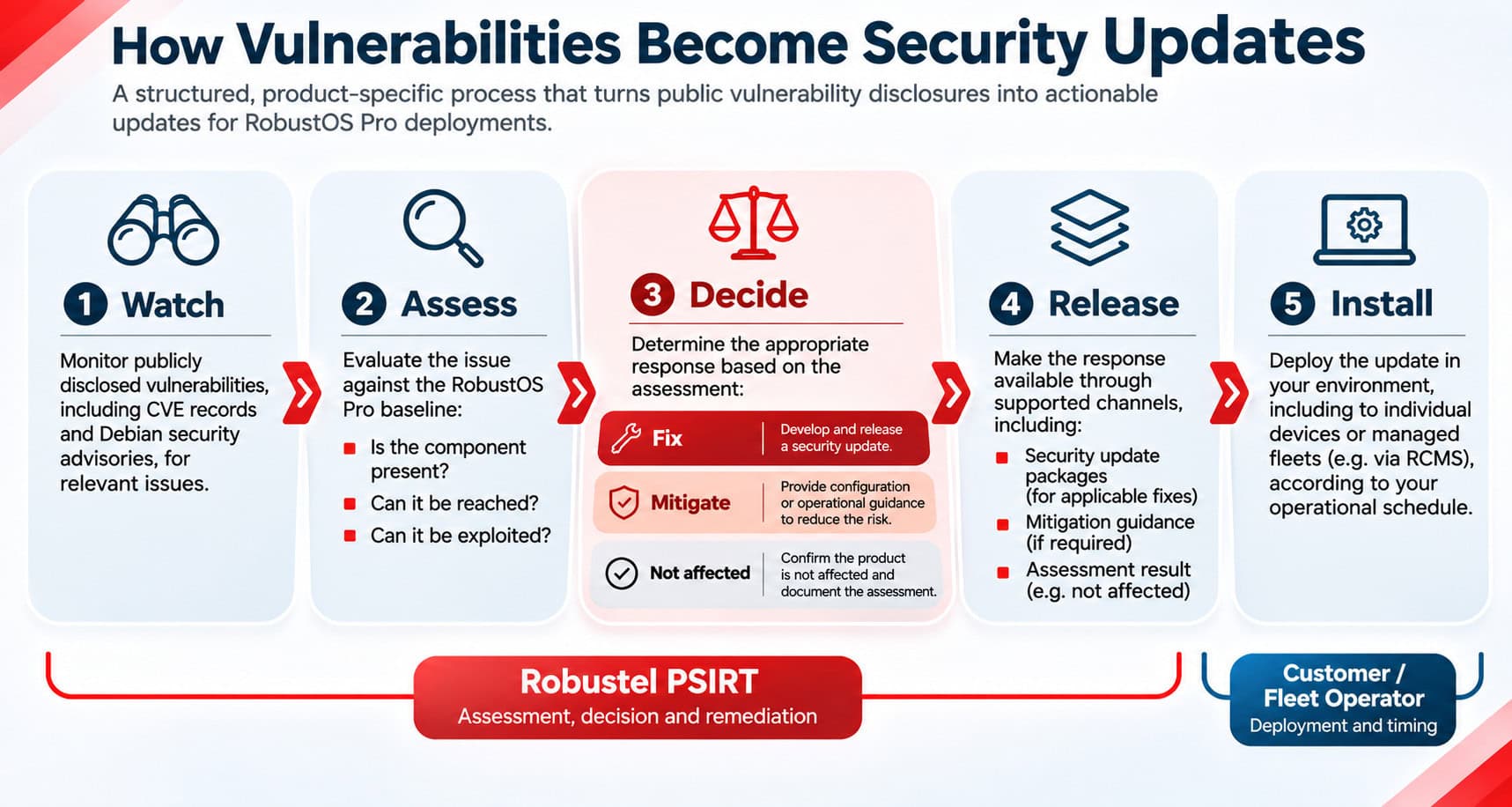
A published vulnerability does not, by itself, establish that a deployed RobustOS Pro device is affected. Vulnerability management therefore begins with assessment rather than assumption. Robustel’s Product Security Incident Response Team (PSIRT) monitors publicly disclosed vulnerabilities and Debian security advisories, then evaluates relevant issues against the software actually supplied within the supported RobustOS Pro baseline.
That assessment considers whether the affected component is present on the device, whether the vulnerable code path is reachable in the RobustOS Pro implementation, and whether the issue can be exploited in the context in which the product operates. A Common Vulnerabilities and Exposures (CVE) record may apply broadly to a software component without creating an exploitable condition in every product that contains it, so the purpose of the assessment is to establish actual product exposure before determining the appropriate response.
Robustel’s vulnerability-management process follows five stages: Watch, Assess, Decide, Release and Install. Following assessment, the response may be to develop and release a software fix, provide mitigation guidance where configuration or another operational control can reduce the risk, or document that the product is not affected where the vulnerable condition does not apply. Severity information, including Common Vulnerability Scoring System (CVSS) data, informs prioritisation, while vulnerabilities known to be actively exploited receive priority regardless of nominal severity.
Where software remediation is required, Robustel can publish an individual security update package through supported channels including the Robustel website and RCMS. Within the Product documentation, a vulnerability is considered fixed when the applicable remediation package has been released; deployment onto individual devices or fleets is then managed by the customer or fleet operator. For RCMS-managed deployments, customers can obtain available security update packages through RCMS and use Zero-Touch or OTA tasks to deploy them remotely across multiple devices. This allows remediation to be incorporated into existing fleet-management processes while preserving customer control over validation, maintenance windows and production rollout.
Vulnerability assessment and remediation are governed by Robustel’s Vulnerability Assessment and Remediation Targets, which provides the authoritative response targets for supported products. Using that page as the single reference point avoids duplicating timing commitments across lifecycle and product content while ensuring that customers, security teams and procurement reviewers have one current source for Robustel’s published response obligations.
Updating a Long-Lived Industrial System
Software maintenance on an industrial gateway has to account for more than the operating system alone. A deployed RobustOS Pro device may also contain customer applications, containers, Debian packages, configuration and operational data that have been developed or validated specifically for that installation. Updating the platform therefore needs to preserve a clear distinction between routine maintenance of Robustel system software and operations that intentionally replace the wider device state.
In RobustOS Pro, the effect of an update is determined by the package being applied, not by the mechanism used to deliver it. Web UI, command line, USB and RCMS are delivery paths; they do not determine what is retained or replaced. A standard firmware update, a full-image installation and a clone restore are different operations and should be planned accordingly.
What Survives an Update?
A standard firmware update installs the Robustel system components carried by that release while preserving the customer environment above them. Applications, containers, configuration, data and logs are retained, while customer-installed Debian packages are not removed. A full-image installation or clone restore has a fundamentally different purpose and can replace the existing device state.
| Standard Firmware Update | Full-Image Install | Clone Restore | |
|---|---|---|---|
| アプリケーション | Kept | Erased | Replaced by clone |
| Containers | Kept | Erased | Replaced by clone |
| Configuration | Kept | Reset to defaults | Replaced by clone |
| Data & logs | Kept | Erased | Replaced by clone |
| Customer-installed Debian packages | Not removed* | Erased | Replaced by clone |
* Customer-installed Debian packages remain installed after a standard firmware update, but this does not guarantee that every package or dependency remains unchanged.
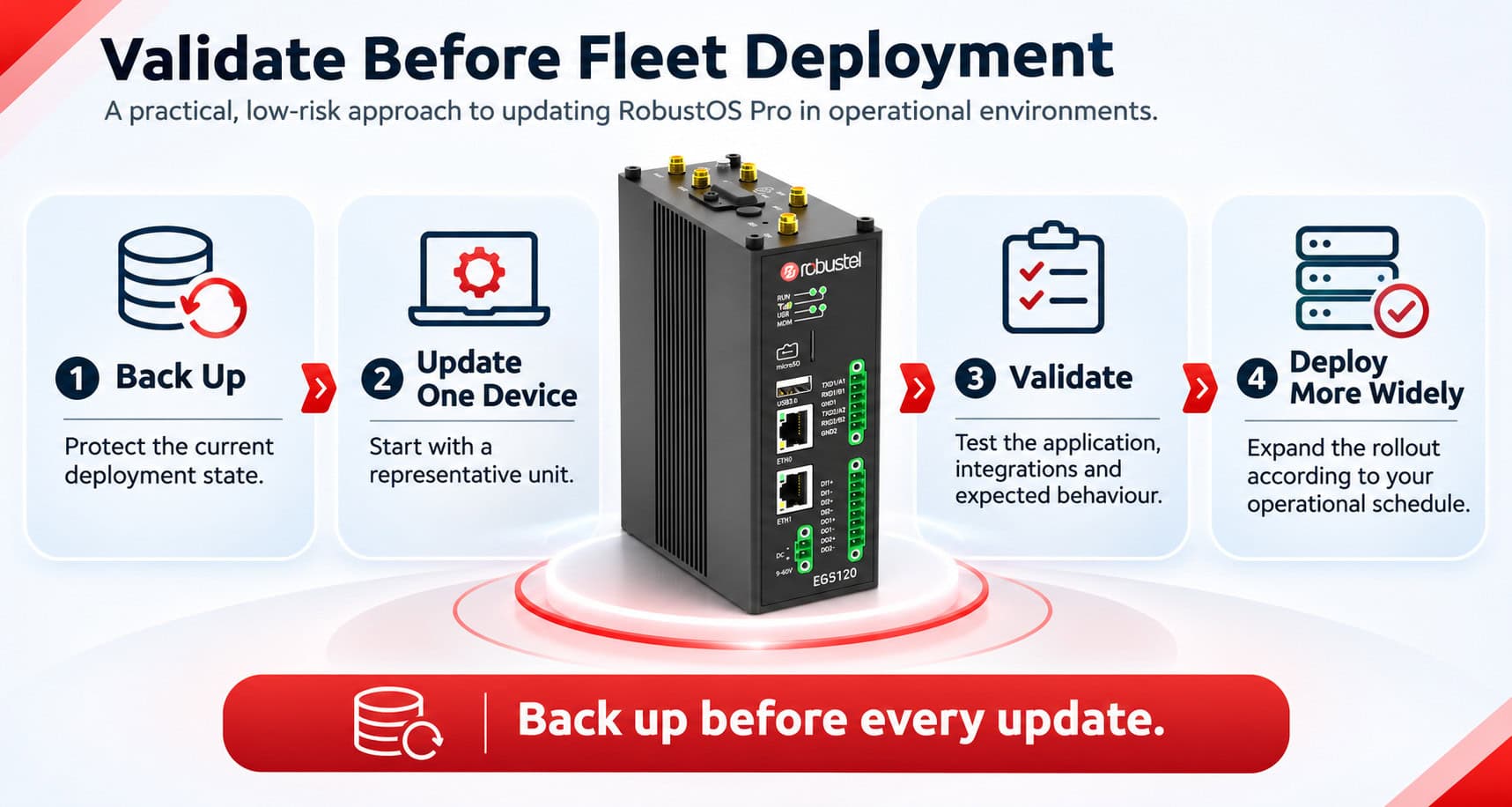
Preserving customer software is not the same as guaranteeing that it will behave identically after the underlying platform has changed. A firmware release can introduce updated Robustel components, kernel changes where applicable, or package-version changes within the shared software environment. Software that depends on particular libraries, interfaces or platform behaviour should therefore be validated against the new release before it is introduced across a production fleet. The Product guidance specifically recommends testing a new release on a representative device first, rather than treating successful installation as sufficient evidence of application compatibility.
For the same reason, backup and validation should be treated as normal parts of the update process. RobustOS Pro does not automatically create a customer backup before an update. The most recent backup is also the state used by automatic recovery if the device later needs to roll back, so customers should maintain a current recovery point before making software changes.
For long-lived deployments, this approach allows maintenance to remain controlled rather than disruptive. Robustel can continue updating the supported platform beneath the customer environment, while fleet operators retain responsibility for deciding when a release enters production and for confirming that deployment-specific software continues to operate as intended.
Stable Deployments, Planned Evolution
Two Valid Paths
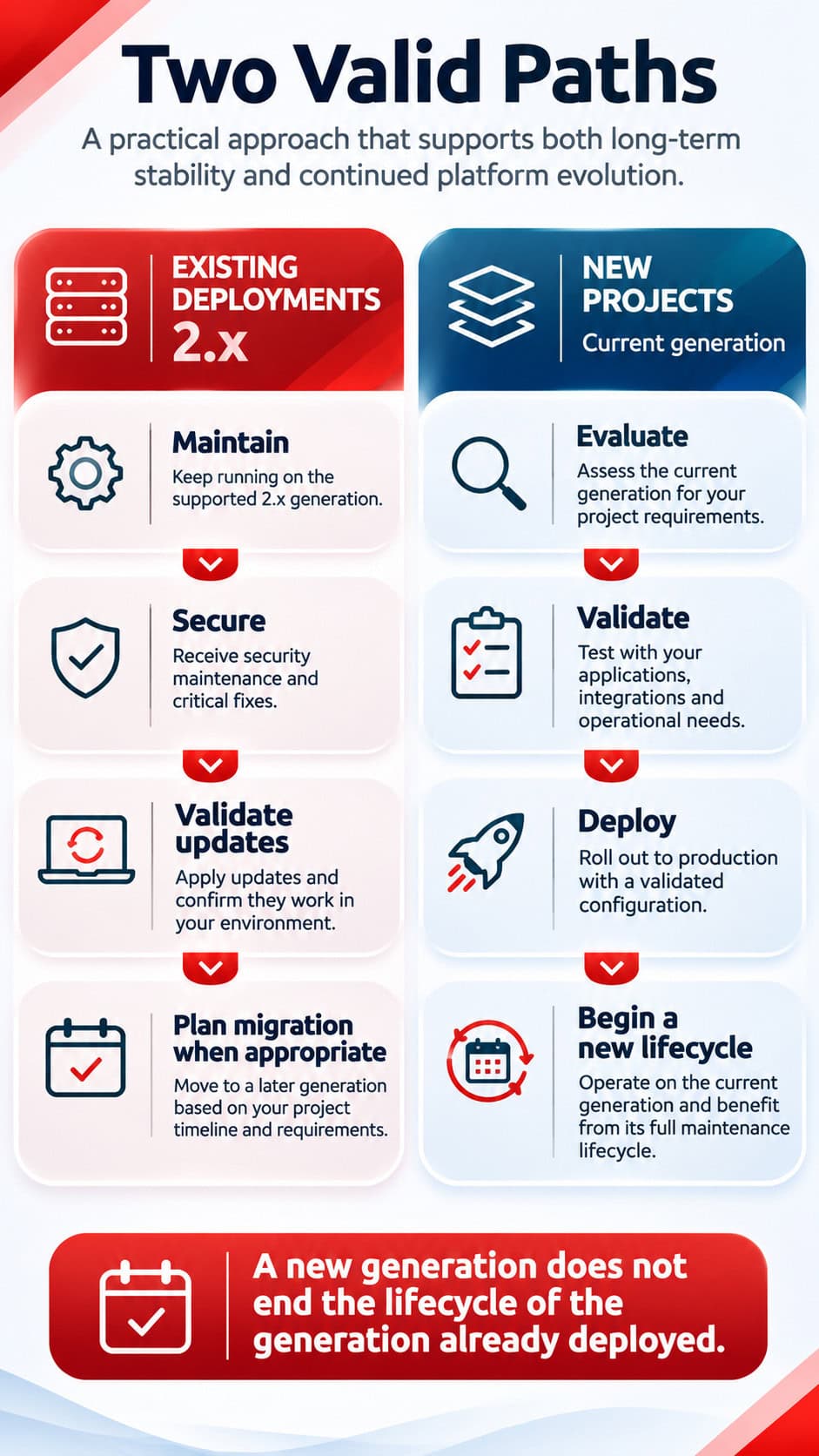
A long-term software lifecycle has to support two objectives at the same time: maintaining established deployments on a predictable platform and allowing the operating environment to evolve for future projects. RobustOS Pro treats these as parallel activities rather than requiring existing fleets to follow every major change in the underlying software platform.
RobustOS Pro 2.x remains within its defined maintenance lifecycle through 2031, and the introduction of a later major generation does not alter that commitment. Maintenance of 2.x continues to address applicable security vulnerabilities and critical software issues within the established generation, while new functionality and broader platform development move into later RobustOS Pro releases. The Product documentation is explicit that installed devices can remain on 2.x and that the 2.x commitment is unaffected by development of 3.x.
For existing deployments, this allows migration to be planned around the requirements of the system rather than around the release date of a new operating-system generation. Application compatibility, third-party dependencies, validation effort, maintenance windows and the expected remaining life of the project can all form part of that decision. Moving from RobustOS Pro 2.x to a later major generation is therefore treated as a planned migration, not as a routine firmware update.
New projects can take a different path. Where a later RobustOS Pro generation is generally available and appropriate for the target hardware, it can be evaluated as the starting point for a new deployment and a new lifecycle. Current Product planning associates RobustOS Pro 3.x with Debian 13 and an expected maintenance horizon through 2035, although those dates remain planning expectations rather than changes to the existing 2.x commitment.
The result is a lifecycle model in which platform evolution does not require unnecessary disruption to systems already in service. Existing deployments retain a defined maintenance horizon, while future projects can adopt newer major generations when their technical and operational requirements justify doing so.
Recovery Is Part of Lifecycle Support
Long-term software support also has to account for what happens when an update does not complete successfully, a device can no longer boot normally, or the installed software state becomes unusable. RobustOS Pro therefore uses a staged recovery model designed to resolve common software failures automatically before physical intervention is required.
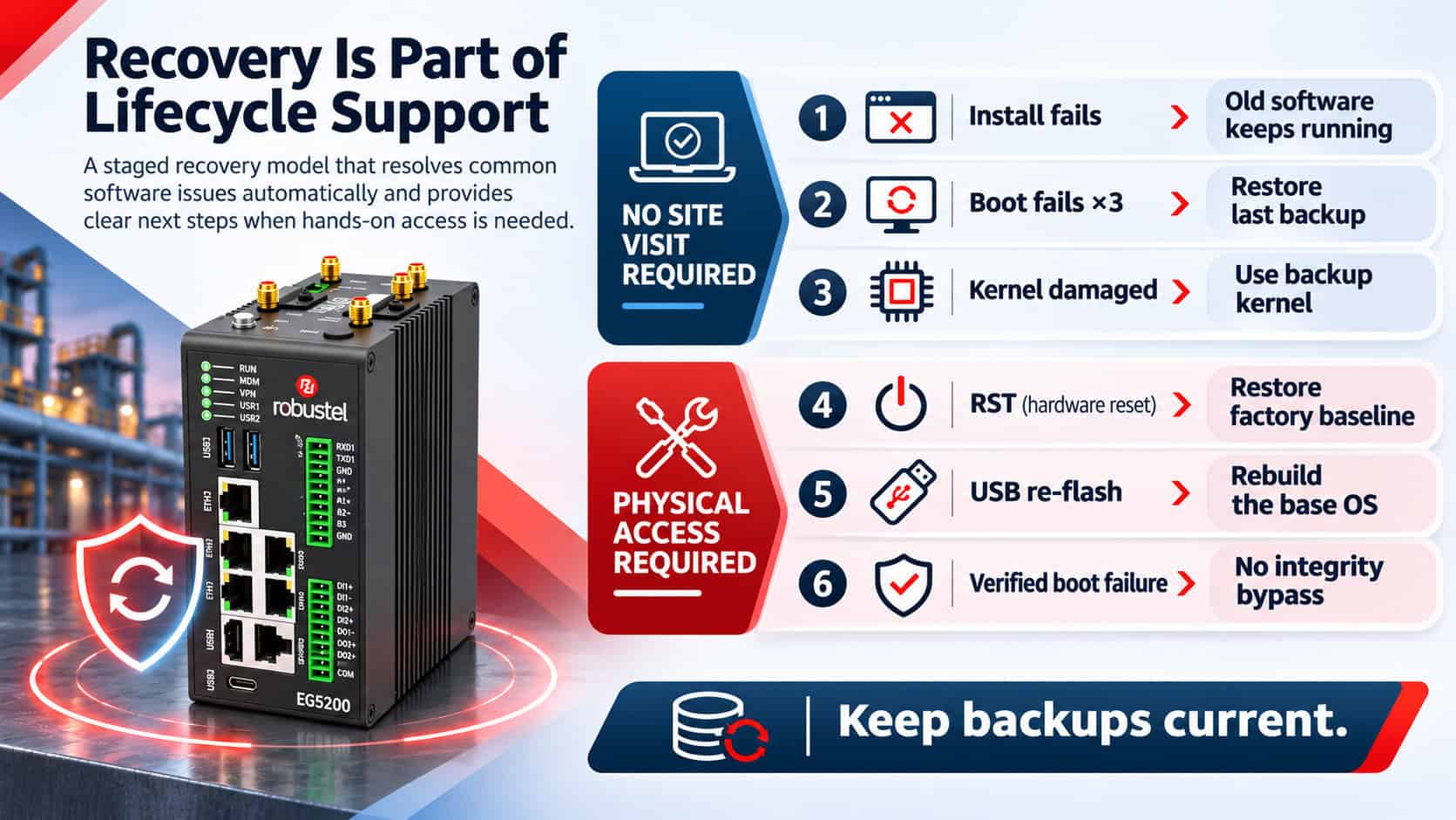
The first stages operate without anyone attending the device. If a firmware installation fails, the installation aborts cleanly and the device continues running the previous software. If the device cannot boot successfully, RobustOS Pro makes three attempts before automatically restoring the most recent available backup. Where no backup is available, recovery returns the device to its factory baseline instead. The boot process also maintains a separate recovery path for the kernel, allowing the system to fall back to a backup kernel copy if the active kernel becomes damaged.
The RobustOS Pro Recovery Ladder
| Stage | Condition | Recovery behaviour | On-site access |
|---|---|---|---|
| 1 | Installation fails | Installation aborts; existing software continues running | いいえ |
| 2 | Device repeatedly fails to boot | Restores the latest backup, or factory baseline if no backup exists | いいえ |
| 3 | Active kernel is damaged | Falls back to the backup kernel copy | いいえ |
| 4 | Device is unreachable or misconfigured | RST operation restores the factory baseline | はい |
| 5 | Base operating system is corrupted | USB full-image re-flash rebuilds the device software environment | はい |
| 6 | Verified boot rejects boot code | No integrity bypass; trusted software must be restored | Yes / recovery procedure dependent |
The first three stages are designed to recover the device without an engineer travelling to site. Physical access becomes necessary only when recovery progresses to hardware reset or USB re-flash. This distinction is particularly important for distributed industrial fleets, where the operational cost of recovery can be driven as much by site access as by the software fault itself.
Automatic recovery depends, however, on the state available to recover to. RobustOS Pro does not create customer backups automatically, including immediately before an update. Customers should therefore maintain current backups as part of normal fleet operation and retain appropriate recovery material outside the device. A recent backup allows automatic recovery to return the system to a recent known state; without one, the fallback is the device’s factory baseline.
That factory baseline should also be understood before a device is deployed. For a standard unit it may represent the normal clean factory state, while devices supplied with a customer-specific factory image can return to that configured delivery state. Recovery operations deliberately restore whichever baseline has been established for the unit, so knowing what that baseline contains is part of effective lifecycle planning.
For devices using verified boot, recovery does not provide a mechanism to bypass failed integrity verification. Code that cannot be authenticated is not allowed to run, preserving the security boundary even when the device is in a recovery condition. Taken together, these mechanisms provide a graduated path from automatic software recovery through to deliberate physical intervention, while keeping responsibility for backups and deployment-specific recovery state clearly defined.
Planning for End of Support
A defined software lifecycle includes a defined endpoint. For RobustOS Pro, end of support does not mean that deployed hardware immediately stops operating; it means that the relevant software generation is no longer maintained under the standard Robustel support lifecycle.
RobustOS Pro 2.x is maintained through 2031. After the supported maintenance period closes, standard software support, fixes and root-cause analysis for that generation cease. Where requirements extend beyond the defined lifecycle, a separately agreed service arrangement may be possible, but this sits outside the standard support commitment and should be discussed with Robustel before normal support ends.
The practical objective is therefore to avoid discovering end of support only when a change, vulnerability or failure creates an urgent need for action. Customers should maintain an accurate view of the software generations deployed across their fleet, understand which systems will require migration or retirement, and begin planning those transitions while the current generation is still actively supported.
Moving from RobustOS Pro 2.x to a later major generation is a planned migration rather than a routine firmware update. The migration should account for application compatibility, third-party dependencies, operational requirements and the time required to validate the target environment before production systems are changed. Robustel’s Product guidance also recommends retaining a known-good state outside the device, including a clone package and configuration material that can be used during transition or recovery.
End-of-Support Planning Guide
Use this checklist to prepare a RobustOS Pro deployment for migration, retirement or other lifecycle action before its supported maintenance period closes.
| Stage | Planning actions |
|---|---|
| 1. Inventory the Installed Fleet Know what is actually deployed. | □ Record the RobustOS Pro generation and release running across the fleet. □ Identify devices approaching the end of their supported lifecycle. □ Map applications, packages and integrations that depend on the current software environment. □ Identify any custom factory baselines, deployment images or device-specific configurations. |
| ↓ | Complete the fleet inventory before defining the migration strategy. |
| 2. Define the Migration Path Decide what happens to each deployment. | □ Continue operating on the current generation while it remains supported. □ Identify deployments that should migrate to a later RobustOS Pro generation. □ Identify devices that should instead be retired or replaced. □ Raise any exceptional support requirements with Robustel before standard support ends. |
| ↓ | Do not begin production migration until the target environment has been validated. |
| 3. Validate Before Migration Prove the future environment before changing production. | □ Build or select a representative test device. □ Validate customer applications, containers and packages. □ Test integrations, connectivity and expected operational behaviour. □ Define rollback and recovery procedures. □ Plan deployment around appropriate operational and maintenance windows. |
| ↓ | Once validation is complete, preserve the existing state before making production changes. |
| 4. Preserve and Execute Maintain a known-good state throughout the transition. | □ Export the current configuration. □ Retain a current clone package or reference image off-device. □ Maintain current backups. □ Migrate the fleet in controlled stages rather than as a single uncontrolled change. □ Decommission and reset devices that leave operational service. |
RobustOS Pro 2.x is maintained through 2031. Migration planning should begin well before the supported lifecycle closes.
Where a device is being retired or transferred, the working state should be handled separately from the hardware itself. Robustel’s Product guidance recommends exporting any required configuration or clone material before reset, understanding what the device’s factory baseline contains, and releasing the device from RCMS where applicable. A factory reset returns the unit to its baseline, but it does not by itself remove the device from an existing RCMS fleet relationship.
End-of-support planning is therefore part of normal lifecycle management rather than an exceptional event. A defined maintenance period gives customers time to decide whether a deployment should remain in service, move to a later software generation or be retired, while the existing platform is still supported and the necessary migration and recovery information is available.
RobustOS Pro Software Support Lifecycle FAQ
The following answers address common questions about RobustOS Pro maintenance, security updates, customer software, major-version migration and end of support. They reflect the lifecycle and software-management model defined in the current RobustOS Pro Product documentation.
Planning a RobustOS Pro Deployment?
Deploying RobustOS Pro does not require every project to adopt the same software baseline, application stack or upgrade schedule. The practical starting point is to understand the device, software generation and customer applications involved, then plan updates, validation and future migration around the operational requirements of the deployment.
For existing and planned RobustOS Pro deployments, Robustel recommends customers:
- confirm the exact device model, hardware configuration and RobustOS Pro version in use;
- record the applications, containers and Debian packages added to the customer software layer;
- understand which components are maintained by Robustel and which remain under customer lifecycle management;
- maintain current backups and a known-good deployment state;
- validate new firmware or software releases on a representative device before wider fleet deployment;
- review Robustel security advisories, release notes and lifecycle information as part of normal maintenance planning;
- maintain an accurate inventory of deployed devices and software versions;
- plan major-generation migration well before the current software lifecycle closes; and
- identify any product-specific support, security or lifecycle evidence required for procurement, integration or internal assurance.
Robustel can support customers, system integrators, channel partners and Original Equipment Manufacturer / Original Design Manufacturer (OEM / ODM) partners with software-baseline identification, lifecycle planning, update strategy, migration planning and RobustOS Pro technical questions.
Need help with a specific product or deployment?
If you need to confirm the lifecycle status of a RobustOS Pro device, understand which software components fall within the Robustel-maintained baseline, plan an update or major-version migration, or discuss the requirements of an existing deployment, contact our team.