
Node-RED on Industrial Edge Gateways: How It Fits Industrial IoT Projects

Node-RED industrial IoT workflows help project teams build selected data flows near equipment instead of sending every raw value directly upstream. The best fit is a 3-step edge workflow: collect field data, transform it locally, and forward structured messages to MQTT, APIs, or cloud systems.
Robustel EG5120 is a practical reference for this architecture because it combines RobustOS Pro, Docker support, 2× RS-232/RS-485 ports, 2× DI/DO, Modbus TCP/RTU, MQTT-to-cloud bridging, and RCMS remote management in one industrial edge gateway.
Node-RED should be used as a low-code data-flow layer, not as a replacement for PLC control. In factory projects, it fits 4 common tasks: Modbus-to-MQTT mapping, serial data parsing, machine status forwarding, and lightweight event routing.
The implementation boundary is important. Robustel’s Node-RED article shows Docker-based deployment on Robustel edge computing gateways, but production use still requires at least 6 checks: firmware, Docker runtime, SSH access, sudo user, port mapping, and network security.
The Factory Data Problem Behind Node-RED on Edge Gateways
Many industrial IoT projects start with a simple data problem: useful machine data exists, but it is not yet in a format that monitoring platforms, dashboards, brokers, or cloud applications can use.
A PLC, meter, sensor, or controller may expose data through Modbus, serial communication, Ethernet, I/O signals, or a local protocol. The factory team may only need 20 selected values, not a full software platform at the first stage.
This is where Node-RED becomes relevant. Node-RED is a low-code, flow-based tool for event-driven applications and is designed to help users collect, transform, and visualize real-time data.
For industrial IoT, the conclusion should stay narrow: Node-RED is useful when the project needs a manageable way to connect data steps, not when it needs deterministic machine control or safety logic.
The Flow Layer Between Field Signals and Upper Systems
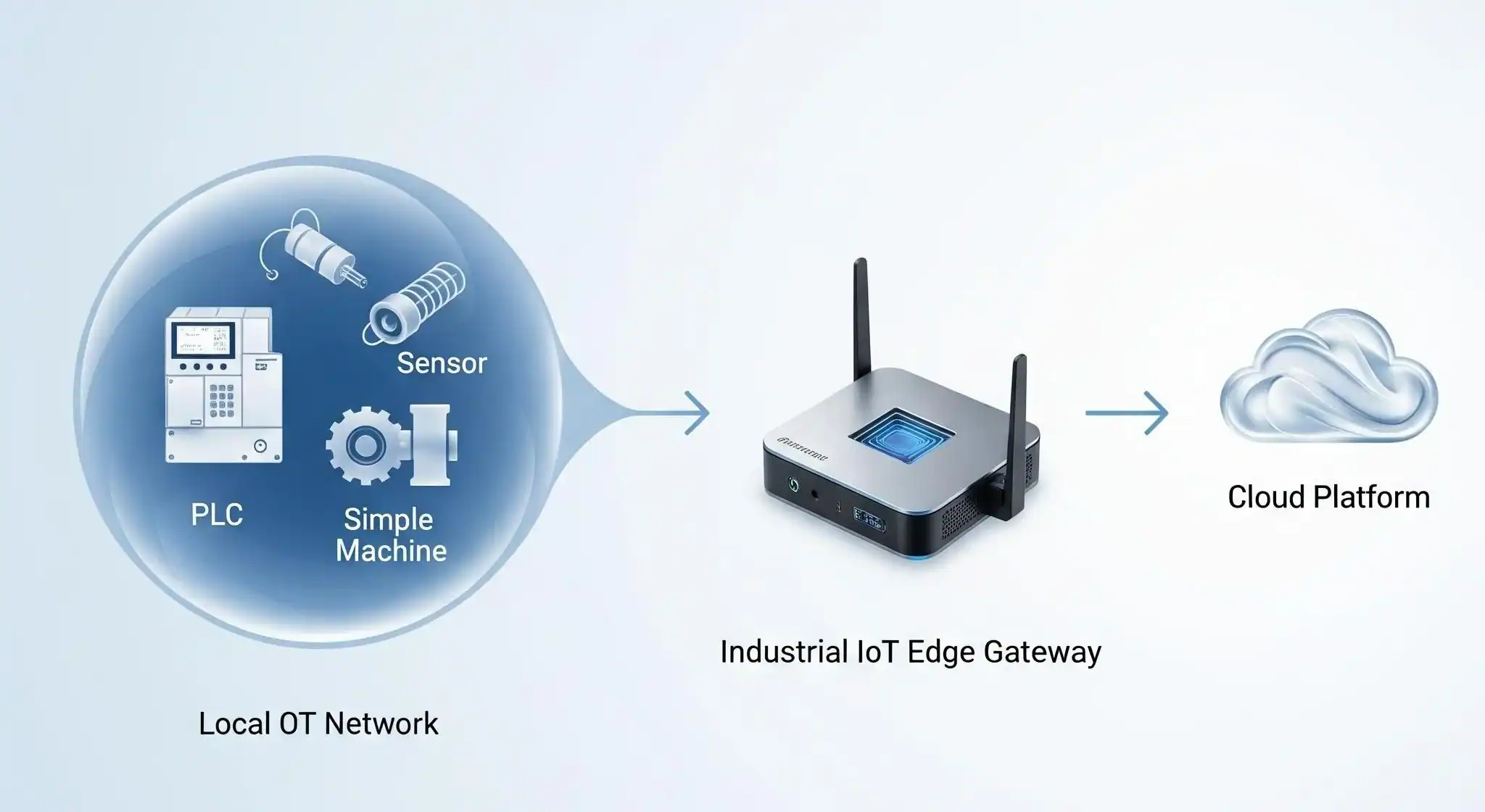
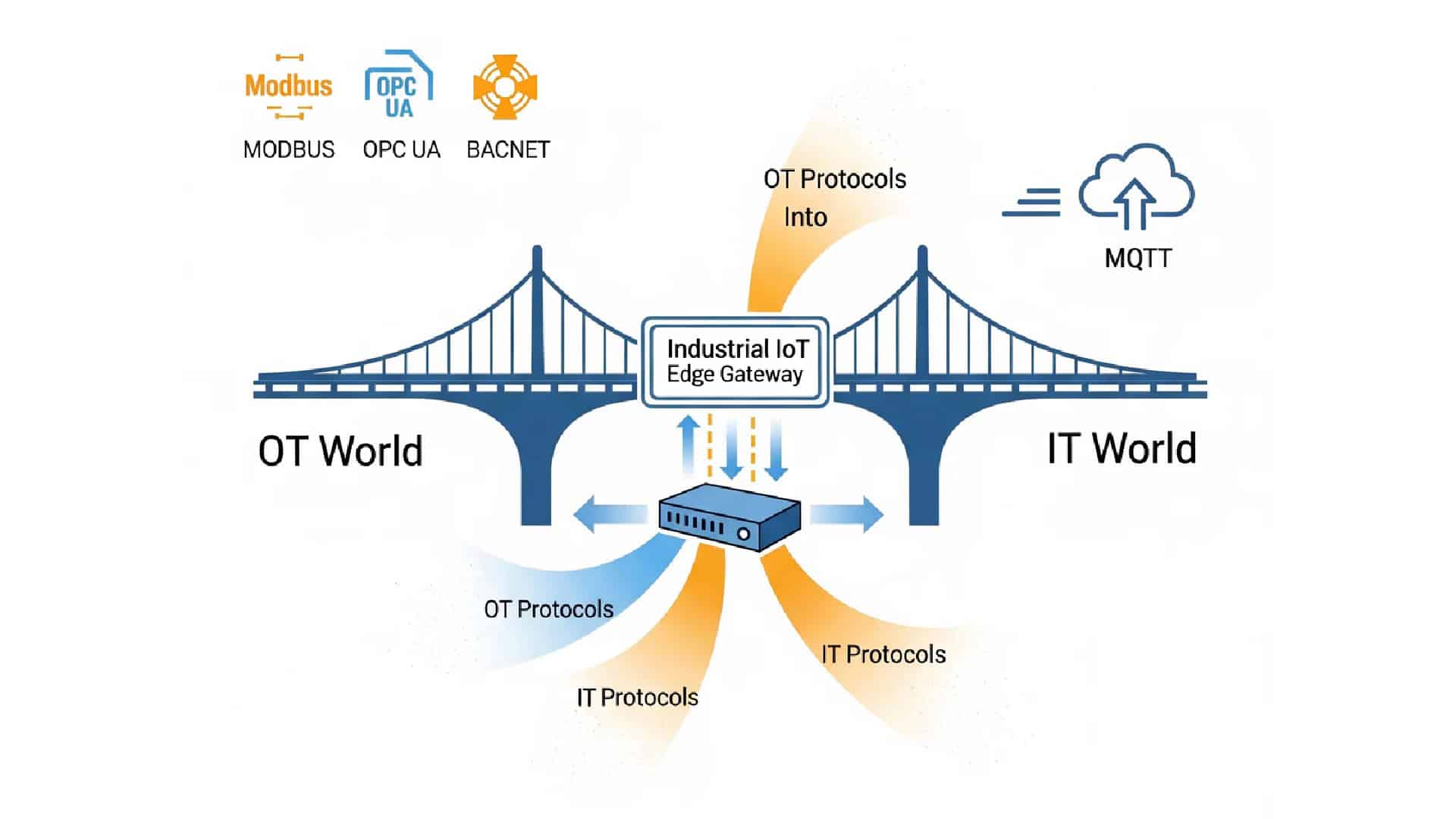
Node-RED fits between field-side data sources and upper-layer systems. It is not the industrial gateway itself. It is the application layer that can run on a gateway when the operating system, runtime, security policy, and maintenance process are ready.
A useful Node-RED edge workflow usually has 4 parts. First, a source provides data. Second, the gateway receives it. Third, Node-RED transforms or routes it. Fourth, the prepared message goes to MQTT, HTTP, a database, SCADA, or a cloud platform.
| Edge data-flow layer | Role in the Node-RED workflow |
| Field source | PLC, meter, sensor, serial device, controller, or machine signal |
| Gateway interface | Ethernet, RS-232, RS-485, DI/DO, or cellular/Ethernet backhaul |
| Node-RED flow | Filtering, mapping, formatting, routing, or simple event logic |
| Upper system | MQTT broker, API, dashboard, cloud platform, database, or SCADA layer |
This layered view is useful because it prevents role confusion. The gateway provides industrial interfaces and runtime capability. Node-RED defines selected data-flow behavior. The upper system handles visualization, analytics, reporting, or business integration.
From Modbus Registers to MQTT Messages
A common industrial example is Modbus-to-MQTT data movement. This is not always complex enough to justify a full custom application, but it still needs careful mapping, data naming, polling intervals, topic design, and security settings.
A typical workflow can be explained in 5 steps. A device exposes Modbus values. The gateway connects through RS-485, RS-232, or Ethernet. Node-RED reads or receives selected values. The flow maps raw registers into structured payloads. The message is published to MQTT or another upstream endpoint.
| Workflow step | Example task |
| 1. Read | Collect selected Modbus values from field-side equipment |
| 2. Parse | Convert raw register values into usable measurements |
| 3. Enrich | Add equipment ID, timestamp, unit, or site label |
| 4. Filter | Remove repetitive or unnecessary values before forwarding |
| 5. Publish | Send structured data to MQTT, HTTP, database, or cloud service |
The practical conclusion is clear: Node-RED can help turn available machine-side data into integration-ready messages, but the quality of the result still depends on the register map, data model, flow design, network path, and security control.
Where Low-Code Helps Without Taking Over Control
Node-RED is valuable because it can shorten the path from a data requirement to a working flow. A project engineer can test whether a meter value, machine state, or sensor reading can support monitoring before a larger system is developed.
This is especially useful in brownfield factories. Older machines may provide useful signals but not a modern cloud connector. A low-code IIoT gateway workflow can help validate whether selected data can support dashboards, alerts, maintenance planning, or energy monitoring.
Node-RED is strongest in 6 non-control tasks: data collection, transformation, routing, API integration, event notification, and proof-of-concept validation. These tasks need flexibility and visibility, not deterministic control cycles.
It should not be used to replace PLC logic. PLCs remain the better layer for deterministic machine control, interlocks, timing-sensitive automation, and safety-related behavior. Node-RED should sit beside the control layer, not inside the safety chain.
For a broader view of why Node-RED is useful in industrial applications, Robustel’s article on Node-RED benefits explains its role in protocol integration, visual programming, customization, and maintenance-friendly workflow design.
Robustel EG5120 Edge Gateway as the Node-RED Host Layer
Robustel EG5120 edge gateway is suitable as the main product reference because Node-RED needs more than a software editor. It needs an industrial host with interfaces, local compute, backhaul, security features, and remote management.
The EG5120 runs RobustOS Pro based on Debian 11, supports Docker containers and Debian packages, and is positioned for protocol bridges, data buffering, and edge workloads. Its hardware includes a quad-core 1.6 GHz Cortex-A53, 64 GB eMMC, and a 2.3 TOPS NPU for selected edge workloads.
| Node-RED project need | Robustel EG5120 capability |
| Run the flow tool locally | RobustOS Pro, Debian 11, Docker containers, Debian packages |
| Connect serial equipment | 2× software-configurable RS-232/RS-485 ports |
| Capture simple site signals | 2× DI and 2× DO |
| Bridge industrial protocols | Native Modbus TCP/RTU and MQTT-to-cloud bridging |
| Send data upstream | Dual-SIM 5G/4G/3G/2G and Ethernet WAN with link backup |
| Secure communication | IPsec, OpenVPN, GRE, L2TP, PPTP, and DMVPN |
| Manage deployed gateways | RCMS monitoring, configuration, and updates |
This table does not mean EG5120 automatically solves every Node-RED project. It means the product provides a practical industrial platform for running and managing selected data-flow applications where the Node-RED flow, installed nodes, data sources, and network design are correctly configured.
Docker-Based Node-RED Runtime Checks
This article should not become an installation tutorial, but the deployment requirements are worth mentioning because they affect production readiness.
Robustel’s How-To article for Node-RED on EG Series devices uses Docker and lists several prerequisites: an EG Series gateway such as EG5120 or EG5100, RobustOS Pro 2.4.0 or higher, SSH client access, Docker Engine, internet access for pulling the image, and a sudo user account.
These details matter because Node-RED is not only a visual editor. Once it runs on a gateway, it becomes a maintained application. Teams need to decide who can access the editor, how ports are exposed, how flows are backed up, and what happens if the container stops.
| Production check | なぜそれが重要なのか |
| Firmware version | Confirms the gateway software baseline |
| Docker runtime | Provides the container environment |
| SSH and sudo access | Controls who can install and maintain applications |
| Port mapping | Controls how the Node-RED editor is reached |
| Internet or image source | Enables Docker image deployment or updates |
| Firewall and VPN policy | Protects access to the editor and data path |
| Flow backup | Prevents loss of project logic or credentials |
| Container restart policy | Supports recovery after reboot or service interruption |
A practical rule is this: if Node-RED becomes part of a production data path, it needs the same operational discipline as any other edge application.
Readers who need a more blog-style walkthrough can also refer to Robustel’s Node-RED tutorial for industrial IoT edge gateways, which covers installation flow, core nodes, additional node installation, Modbus nodes, and dashboard examples.
Factory-Floor Workflows That Fit Node-RED
Node-RED is best used where the workflow is valuable but not safety-critical. In factory data collection, it can help convert selected machine-side values into readable payloads for dashboards or cloud applications.
In energy monitoring, Node-RED can help collect selected meter readings, add context such as site or line ID, and publish structured messages to an MQTT broker. The goal is not to control the electrical system; it is to make data easier to consume.
In machine status monitoring, Node-RED can turn run, stop, fault, alarm, or simple DI/DO events into usable status messages. This can support visibility for older equipment that was not designed with modern API or cloud connectivity.
In pilot projects, Node-RED can help teams validate whether a data path is useful before investing in a larger integration. This is valuable when the first objective is to prove that field-side data can support reporting, maintenance, or operational decisions.
When Node-RED Is the Wrong Layer
Node-RED should not be selected only because it is convenient. A low-code tool can make early development faster, but it can also create unmanaged complexity if flows become too large, poorly documented, or dependent on unreviewed nodes.
It is usually the wrong layer for deterministic control, safety-critical automation, certified control logic, or high-speed closed-loop operation. These tasks belong in PLCs, dedicated control systems, or validated industrial software environments.
It can also become a risk if the Node-RED editor is exposed carelessly. Access control, VPN policy, firewall rules, credentials, API keys, and flow backups should be part of the deployment plan from the beginning.
The strongest conclusion is measured: Node-RED can support industrial IoT data workflows, but only when the project treats it as an edge application with ownership, monitoring, security, and maintenance—not as a shortcut around engineering discipline.
How to Decide Whether Node-RED Belongs in the Architecture
A project team can evaluate Node-RED using 7 practical checks.
| Check | Good fit signal | Caution signal |
| Data task | Collect, transform, or route selected values | Control loop or safety logic |
| Timing need | Seconds-level monitoring or event routing | Deterministic millisecond control |
| Data source | Modbus, serial, MQTT, HTTP, API, DI/DO | Proprietary logic with no clear mapping |
| 保守 | Team can own and document flows | No owner for updates or backups |
| セキュリティ | Editor access controlled through VPN/firewall | Editor exposed directly to wider networks |
| Scale | Flow remains readable and testable | Visual logic becomes too complex |
| Gateway fit | Linux, Docker, interfaces, and management available | Runtime environment not ready |
This checklist helps position Node-RED correctly. It is not a universal industrial software platform. It is a practical edge-side flow layer for selected data movement and integration tasks.
Node-RED Edge Gateway Takeaway
Node-RED fits industrial IoT projects when the goal is to build, test, and maintain selected data flows close to factory equipment. It can help teams move from raw field signals to structured MQTT, HTTP, dashboard, or cloud-ready data without building a full custom application at the first stage.
Robustel EG5120 edge computing gateway is a suitable product reference because it provides the industrial gateway layer around Node-RED: RobustOS Pro, Docker support, serial and I/O interfaces, Modbus and MQTT capabilities, cellular and Ethernet backhaul, VPN functions, and RCMS remote management.
The practical boundary should stay clear. Node-RED can help with factory data flow, low-code IIoT integration, and edge-side workflow development. It should not replace PLCs, SCADA systems, MES platforms, deterministic control, or safety-critical automation logic.
FAQs
Q1. What is Node-RED used for in industrial IoT?
Node-RED is used in industrial IoT to build selected data flows between field-side equipment and upper-layer systems. It can help collect Modbus or serial data, format raw values, add equipment context, publish messages to MQTT, send data to APIs, or trigger simple monitoring events. Its strongest role is edge-side data collection, transformation, and routing. It should not be treated as a replacement for PLCs, SCADA systems, MES platforms, or safety-critical control logic.
Q2. Can Node-RED run on an industrial edge gateway?
Yes. Node-RED can run on an industrial edge gateway when the gateway provides a suitable software environment, such as Linux, Docker support, network access, and enough computing resources. Robustel’s How-To article shows Node-RED deployment on EG Series gateways through Docker, with requirements such as RobustOS Pro 2.4.0 or higher, Docker Engine, SSH access, internet access, and a sudo user account. Final suitability still depends on the gateway model, firmware, container setup, and project security policy.
Q3. Which Robustel edge gateway fits Node-RED-based workflows?
Robustel EG5120 edge computing gateway is a strong reference for Node-RED-based industrial IoT workflows because it combines RobustOS Pro, Docker support, 2× RS-232/RS-485, 2× DI/DO, Modbus TCP/RTU, MQTT-to-cloud bridging, dual-SIM 5G/4G/3G/2G cellular, Ethernet WAN, VPN functions, and RCMS remote management. These features make it suitable as the site-side host layer for selected Node-RED data collection, transformation, and forwarding workflows where the project design and security settings are properly managed.
Q4. Can Node-RED be used for Modbus-to-MQTT data flow?
Yes. Node-RED can be used for Modbus-to-MQTT workflows when the required nodes, Modbus settings, data mapping, and MQTT broker configuration are correctly designed. A typical flow may read selected Modbus values, convert register data into named measurements, add equipment ID or timestamp, format the payload as JSON, and publish it to an MQTT topic. The workflow still depends on correct register maps, polling intervals, topic structure, credentials, firewall rules, and maintenance ownership.
Q5. Is Node-RED suitable for industrial control?
Node-RED can support monitoring, data forwarding, lightweight integration, and non-safety-critical event handling, but it should not be used as the main layer for deterministic industrial control or safety-critical automation. PLCs remain the right layer for real-time machine control, interlocks, and safety functions. A careful architecture should place Node-RED beside the control layer as a data-flow tool, not inside the core control loop. This distinction is important when deploying Node-RED on industrial edge gateways.
Related Reading on Edge Computing in Industrial IoT:


著者について
Robert Liao | Technical Support Engineer
Robert is an IoT Technical Support Engineer at Robustel, specializing in industrial networking and edge connectivity. A certified Networking Engineer, Robert focuses on the deployment and troubleshooting of large-scale IIoT infrastructures. His work centers on architecting reliable, scalable system performance for complex industrial applications, bridging the gap between field hardware and cloud-side data management.