
5G Router Fleet Management: What to Demand Before Deploying 100+ Sites
The Robustel R5010 Industrial 5G Router and RCMS fit multi-site 5G deployments where centralized provisioning, monitoring, configuration and updates are needed across large router estates. The main challenge beyond 100 sites is not simply seeing every router online—it is preventing configuration, firmware and operational policy from drifting into hundreds of slightly different site builds.
- Five pilot sites are easy.
- An engineer configures each router manually.
- A few settings differ because one branch has a different carrier.
- A temporary test rule remains on another device.
- Nothing breaks.
- Then the rollout reaches 40 sites.
- Later, 180.
Now the estate contains several firmware versions, different APNs, undocumented firewall changes and a handful of routers nobody is confident enough to update. This is the real fleet-management problem: How do 180 routers continue behaving like one controlled deployment?
The Problem at 100 Sites Is Consistency, Not Router Count
A device-management platform should do more than display 100 green status icons. The fleet needs a definition of normal. For each router class, that can include:
- Approved model and hardware variant
- Firmware baseline
- RCMS application version
- Cellular/APN configuration
- SIM strategy
- VPN policy
- Firewall rules
- WAN/failover policy
- Management settings
- Allowed local exceptions
- Maintenance owner
Without a defined baseline, an alert showing that a configuration has changed provides limited operational value because the team has no agreed reference against which to judge the difference. Fleet management should therefore begin before mass deployment, with a validated configuration that can be reproduced across the intended device group. This golden configuration establishes the approved starting point while still allowing documented site-specific exceptions where necessary.
Define a Golden Configuration Before Zero-Touch Deployment
Zero-Touch Provisioning becomes valuable only after the template is trustworthy.
A bad template deployed automatically is simply a faster way to create a large problem.
The operating sequence should be:
- Lab build
- → validate cellular and WAN behaviour
- → validate security policy
- → test remote management
- → freeze approved template
- → assign site-specific parameters
- → deploy
The Robustel RCMS remote device management platform currently supports Zero-Touch provisioning, device templates, group management, OTA firmware/configuration workflows, alerts and centralized fleet status.
That allows a deployment template to standardize the settings that should remain consistent across the fleet, such as firewall rules, VPN configuration, RCMS settings, firmware baseline and monitoring policy. Site-specific parameters—including the APN, SIM or carrier, local subnet, device name and customer or site identifier—can then be applied separately during provisioning.
This distinction is important because excessive customization makes Zero-Touch deployment difficult to maintain, while forcing every site into an identical configuration can ignore legitimate local network requirements. A scalable fleet therefore keeps shared policy standardized and treats site-specific differences as controlled, documented exceptions.
Manage Changes in Rings Instead of Updating the Entire Fleet at Once
Configuration consistency does not mean changing every router simultaneously. Imagine a new firmware release is approved. The quickest deployment is: Select all → update. The safer fleet model divides routers into rings.
For example:
Ring 0 – Lab
Representative hardware in a controlled environment.
Ring 1 – Pilot sites
Small number of production sites with good support access.
Ring 2 – Limited production
A larger but still contained group.
Ring 3 – Broad fleet
Remaining compatible estate after success criteria are met.
This gives the team time to detect before the change reaches every site:
- Cellular regressions
- VPN changes
- Configuration incompatibilities
- Application issues
- Unexpected reboot behaviour
- Site-specific exceptions
RobustLink currently describes fleet-wide updates, template-based standardization, version/policy control and rollback-oriented workflows. RCMS also supports batch firmware and configuration updates.
But rollback should not be interpreted as: Any device can always return to any previous firmware. Robustel’s current RCMS release notes include explicit firmware downgrade restrictions between certain versions because of EN 18031 requirements.
That is exactly why a buyer should ask: What recovery path is available for this model and firmware pair if the rollout fails? A documented recovery plan is more useful than a generic “rollback supported” checkbox.
Detect Drift, Exceptions and Failed Rollouts Centrally
After deployment, a router fleet rarely remains identical for long. A technician may change an APN at one site, a customer may require a different firewall rule, another router may miss a firmware window because it was offline, and a device involved in an incident may receive an emergency configuration. Some of these differences are intentional and approved, while others are signs of configuration drift.
The management platform therefore needs to help operations distinguish a legitimate site-specific exception from an unexplained deviation. Online/offline status alone is not enough for that. Engineers need visibility into the device model, firmware version, configuration or template status, mobile operator, signal condition, data usage, connection history, alerts, update results, user activity and the groups or tags associated with each device.
The Robustel RCMS platform currently exposes many of these fleet and device status categories, including connection type, carrier, signal, data usage, firmware, alerts, device groups and activity logs. That allows the operations team to move beyond a general question such as whether the routers are healthy and investigate more useful exceptions instead: which devices are still on an older firmware baseline, which sites did not receive the latest approved configuration, whether a branch is using an unexpected carrier, or whether a router is consuming significantly more data than comparable devices.
This is where fleet visibility becomes configuration control. The value is not simply knowing that a router is online, but being able to identify which devices no longer match the expected operational state and whether that difference is intentional.
How the Robustel R5010 Industrial 5G Router and RCMS Support Large Multi-Site Operations
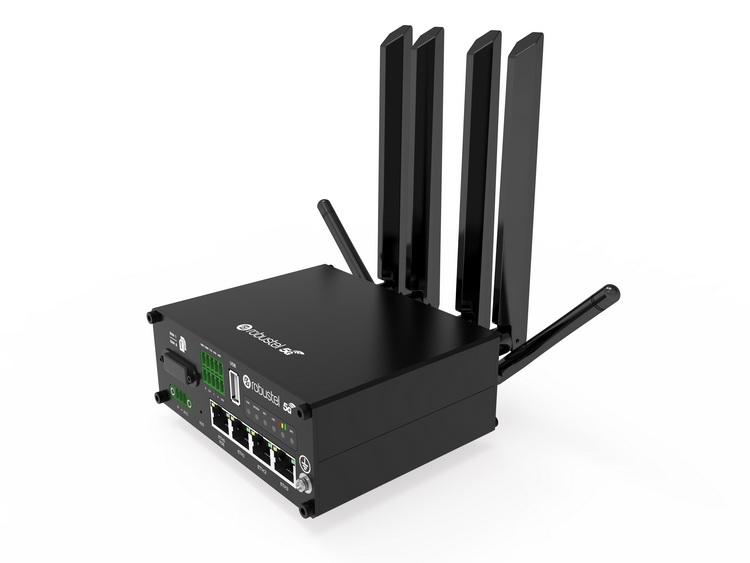
The Robustel R5010 Industrial 5G Router is positioned for manageable 5G connectivity across multi-site and SD-WAN environments, with RCMS support for centralized monitoring, configuration and updates.
One common architecture is:
- Branch firewall / SD-WAN
- → R5010 cellular WAN
- → 5G/LTE
- → central network
The branch network can remain standardized while RCMS manages the cellular-router layer.
Robustel’s Jones Technology retail resilience case study is especially relevant here. Jones Technology uses R5010 routers across distributed retail locations and manages the estate centrally with RCMS rather than treating every site as an independent 5G installation.
The important lesson for a 100+ site rollout is not simply “remote management saves visits.” It is: the fleet needs one repeatable operating model.
A second example comes from transportation rather than retail. Robustel’s Passenger Wi-Fi application example describes centrally managed groups and templates across vehicle fleets, including configuration, firmware, Wi-Fi policies, monitoring and alerts. The endpoints move, but the fleet-control problem is similar: operators need consistency across many individually deployed routers.
That shows why fleet management is not tied to a specific physical site type. A “site” can be: a branch, a kiosk, a bus, a machine, a remote cabinet. The operating principle remains the same.
Integrate Fleet Management with the Wider Operations Stack
At 20 sites, engineers may be happy to open RCMS directly.
At 2,000 sites, the business may already have:
- NOC systems
- Service desk software
- Customer portals
- Asset-management tools
- Reporting platforms
The router fleet should not necessarily become another isolated operational island. Robustel RCMS provides OpenAPI/RESTful integration capabilities for third-party systems, subject to applicable platform and license conditions.
A practical integration might allow:
- Router alert
- → service-management workflow
- → customer/site context
- → engineer action
- → closure record
Or:
- Fleet status
- → operational dashboard
- → identify firmware cohort
- → schedule maintenance
The API is not valuable because APIs are fashionable. It is valuable when it removes duplicate manual work between systems the operations team already uses.
Before deployment, define:
- Which system owns device inventory
- Which system owns alarms
- Which system owns change approval
- Which system owns customer/site metadata
- Which actions may be automated
- Which changes still require human authorization
Large-fleet operations become easier when those responsibilities are explicit.
Plan the Router Lifecycle Before the First Mass Deployment
The final mistake is treating provisioning as the end of fleet management. It is only the beginning. A 100-site operations model should cover:
| Fleet stage | Required control |
|---|---|
| Procurement | Approved hardware/firmware baseline |
| Staging | Golden configuration |
| Activation | Zero-Touch/site parameters |
| Normal operation | Status alerts reports |
| Routine change | Deployment rings |
| Exception | Documented deviation |
| Failed change | Tested recovery process |
| Integration | API/service workflow |
| Replacement | Reproduce approved site state |
| Retirement | Remove device credentials SIM and inventory records |
The key is continuity. A replacement router should not require someone to reverse-engineer what the failed device was doing. A new branch should not need an engineer to remember ten WebUI settings. A firmware upgrade should not become a fleet-wide experiment. The platform should help turn the approved architecture into a repeatable operational process.
よくある質問
Q1. Why does 5G router management become harder after 100 sites?
The difficulty comes from variation. Manual changes, different firmware versions, site-specific APNs, missed updates and undocumented exceptions accumulate as the fleet grows. Central management should make the approved baseline visible and help teams identify which devices have diverged from it.
Q2. Can the Robustel R5010 Industrial 5G Router be managed centrally?
Yes. The Robustel R5010 Industrial 5G Router supports RCMS for centralized monitoring, configuration and firmware management. This is particularly useful when the R5010 is deployed repeatedly as a 5G WAN or SD-WAN backup device across multiple sites.
Q3. What is Zero-Touch Provisioning?
Zero-Touch Provisioning applies an approved configuration template automatically during deployment so local installers do not have to build each router manually. It works best when the organisation has already validated a known-good template and clearly separated shared settings from site-specific parameters.
Q4. Should firmware updates be pushed to the entire router fleet at once?
Usually a staged rollout is safer. Representative lab and pilot devices can identify compatibility or connectivity problems before the update reaches the full estate. The exact change-control process should reflect the operational impact of the sites being managed.
Q5. Does rollback mean any firmware version can always be restored?
No. Recovery and downgrade capabilities can depend on product and firmware versions, and security or compliance requirements may restrict certain downgrade paths. The recovery procedure should therefore be validated before a large deployment rather than assumed from a generic rollback feature.
結論
5G router fleet management becomes a configuration-control problem long before it becomes a device-count problem. The Robustel R5010 Industrial 5G Router and RCMS can support centralized provisioning, monitoring, templates, alerts, updates and integration across distributed estates, but the organisation still needs to define what a correct router looks like and how controlled change takes place.
Build the fleet around: Golden baseline → Zero-Touch → monitoring → deployment rings → exception control → recovery → lifecycle
The objective is not to make 100 routers invisible. It is to make their differences visible and intentional.
Robustel’s tips: A scalable 5G router fleet is one where the operations team can explain why every device is configured the way it is—and can reproduce that state without relying on individual engineer memory.
Explore more articles about Robustel industrial 5G routers:


著者について
Robert Liao | Technical Support Engineer
Robert is an IoT Technical Support Engineer at Robustel, specializing in industrial networking and edge connectivity. A certified Networking Engineer, Robert focuses on the deployment and troubleshooting of large-scale IIoT infrastructures. His work centers on architecting reliable, scalable system performance for complex industrial applications, bridging the gap between field hardware and cloud-side data management.