
From Prototype to Production: Enabling Persistent Remote Access for Raspberry Pi via Industrial Gateways
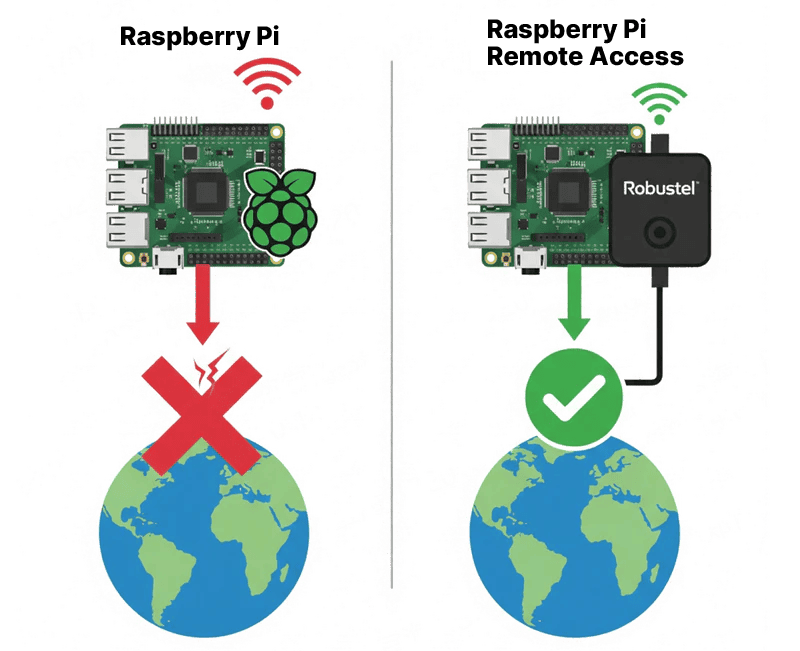
Why do Raspberry Pi deployments often fail the moment they leave the lab? The challenge isn’t the code—it’s the unpredictable nature of remote networks, private IPs, and firewall barriers. This guide moves beyond fragile software workarounds to provide a professional-grade connectivity architecture for your edge devices.
What you will master in this guide:
- Beyond Local Wi-Fi: How to leverage the Robustel R1520 Gateway and Dual-SIM Failover to ensure your Pi never stays offline.
- Seamless NAT Traversal: Using the RCMS Platform to establish secure, persistent SSH and VNC access without the need for complex DDNS or static public IPs.
- Hardened Security: How to wrap your Raspberry Pi in a Stateful Firewall and VPN Tunnels, keeping your edge intelligence invisible to public threats.
Stop troubleshooting and start managing. Learn how to transform your Raspberry Pi from a standalone prototype into a reliable, commercially viable Industrial IoT asset.
Introduction: The “Remote Blind Spot” in Edge Computing
We’ve all been there: you deploy a brilliant Raspberry Pi-based solution at a remote site, and it works perfectly—until you get back to the office. Suddenly, the device is unreachable. Whether it’s a private IP address issue, a flaky local Wi-Fi connection, or a firewall block, that “brilliant project” quickly becomes a liability when you can’t see what’s happening under the hood.
In the professional world of Industrial IoT, hope is not a connectivity strategy. To move from a prototype to a Headless Deployment, your Raspberry Pi needs more than just a standard internet link; it requires a dedicated communication channel that bridges the gap between local processing and remote management.
This is where the concept of systemic synergy comes into play. By pairing the versatile computing power of a Raspberry Pi with the rugged reliability of an Industrial IoT Edge Gateway, you create a unified system that is both intelligent and accessible. This guide isn’t just about “phoning home”—it’s about building a professional-grade bridge that ensures your edge intelligence is always within reach, no matter where in the world it’s deployed.
Beyond Apps—Building a Professional Connectivity Architecture
When troubleshooting connectivity, many search for the “best app to remote connect to Raspberry Pi”. However, in a professional setting, the most reliable “app” isn’t software at all—it’s a synergy between industrial-grade hardware and a robust cloud management layer.
Relying on a simple software tool or a consumer-grade hotspot creates a fragile link. To achieve a truly “always-on” state, your Raspberry Pi requires the structural support of an Industrial Gateway, like the Robustel R1520. Here is how this hardware-software integration transforms your deployment:
1. Eliminating the Single Point of Failure (Dual-SIM Redundancy)
In the field, a carrier outage isn’t a possibility; it’s an eventuality. The R1520 provides Dual-SIM Failover, ensuring that if one cellular network fluctuates, the gateway switches to a backup carrier in seconds. This hardware-level redundancy keeps your Raspberry Pi’s data flowing when a standard USB dongle would simply disconnect.
2. Cybersecurity Hardening: The Perimeter Guard
Exposing a Raspberry Pi directly to the public internet is an open invitation for brute-force attacks. By utilizing the R1520 as a security gateway, you place your Pi behind a Stateful Firewall. More importantly, it allows you to establish Secure VPN Tunnels. This means you can access your Pi’s SSH or VNC ports through a private, encrypted pipe, keeping your edge intelligence invisible to the public web.
3. Orchestration at Scale: The RCMS Advantage
The real “force multiplier” in this system is the Robustel Cloud Manager Service (RCMS). Instead of managing IP addresses and port forwarding rules for every individual site, RCMS provides a centralized pane of glass. It acts as the orchestration layer, allowing you to remotely connect to your Raspberry Pi through the gateway without needing a static public IP.
Step-by-Step Guide: How to Remotely Connect to a Raspberry Pi
This guide will walk you through the entire process of setting up secure remote access.
Prerequisites / What You’ll Need:
- 1 x Robustel R1520 Industrial Cellular Router .
- 1 x Raspberry Pi (any model with an Ethernet port).
- 1 or 2 x Active SIM cards with a data plan.
- An active RCMS account (you can register for free).
- Basic familiarity with the Raspberry Pi’s command line and networking settings.
(Note: The following configuration section is kept structurally intact for screenshot placement.)
Step 1: Basic Network Setup
First, let’s get the physical connection established.
- Insert your active SIM card(s) into the R1520 and attach the cellular antennas.
- Connect your Raspberry Pi to one of the LAN ports on the R1520 using an Ethernet cable.
- Power on both the R1520 and the Raspberry Pi.
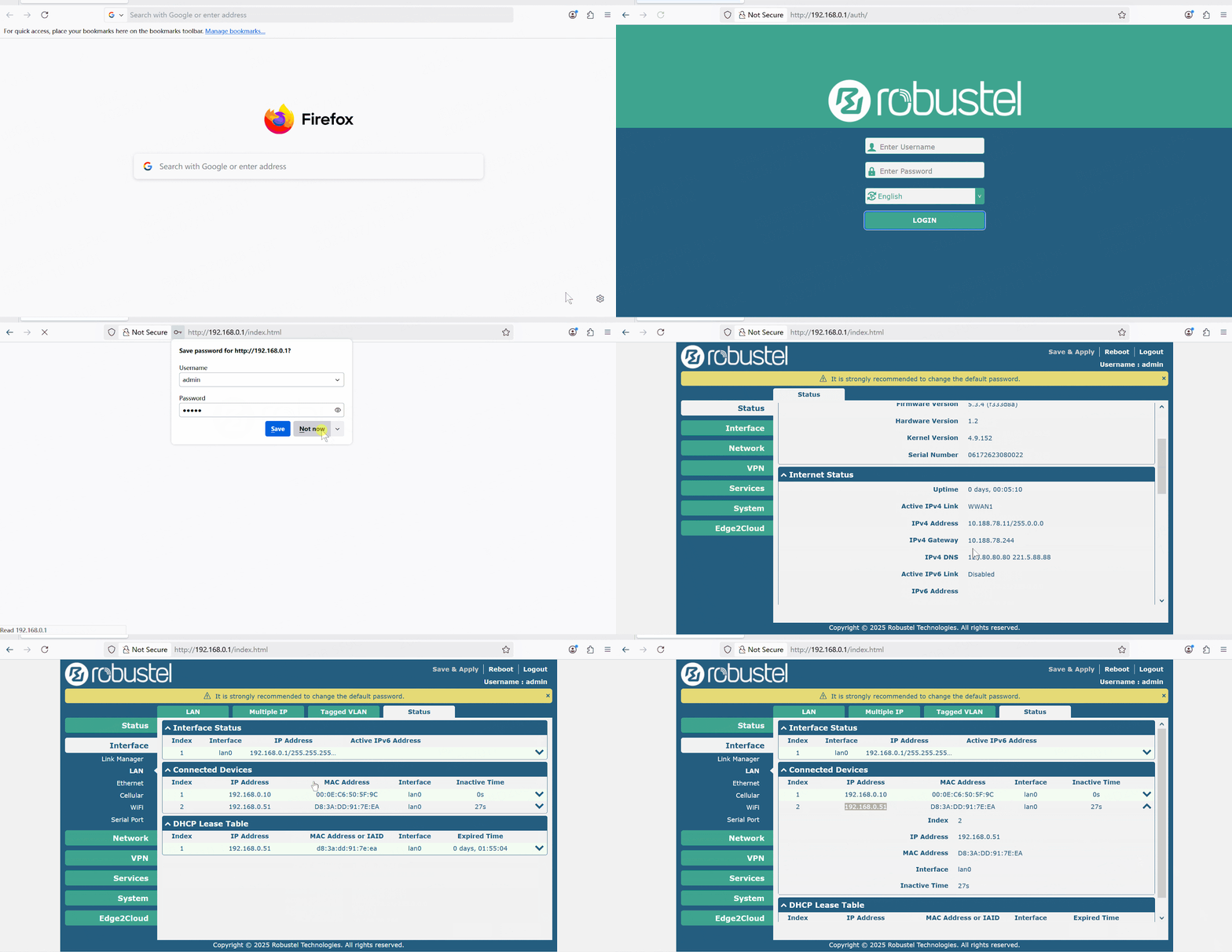
- Log in to the R1520’s web interface (default IP: 192.168.0.1) and ensure it has established a cellular connection to the internet.
- On your Raspberry Pi, ensure its Ethernet port is configured to get an IP address via DHCP. It will receive an address from the R1520 (e.g., 192.168.0.51).
Step 2: Registering Your Devices in RCMS
Now, we’ll add the R1520 to your RCMS account.
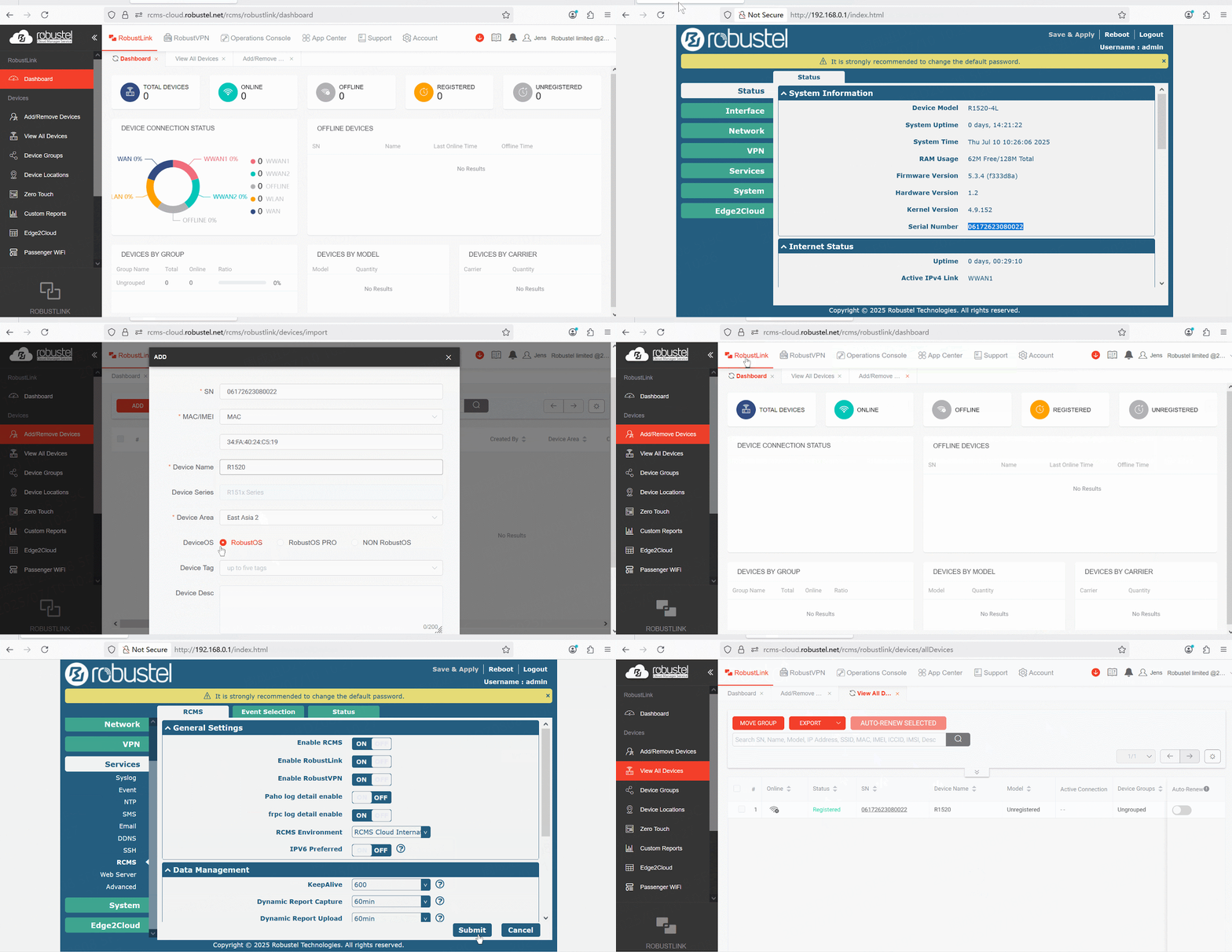
- Log into your RCMS account.
- Navigate to the Device List and click “Import” or “Add Device.”
- Enter the Serial Number (SN) and IMEI of your R1520, which can be found on the device label.
- Log in to the R1520’s web interface, navigate to Services -> RCMS , and ensure it’s enabled and showing a “Registered” status.
Step 3: Creating the RCMS RobustVPN Tunnel
This is the core of our secure remote access solution. We will use RCMS to create a virtual private network.
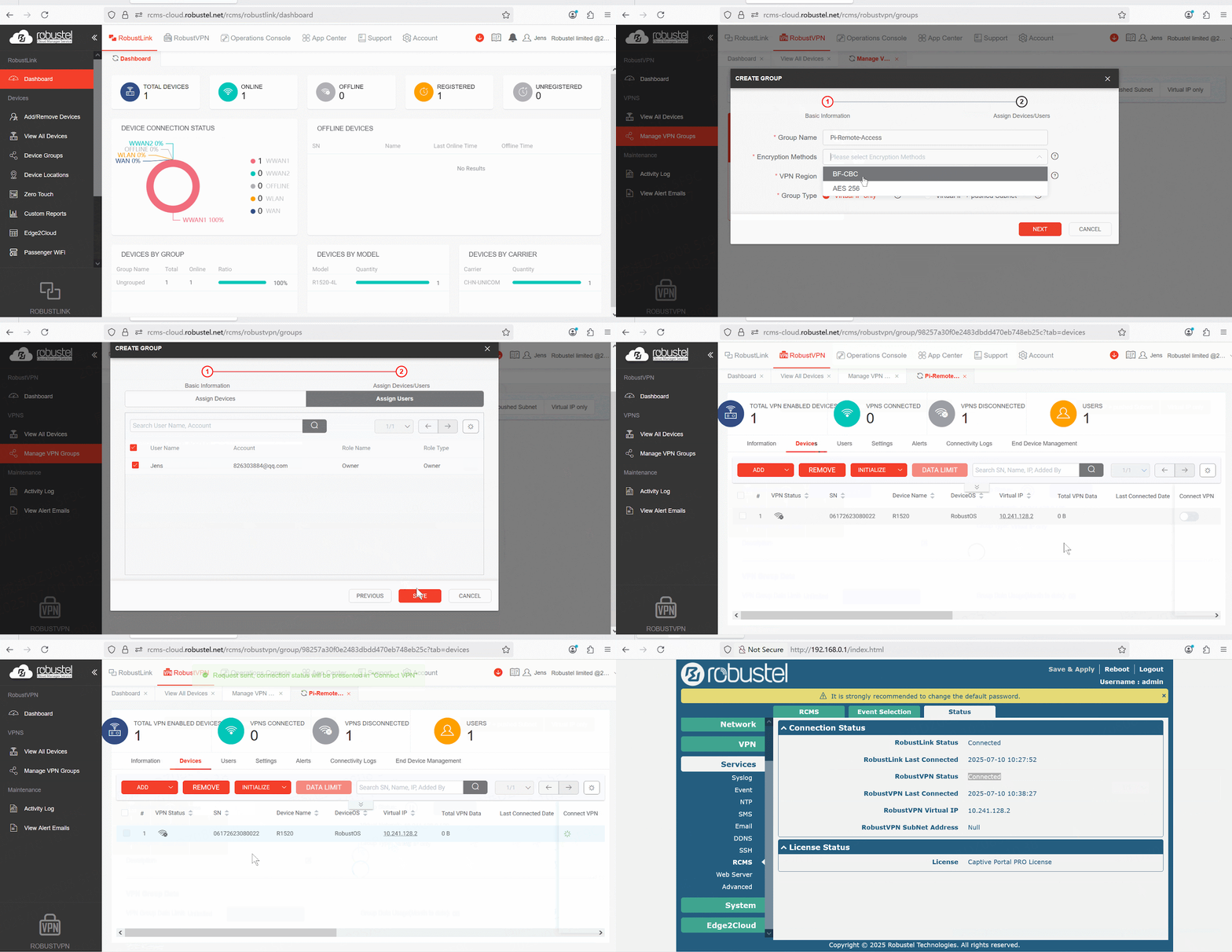
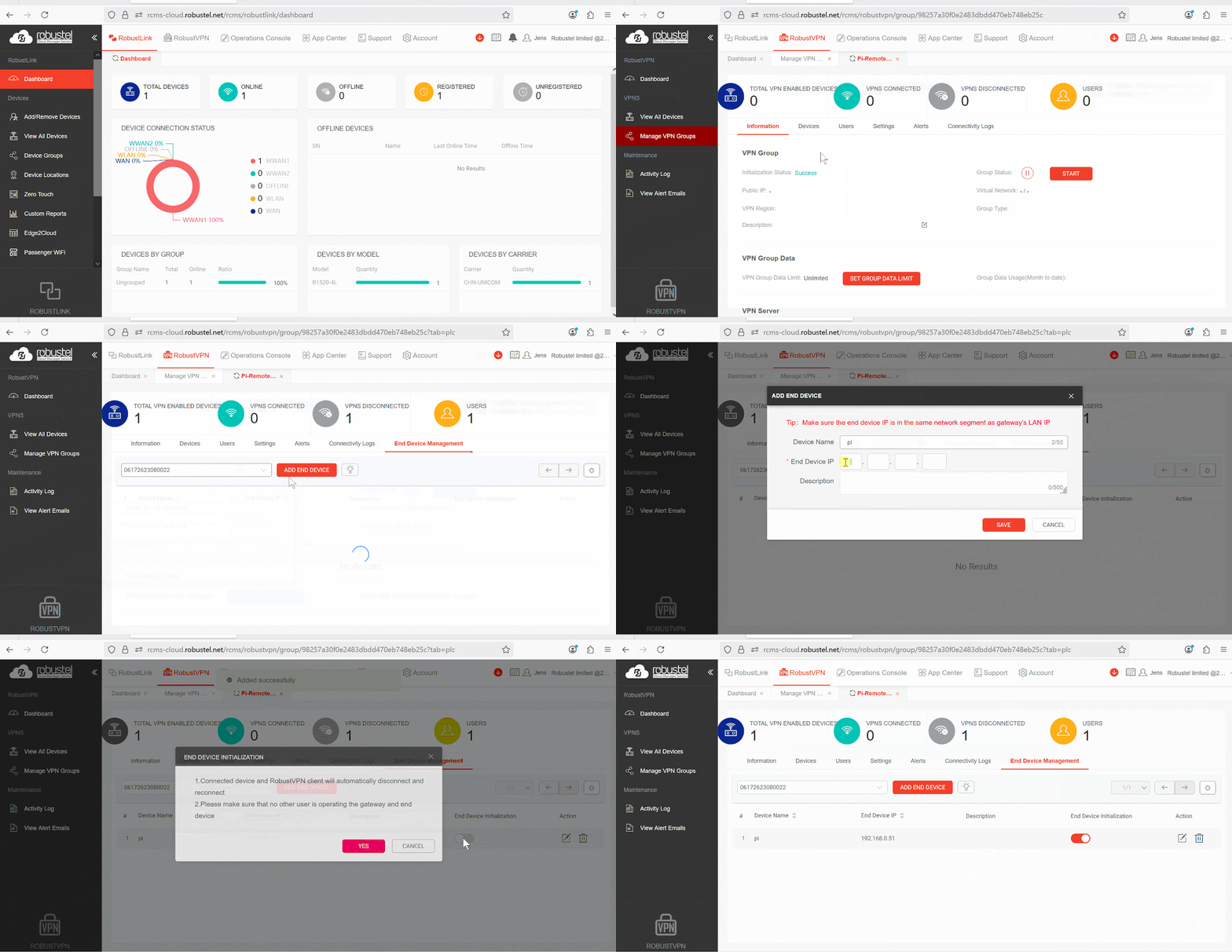
- In RCMS, navigate to the RCMS RobustVPN section.
- Click “Add” to create a new VPN network. Give it a descriptive name (e.g., Pi-Remote-Access).
- In the VPN configuration, add the R1520 gateway from your device list to this VPN network.
- Once created, RCMS will automatically push the VPN configuration to your R1520. After a minute or two, the status should show as connected.
Step 4: Remotely Connect to Your Raspberry Pi
With the VPN active, your computer (running the RCMS RobustVPN client) and the R1520 are now on the same secure, private network. The R1520 assigns a virtual IP address to your Raspberry Pi.
- In the End Device Management section of the VPN, add the IP address that the Raspberry Pi obtained from the R1520 via DHCP (e.g., 192.168.0.51).
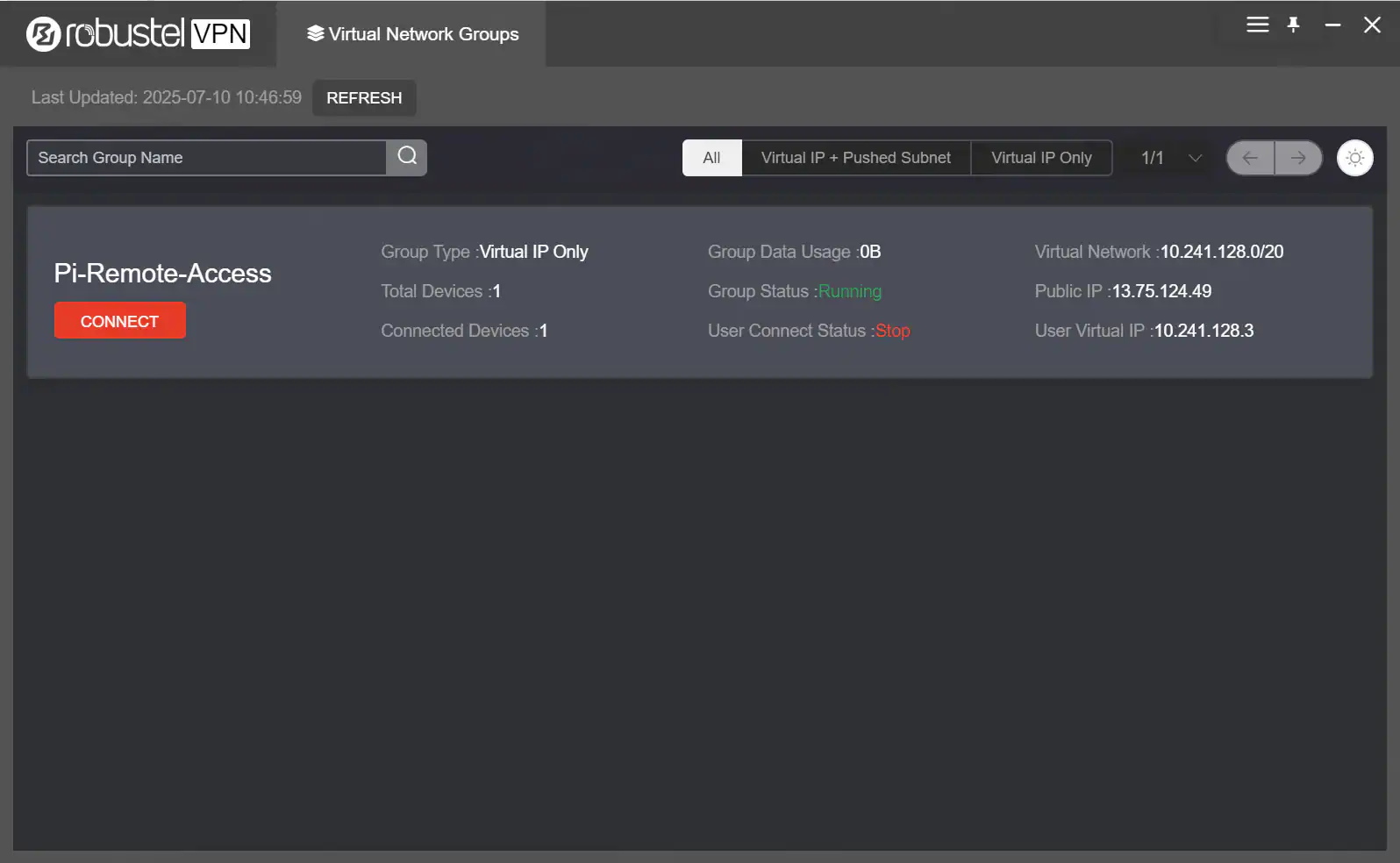
2. Run the RCMS RobustVPN client on your computer, log in to your RCMS account, then click “Connect” on the VPN tunnel created in Step 3.
3. For SSH Access: Open your SSH client (like PuTTY or Terminal) and connect to the Pi’s local IP address. (Bash; ssh pi@192.168.0.51)

4. For Web GUI or VNC Access: For the Raspberry Pi device’s web service, it can be accessed using its local IP address and port in a browser (e.g., http://192.168.0.51:8080). The following demonstrates remote access to the Raspberry Pi desktop via VNC.
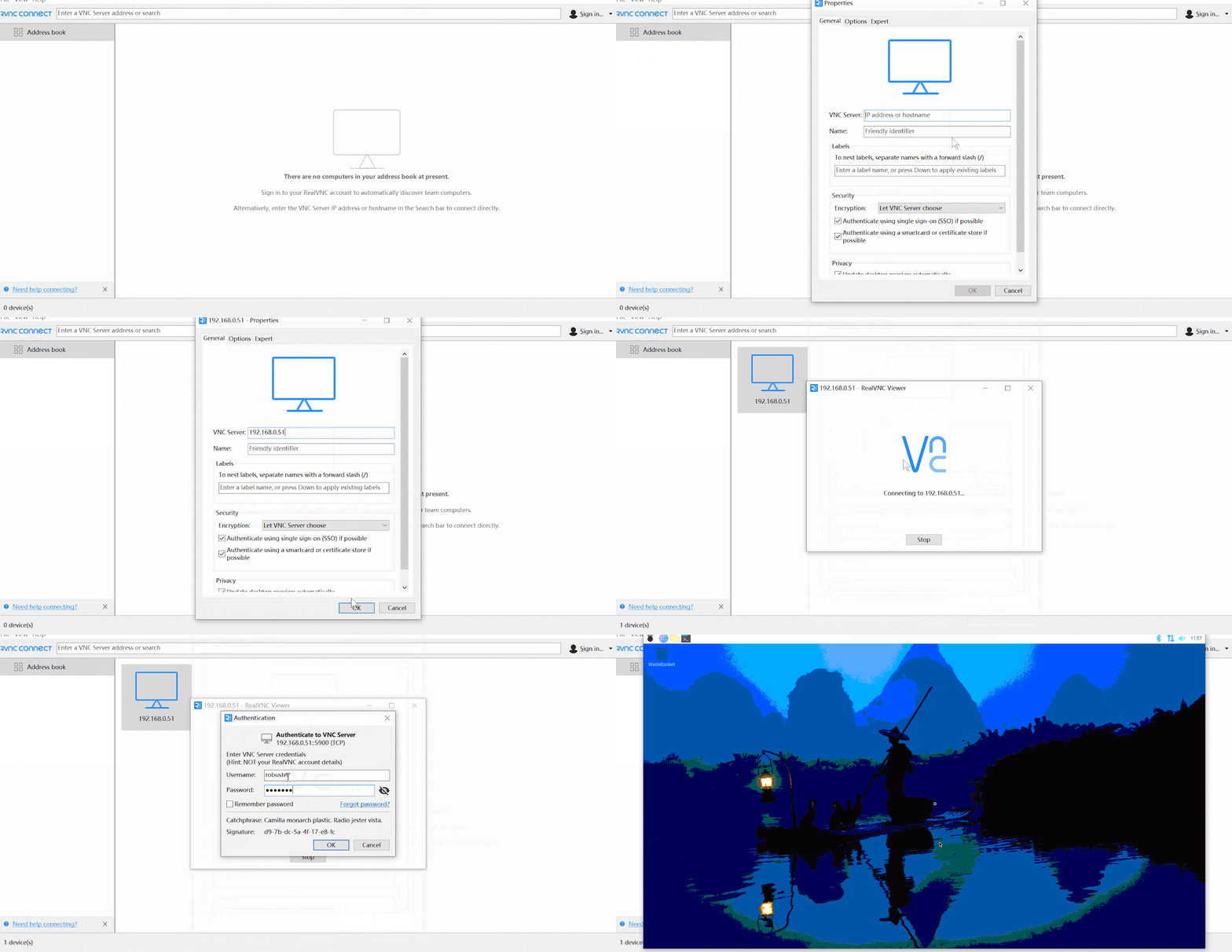
You now have a secure, reliable way to remotely connect to your Raspberry Pi from anywhere in the world!
Conclusion: Bridging the Gap from Prototype to Production
Mastering the ability to remote manage a Raspberry Pi with industrial-grade precision is more than just a technical milestone; it is the definitive step in moving your project from a lab bench to a real-world deployment. By moving beyond fragile software workarounds and embracing the systemic synergy of the Robustel R1520 and the RCMS platform, you have solved the three pillars of industrial success: connectivity, security, and scalability.
In an industry where uptime translates directly to revenue, the transition from a “working prototype” to a commercially viable product depends on the reliability of your communication infrastructure. This hardware-plus-cloud setup ensures that your edge intelligence remains a robust asset rather than a maintenance liability. Whether you are managing a single remote monitor or a fleet of thousands, this professional-grade foundation provides the peace of mind that your data—and your deployment—are always under your control.
Häufig gestellte Fragen
Q1: Do I need a public IP address on my SIM card for this to work?
A1: No, and that is a major advantage. Because the RCMS VPN creates an outbound connection from the gateway, this solution works perfectly even with private IP addresses assigned by cellular carriers, which is very common for IoT/M2M data plans.
Q2: Is this remote connection secure?
A2: Yes, it is highly secure. All traffic between your computer and the Raspberry Pi is encrypted and travels through the secure RCMS VPN tunnel. The Raspberry Pi’s SSH and web ports are never exposed to the public internet.
Q3: Can I manage more than one Raspberry Pi this way?
A3: Absolutely. You can connect multiple Raspberry Pis to the LAN ports of a single R1520 router, and they will all be accessible through the same secure VPN connection, each with its own IP address on the local network.
Über den Autor
Robert Liao | Technical Support Engineer
Robert is an IoT Technical Support Engineer at Robustel, specializing in industrial networking and edge connectivity. A certified Networking Engineer, Robert focuses on the deployment and troubleshooting of large-scale IIoT infrastructures. His work centers on architecting reliable, scalable system performance for complex industrial applications, bridging the gap between field hardware and cloud-side data management.