
A Step-by-Step IoT Edge Gateway Guide: Sending Modbus Alarms via SMS
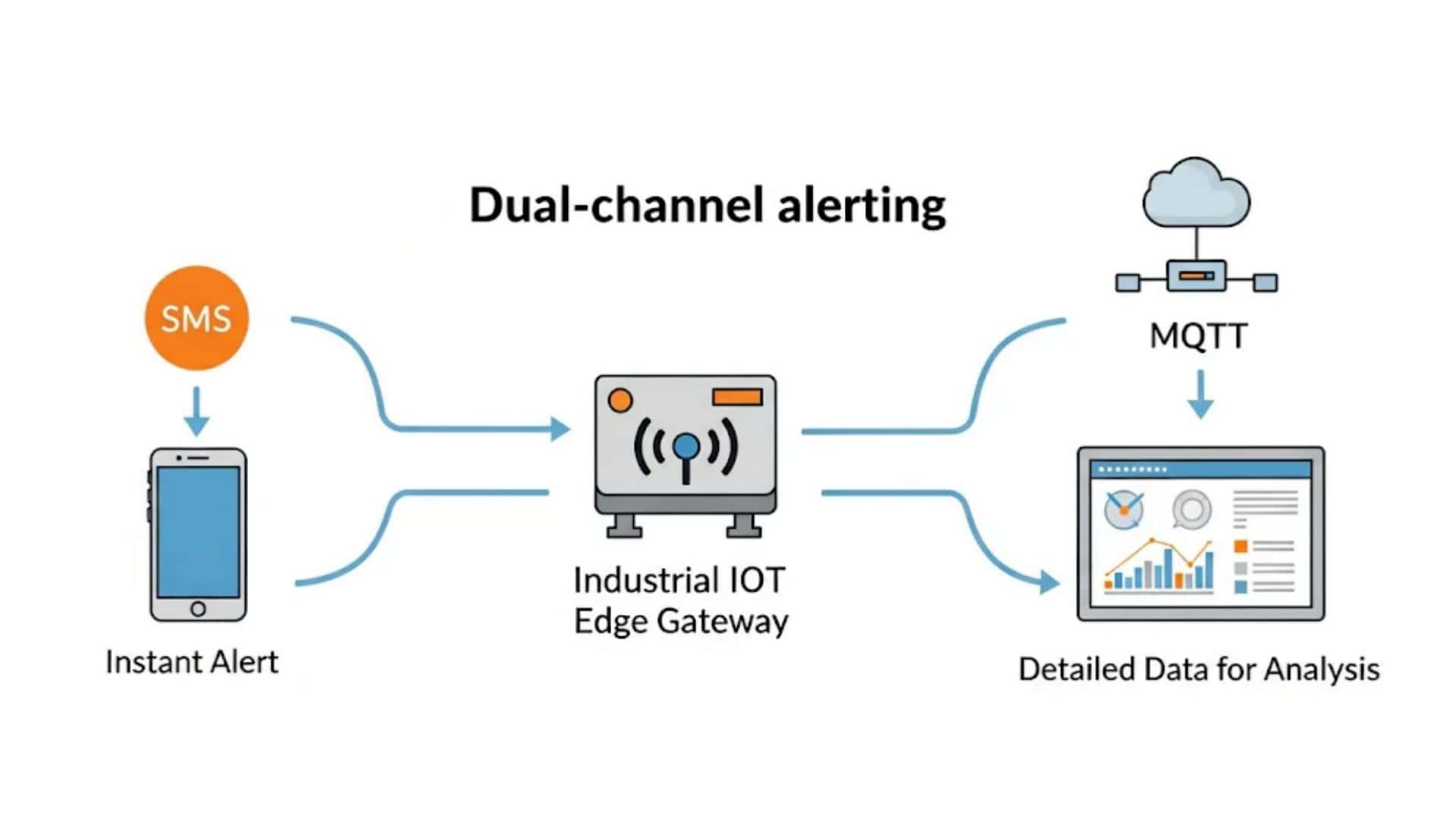
In mission-critical industrial environments, receiving real-time data is non-negotiable, yet unreliable internet connectivity can often create dangerous blind spots. This step-by-step guide demonstrates how to build a resilient IoT alerting architecture by utilizing a high-performance edge gateway to bridge the gap between field site and cloud.
By localizing the intelligence at the edge, you can extract critical MODBUS register data and trigger immediate SMS notifications directly from the hardware, ensuring alerts bypass the public internet when necessary. Simultaneously, the system utilizes the MQTT protocol to push telemetry to your central dashboard, providing a dual-path communication strategy that keeps your industrial operations secure and informed.
Introduction: The Critical Need for Reliable Industrial Alerting
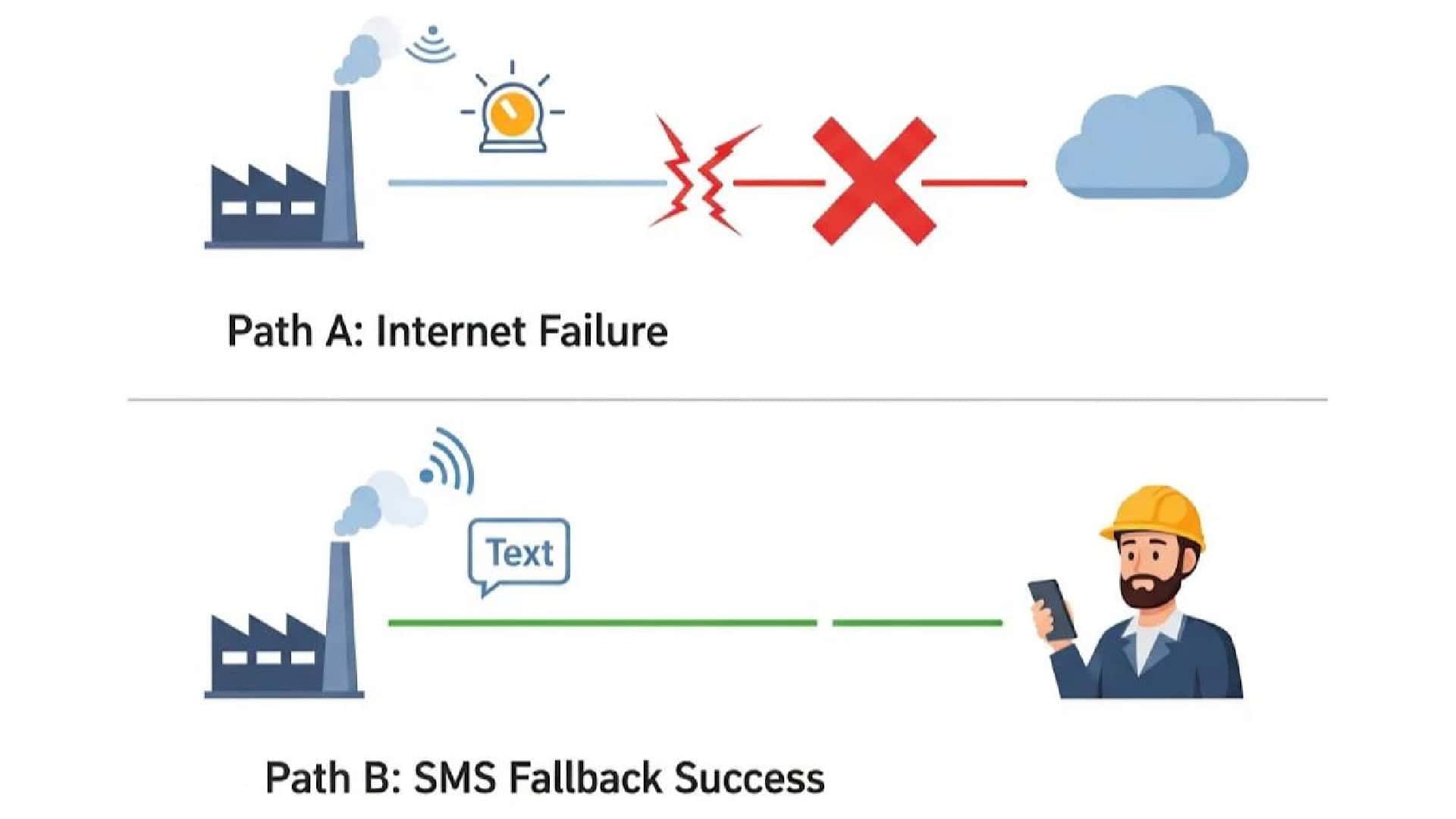
In the Industrial Internet of Things (IIoT), data is the foundation of modern operations. We rely on a constant stream of information to monitor equipment health, ensure safety, and maintain efficiency. While cloud platforms and IP-based networks are powerful, their reliability is often at the mercy of a stable internet connection. For a remote pumping station, a cellular “dead zone”, or a factory with network congestion, a lost internet connection can mean a missed critical alert, leading to costly downtime or even safety hazards.
This is where a proven, universal technology comes back into focus: SMS. By leveraging the core cellular control channel, SMS provides a highly resilient communication path that often remains active even when IP data services fail. The solution is not to abandon modern cloud platforms, but to augment them with a robust fallback. This guide will show you exactly how to build a system that sends Modbus alarms via SMS using an intelligent industrial IoT edge gateway, ensuring your most critical alerts are always delivered.
The Solution: Using an IoT Edge Gateway as a Smart SMS Gateway
To achieve this level of reliability, you need a device on-site that can act intelligently. An industrial IoT edge gateway like the Robustel EG5120 is purpose-built for this role. It acts as a powerful SMS Gateway for IoT , capable of:
- Directly communicating with industrial equipment via protocols like Modbus.
- Executing local logic to determine when an alarm condition is met.
- Sending alerts over multiple channels, including SMS and IP networks.
This local intelligence is the key to creating a truly resilient system that doesn’t solely depend on an end-to-end internet connection.
The Robustel EG5120 is an industrial IoT edge gateway designed to bridge OT and IT networks. It combines a quad-core ARM processor with the Debian-based RobustOS Pro for real-time data processing and control in applications like smart manufacturing and smart buildings.
Real-World Case Study: Remote Water Tank Monitoring
Let’s explore a practical example of a Modbus alarm via SMS system in action.
Background
A remote industrial facility depended on a large water storage tank for its continuous operations. Maintaining the water level was critical, but the site’s location suffered from unreliable internet, making real-time cloud monitoring difficult.
Challenge
Operators had to perform time-consuming manual inspections to prevent the tank from running dry. An IP-based alert system was not reliable enough, as a missed alert during an internet outage could halt production entirely.
Solution with the EG5120
The facility deployed a Robustel EG5120 , transforming it into a smart SMS Gateway.
- The EG5120 was connected directly to a liquid level sensor in the tank using its RS485 interface to read data via Modbus RTU.
- Using its built-in applications, the EG5120 was configured to monitor the water level locally (an edge computing task).
- When the water level dropped below a critical threshold, the EG5120 instantly sent a customized SMS alert (e.g., “WARNING: Water Tank Level Low – 15%”) to the maintenance team’s mobile phones.
- Simultaneously, the gateway could be configured to trigger a local digital output (DO) to activate a warning light.
This solution ensured that critical alerts were always delivered, regardless of internet status, a perfect demonstration of a Modbus alarm via SMS system.
Regarder : Découvrez-en davantage sur l'EG5120.
The Edge Advantage: Dual-Channel Alerting (SMS + MQTT)
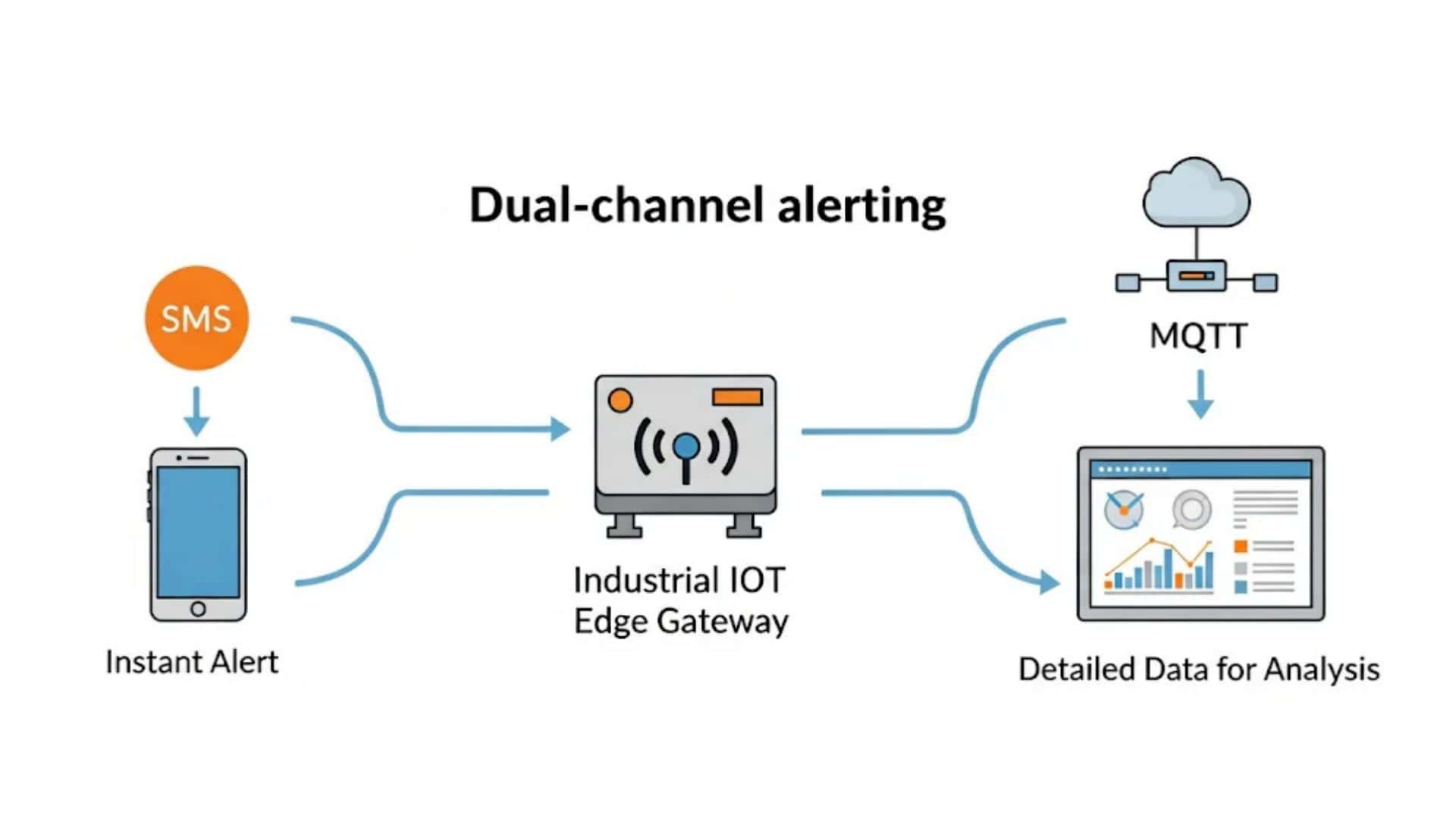
A true industrial IoT edge gateway offers capabilities beyond a simple SMS modem. One of its greatest strengths is multi-channel communication. The EG5120 can be configured to react to a single Modbus alarm event in two ways simultaneously:
1. Instant, Reliable Alerts via SMS
This channel is for immediate human intervention. The SMS is a simple, direct message (“Alert: Pump A has failed”) sent to the people who need to take action right away. Its primary advantage is reliability. This is the core of the Modbus alarm via SMS system.
2. Detailed Context via MQTT to the Cloud
This channel is for data logging, historical analysis, and dashboarding. At the same moment it sends the SMS, the EG5120 can publish a structured MQTT message with rich contextual data to a cloud platform like AWS IoT Core or the Microsoft Azure IoT Hub. This message could look like:
{"timestamp": "2025-06-11T10:30:01Z", "device_id": "PUMP_A_EG5120", "alarm_type": "MODBUS_REGISTER_HIGH", "register": "40001", "value": "1", "message": "Pump A has failed"}This dual-channel capability provides the best of both worlds: the unmatched reliability of SMS for critical alerts and the rich data context of MQTT for advanced analytics.
A Step-by-StepGuide for Configuration: Setting up a Modbus Alarm via SMS on the EG5120
This section guides you through the step-by-step guide on your Robustel EG5120 .
(Note: This section’s structure is preserved for easy screenshot insertion.)
1. Install Modbus Master APP
Access the EG5120 WEB interface and navigate to System -> APP Center. Load the Modbus Master.rpk APP and install it.
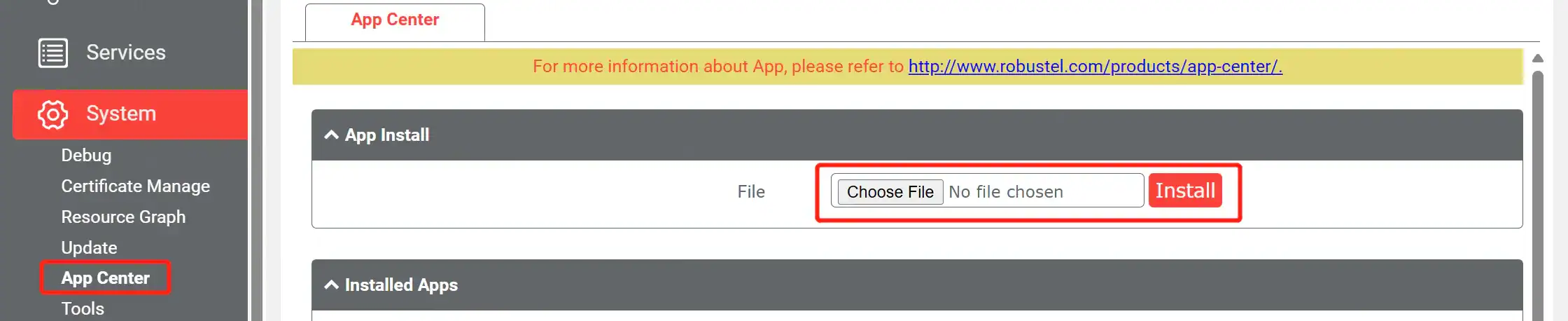
After the reboot, the Modbus Master APP will be visible on the WEBUI under Services -> Modbus Master.
2. Enable Modbus Protocol
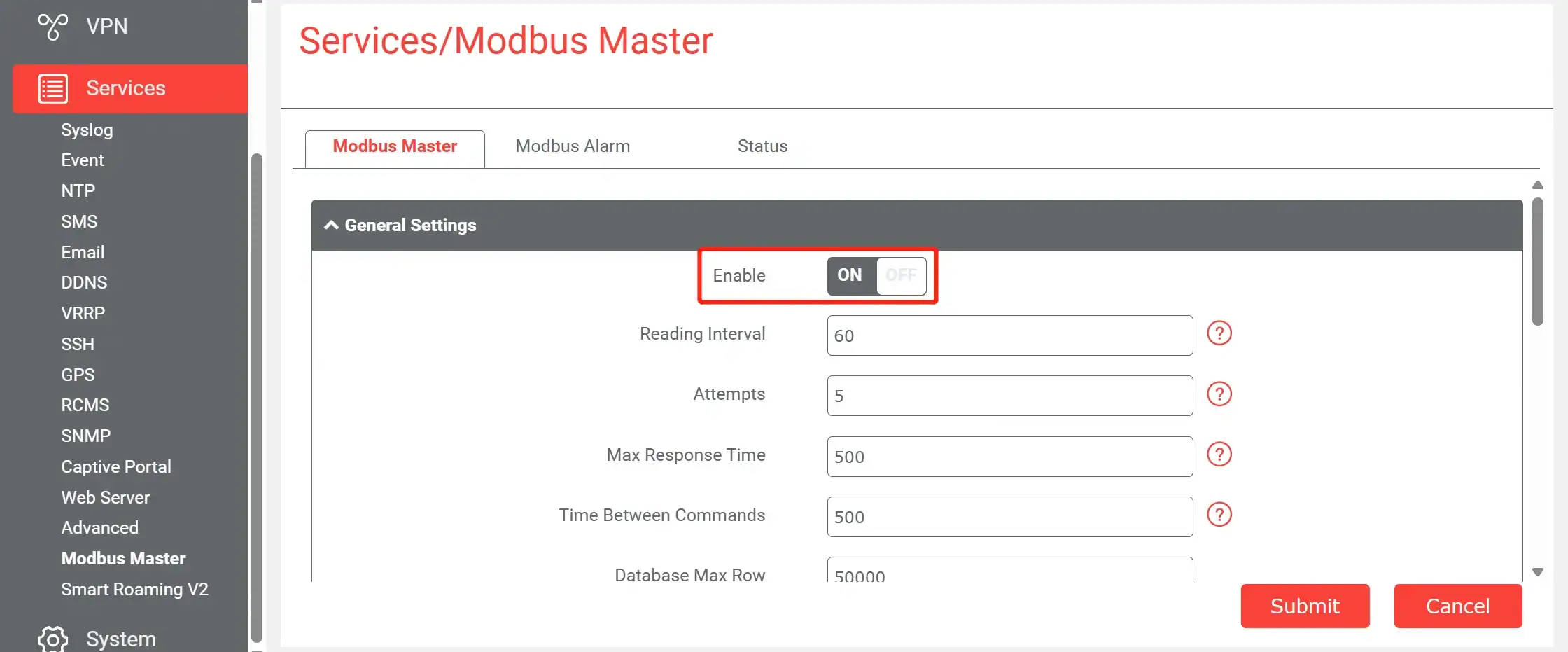
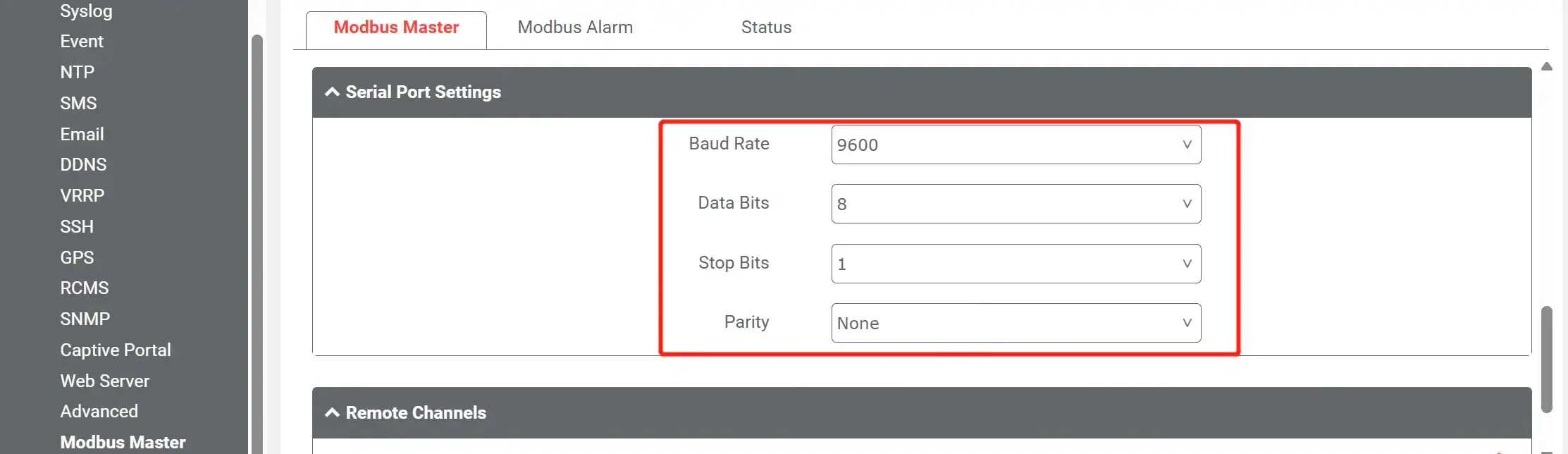
Set serial parameters according to the sensor serial specification.
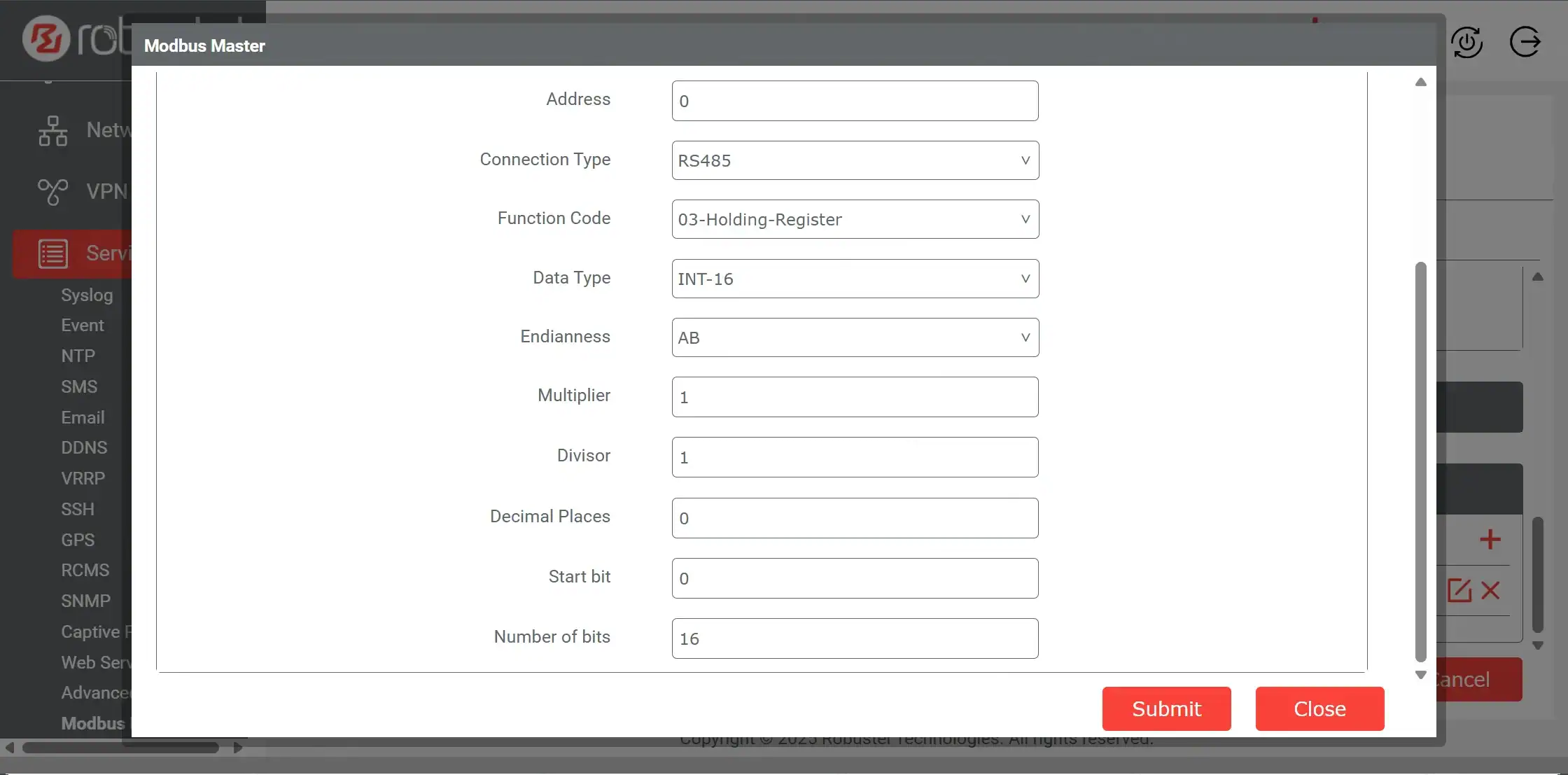
Set the sensor’s Modbus register address, function code, data type accordingly, and data calculation if needed.
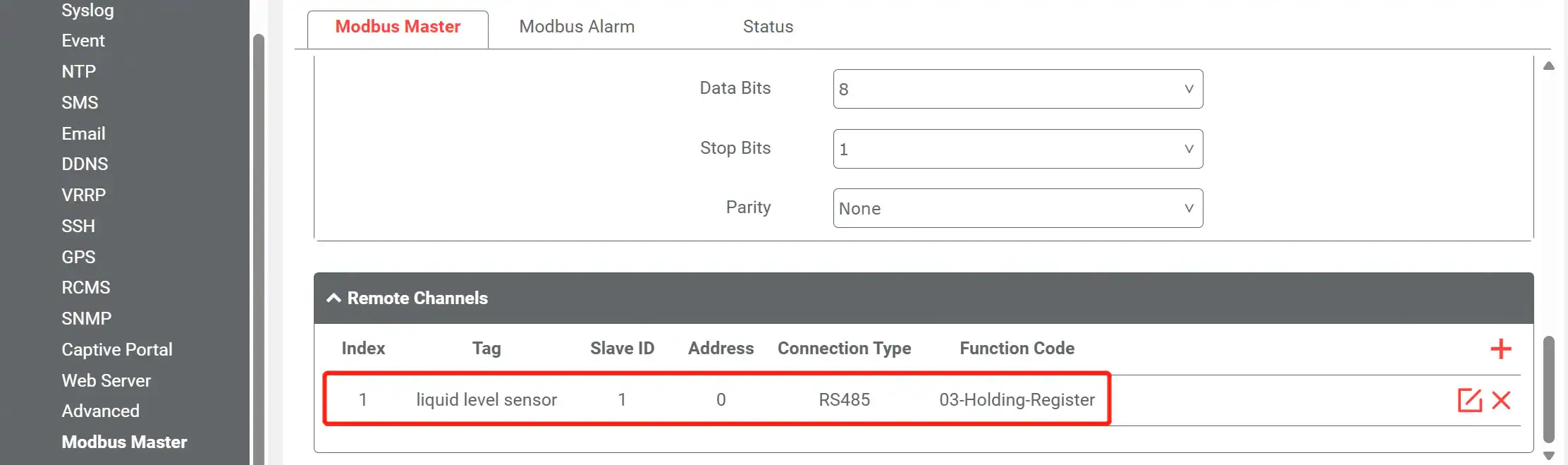
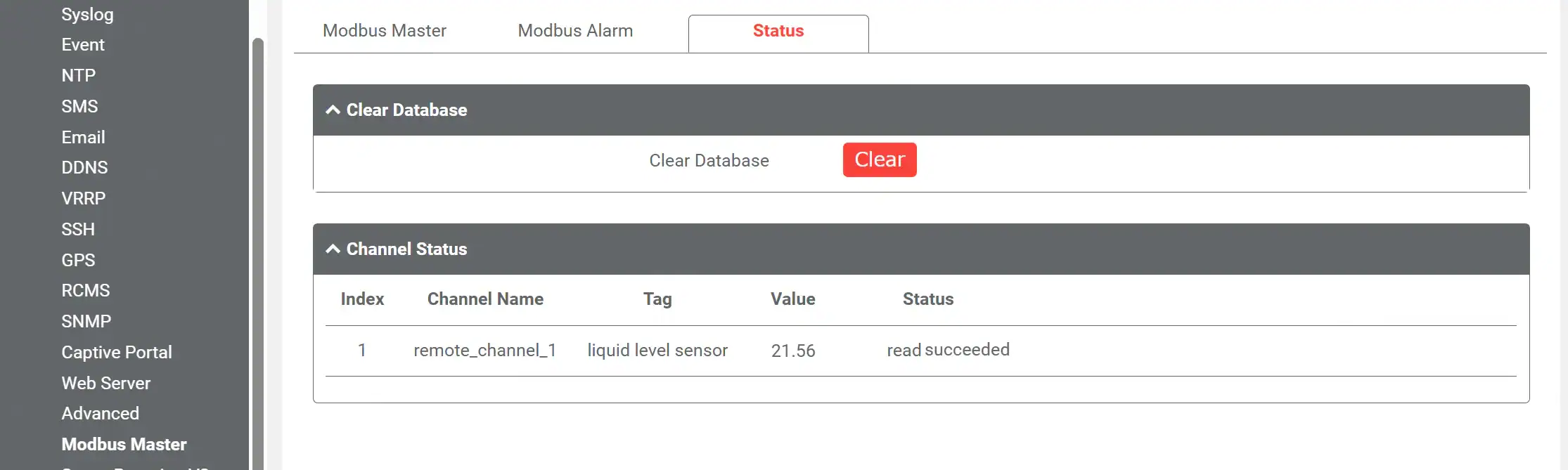
Submit parameters, save and apply. The EG5120 communicates with sensors via Modbus, and their readings are displayed on the status page.
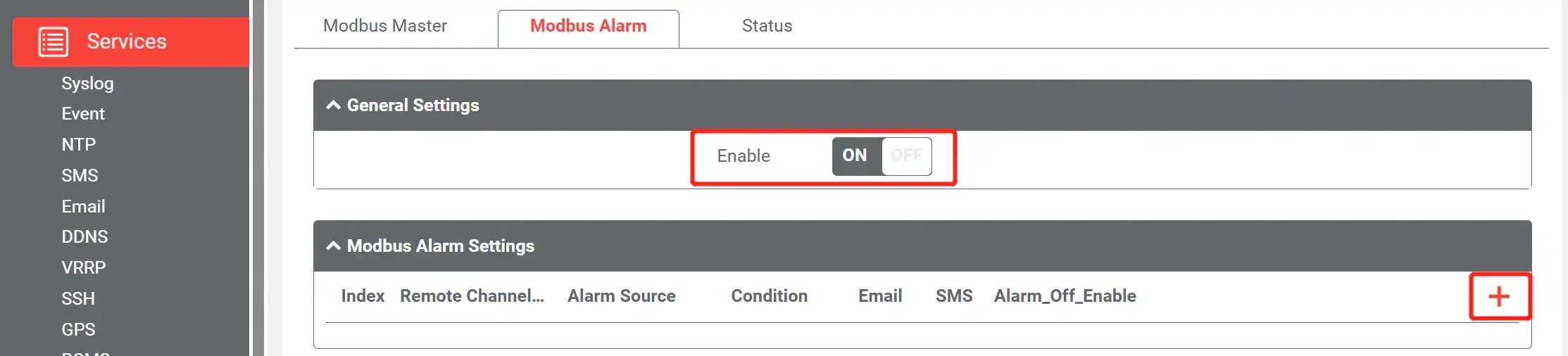
3. Enable SMS Alarm and Set Threshold
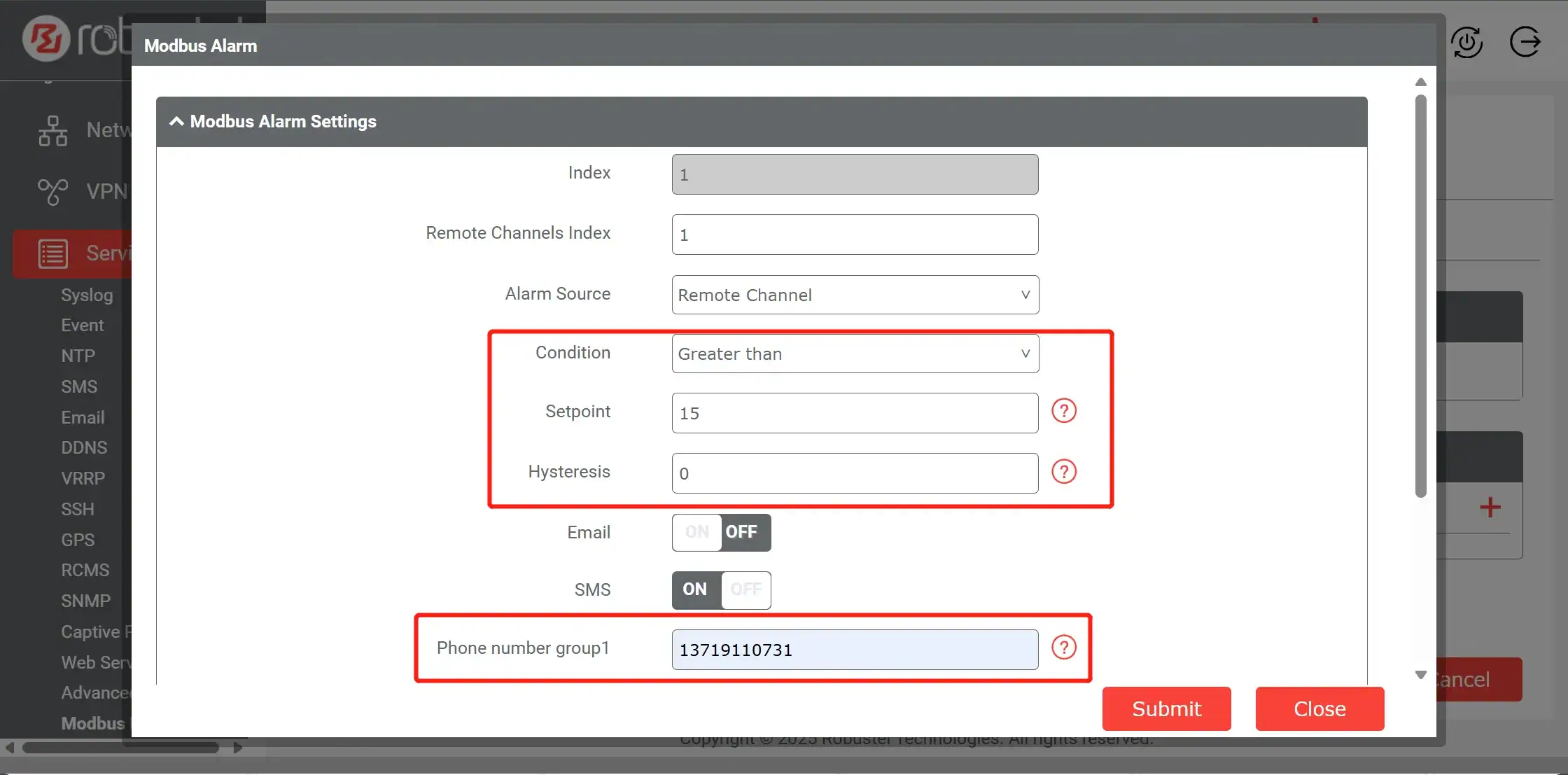
Navigate to the SMS Alarm settings. Here, you can define the alarm trigger conditions (e.g., equal, unequal, less than, greater than the setpoint) and set a Hysteresis value if needed to prevent rapid toggling. You can also specify the phone numbers that will receive the SMS alerts.
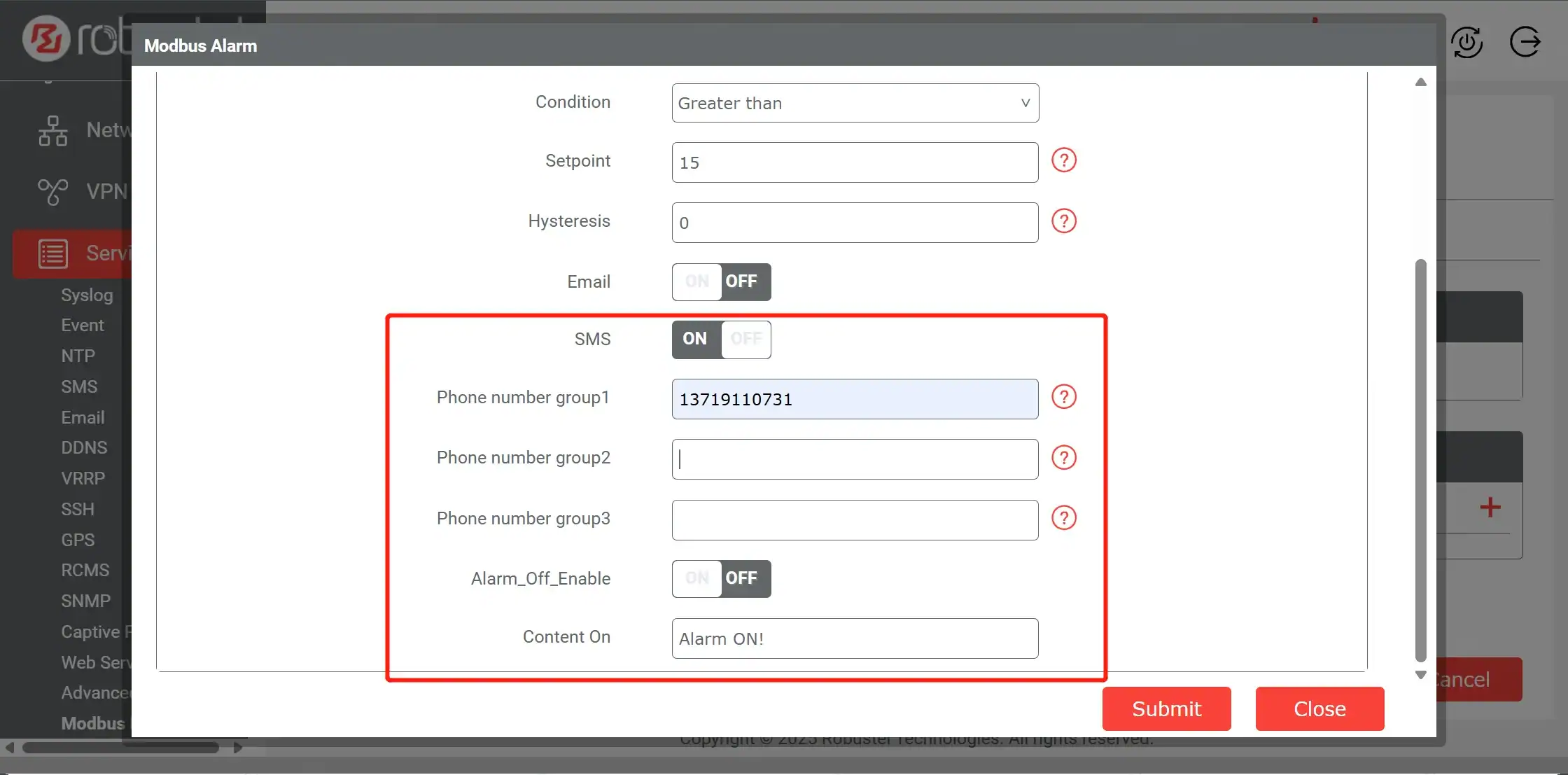
More than 30 phone numbers can be configured to receive the alarm, and the alarm content itself is fully customizable, allowing you to include specific sensor readings or contextual information.
Beyond Modbus: Other Applications for Your SMS Gateway
While this guide focuses on a Modbus alarm via SMS , the capabilities of the EG5120 as an SMS Gateway extend to many other applications:
- Remote Device Control: Send an SMS command (e.g.,
REBOOT_SYSTEM) to remotely restart the gateway or trigger a connected device via its digital output. - System Status “Heartbeats”: Configure the gateway to send a daily or weekly “I’m alive” SMS to a central number, providing confidence that remote, unmonitored sites are still operational.
- Security Breach Alerts: Use a digital input connected to a door sensor. If a cabinet is opened unexpectedly, the gateway can instantly send an SMS alert for a potential security breach.
- Network Failover Notification: Configure the gateway to send an SMS alert when it switches from its primary Ethernet connection to its 4G cellular backup, notifying IT staff of a primary network failure.
Conclusion
While cloud platforms are foundational to modern IoT ecosystems, relying on a single connection for mission-critical alerts is a high-risk strategy. As demonstrated in this step-by-step guide, true operational resilience comes from combining localized intelligence with redundant communication paths. By utilizing an industrial edge gateway, you can bridge the gap between legacy hardware and the future of connectivity, ensuring your facility stays online 24/7.
Whether you are extracting data via the MODBUS protocol for local SMS alerts or using the MQTT protocol for real-time cloud analytics, the right IoT gateway ensures notifications are delivered regardless of internet stability. Implementing a dedicated system to send Modbus alarms via SMS is not just a backup plan; it is a strategic investment in building a fail-safe, robust industrial environment.
Foire aux questions
Q1: What is the main advantage of using SMS for industrial alerts over email or a mobile app push notification?
A1: The main advantage is reliability . SMS uses the cellular network’s control channel, which is separate from the IP data channel used by email and apps. This means SMS messages can often be delivered even when internet connectivity is down or congested, making it the ideal fallback for mission-critical alerts.
Q2: Can the EG5120 send SMS alarms from any type of sensor?
A2: The EG5120 can trigger SMS alarms based on data from any device it can communicate with. This includes sensors connected via its Modbus (RTU/TCP) interface, devices connected to its Digital Inputs (DI) , or even based on internal system events.
Q3: How secure is controlling a device with an SMS command?
A3: The EG5120 provides security features to make SMS control safe. You can create a “whitelist” of authorized phone numbers , so the gateway will only accept commands from pre-approved sources. You can also define a specific list of accepted commands to prevent unauthorized actions.
À propos de l'auteur
Robert Liao | Ingénieur support technique
Robert Liao est ingénieur support technique IoT chez Robustel, spécialisé dans les réseaux industriels et la connectivité périphérique. Ingénieur réseau certifié, Robert se concentre sur le déploiement et le dépannage d'infrastructures IIoT à grande échelle. Son travail consiste principalement à concevoir des systèmes fiables et évolutifs pour des applications industrielles complexes, comblant ainsi le fossé entre le matériel sur le terrain et la gestion des données dans le cloud.